AM-JACKAL-35/ JULY 2020
REMOTE RUN/HOLD (ACTIVATE BY OUTPUT)
The Jackal Monitor has the ability to Run/Hold an external
device such as a remote clutch switch.
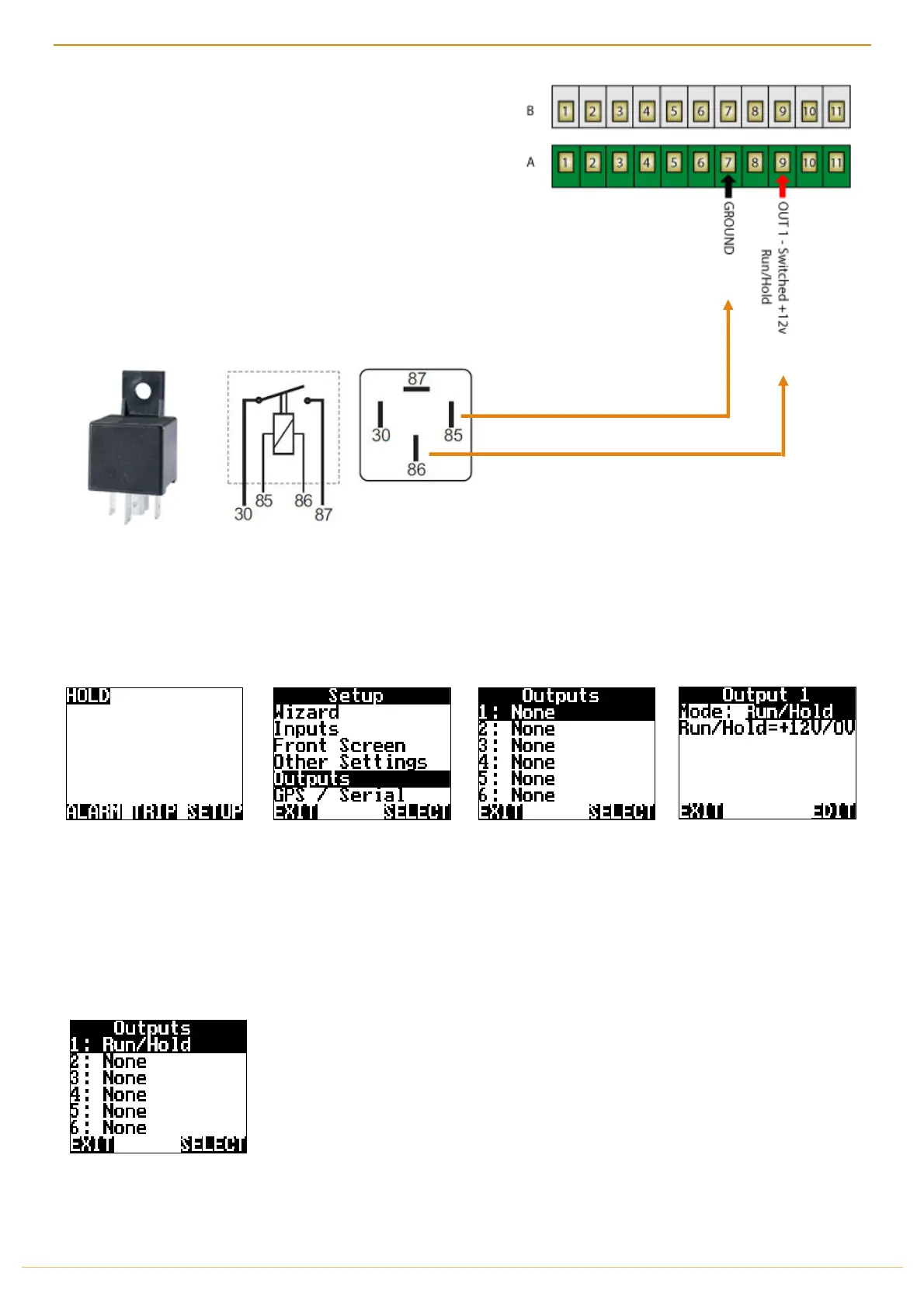
There are 6 outputs available on the Jackal. (A8-A9 & B6-B9)
This allows you to press the Run/Hold on the Jackal to enable an
external operation.
NB: This function is used in conjunction through an automotive
relay.
Example: Hella Automotive Relay (12v / 30A) – 4RA003510-08
Pin 86 to A9 Out 1 (Jackal +12v Run/Hold Output)
Pin 85 to A7 (Ground)
Pin 30 to 12v in (Direct to Vehicle Battery)
Pin 87 to Positive Side of clutch switch (Ensure negative/ground on other side of switch returns to battery)
Enable the remote run/hold out by:
From the front screen press
SETUP
Highlight OUTPUTS and press
SELECT
Highlight 1: NONE and press
SELECT
Press EDIT and change to
MODE: Run/Hold
Press EXIT
Run/Hold can be changed
from +12V/0V to 0V/+12V
by pressing EDIT



 To Next Page