AM-JACKAL-35/ JULY 2020
TRIPS
The Trips page allows accumulating values to be saved and recalled at a later time.
Examples include Area, Distance, Weight, Volume etc. Instantaneous readings such as Speed, Flow & Rate etc. are
not able to be recorded.
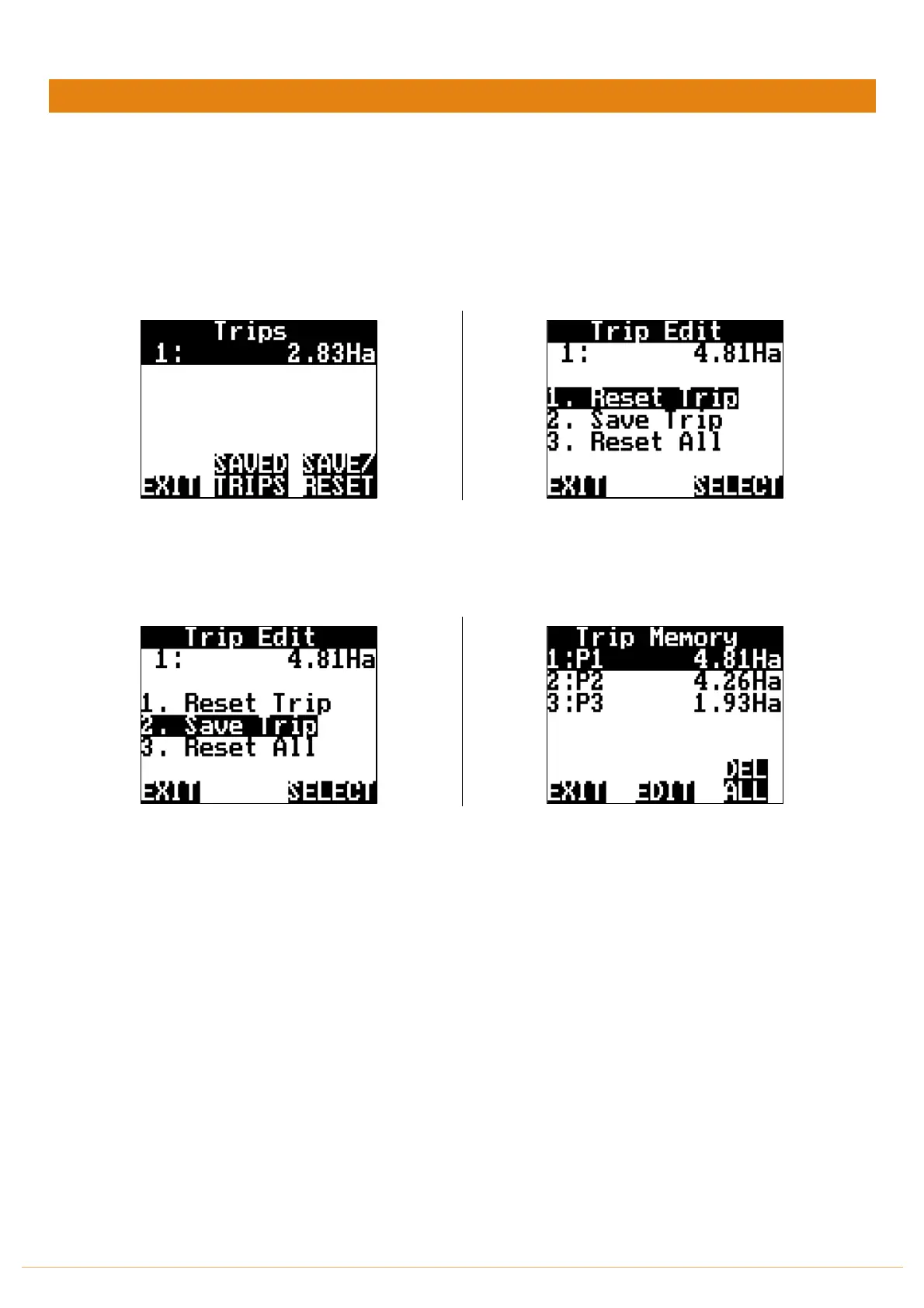
• From the front-page press TRIP
The screen above allows you to SAVE/RESET individual
trips or view SAVED TRIPS
By pressing the SAVE/RESET you have the ability to
Reset Trip | Save Trip | Reset All
By pressing 2. Save Trip it will be stored in the
SAVED TRIPS option
You can now view the SAVED TRIPS. You also have the
ability to EDIT and name the Trip or DEL ALL
(Delete All Trips)
When you return to the TRIPS page the Trip will continue to accumulate. (Like above)
You will need to SAVE/RESET the trip if you want to start from Zero (0) again



 To Next Page