AM-JACKAL-35/ JULY 2020
SLIPPAGE METER (WIZARD)
The Jackal Monitor can allow the operator to compare two inputs and provide the result as a
percentage. This is applicable when speed over ground is not necessarily equivalent to rotational
speed of the wheel/s. This will enable you to set up a comparison between wheel speed and
actual speed (using GPS)
Sensors Required:
• Wheel sensor input (wheel or shaft pickup)
• GPS
Available Connections: Refer to Installing Sensors from PAGES 9-11
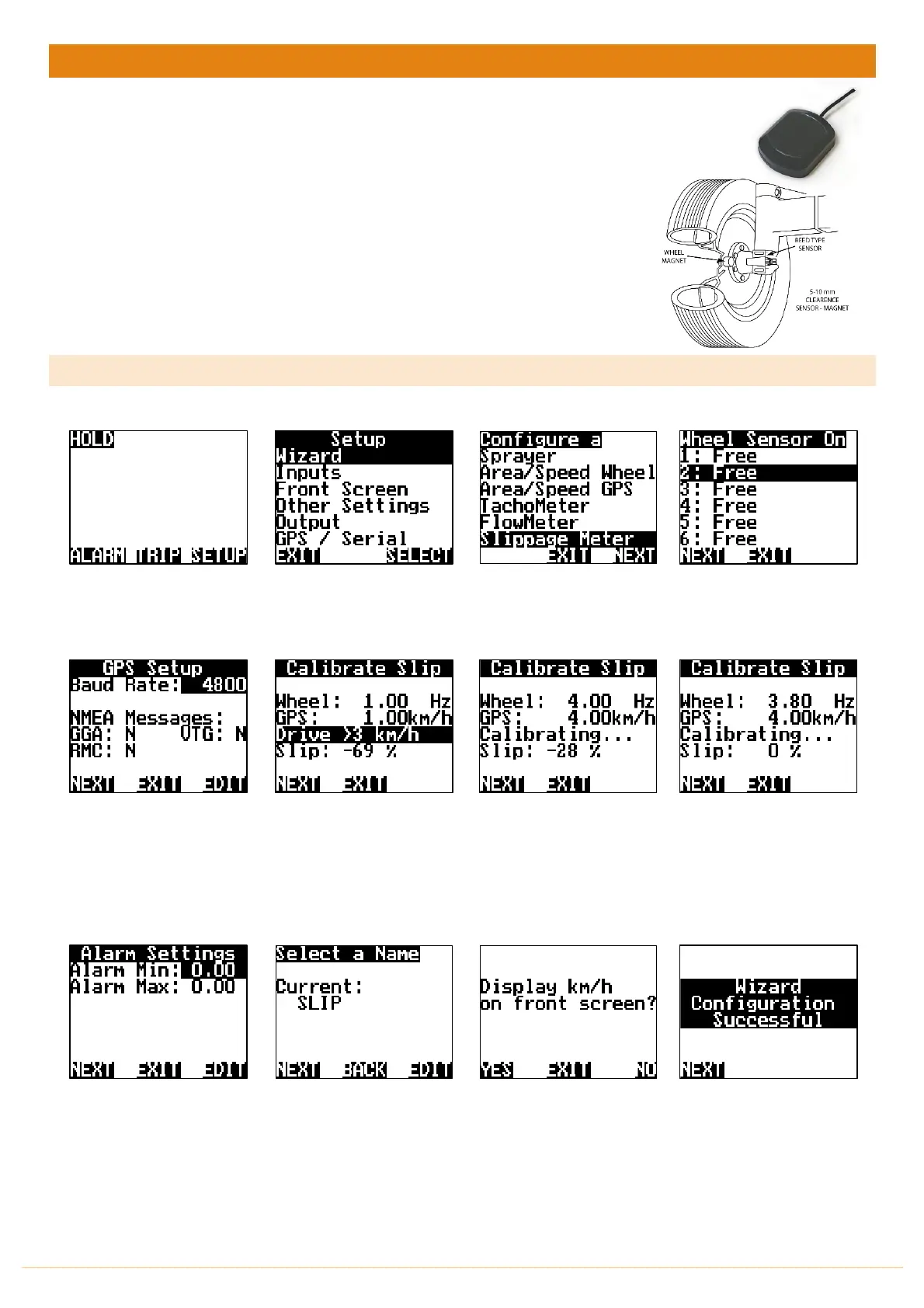
SETUP
From the front screen press
SETUP
Highlight WIZARD & press
SELECT
Highlight SLIPPAGE METER
press NEXT
Highlight the INPUT number
X: the WHEEL sensor wire is
connected into on the rear
of the Jackal & press NEXT
Press the EDIT button to
change the baud rate, when
the correct baud rate is
selected the corresponding
NMEA message will be
acknowledged with a Y.
Press NEXT
As indicated, drive above
3km/hr
Wheel input will then
increment up (displayed in
Hz) & GPS speed will start to
show.
As the system
self-calibrates the slip % will
get closer to 0%.
When the slip has settled
close to 0% press NEXT
You have the option to set
Alarm Min/Max points if
required. Using the NAV
buttons select &
EDIT
as
required. Press
NEXT
There is no need to EDIT the
name. It will default to GPS
Press
NEXT
Finally acknowlege that you
wish to also display Speed
(km/hr) on the front screen
with the area covered.
Press YES
The Wizard is now complete.
Press
NEXT.
THIS ENDS THE SETUP WIZARD FOR WHEEL SLIPPAGE



 To Next Page