AM-JACKAL-35/ JULY 2020
BIN LEVEL SENSOR
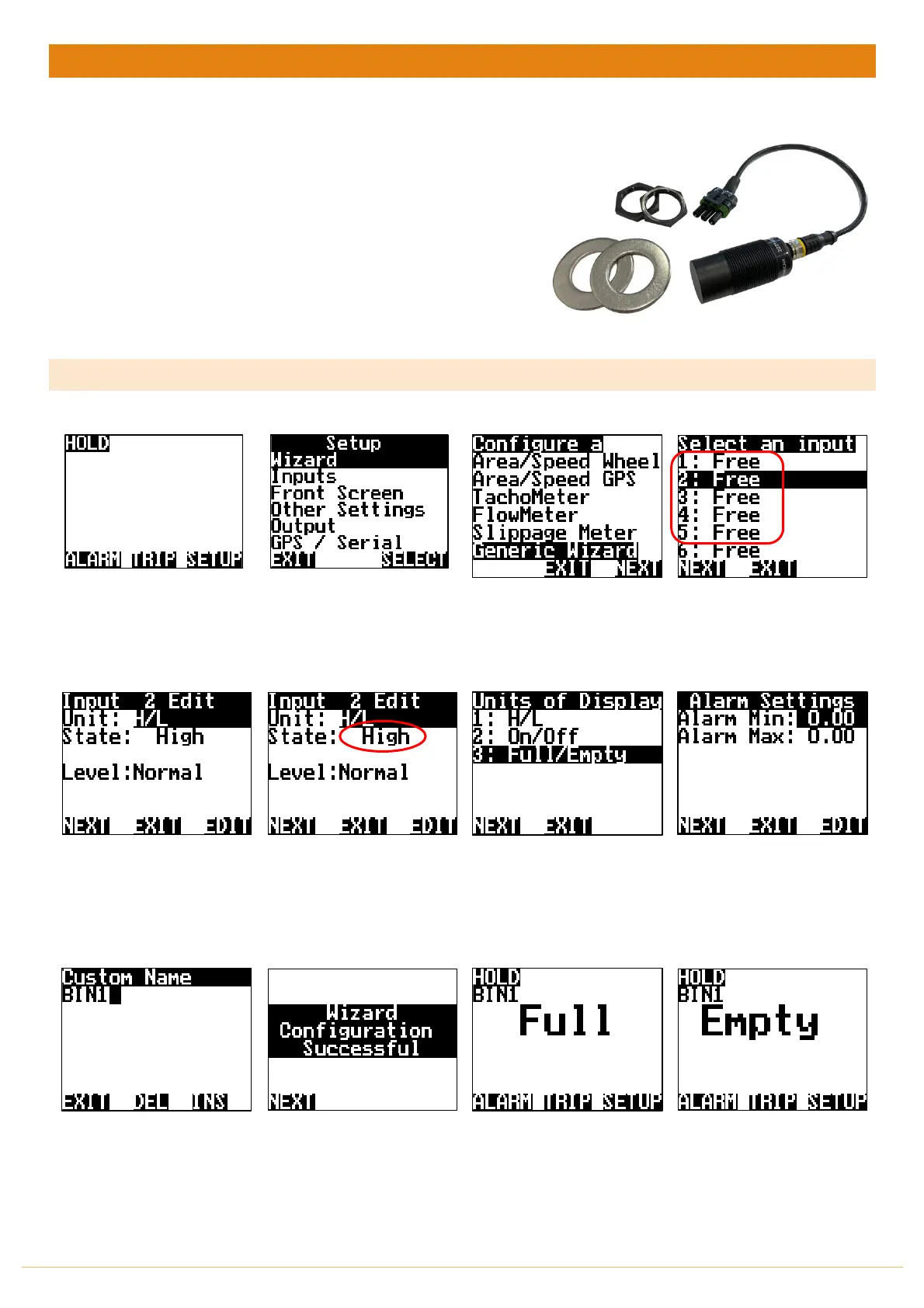
The Jackal can be configured with a bin level sensor for detecting empty/full.
All Farmscan sensor will register as High/Low (H/L) for liquid or solid.
Sensors Required:
• Bin Level Sensor (A-2220P Sensor V1)
• Bin Level Sensor (A-2221)
o Capacitive Sensor V2 – Pictured right >
Available Connections: Refer to Installing Sensors from PAGES 9-11
SETUP
From the front screen press
SETUP
Highlight WIZARD & press
SELECT
Highlight GENERIC WIZARD &
press SELECT
Highlight the INPUT number
(1-5 or 8-9) to where the
sensor wire is connected into
on the rear of the Jackal &
press NEXT
Press EDIT to change the unit
to H/L (high/low) – Other
options include On/Off,
Full/Empty
State will updated “Live” For
example. Low = bin empty,
High = bin full. Test by placing
hand around sensor.
Press NEXT
Highlight the Unit of Display
that you wish to be displayed
on the front screen.
Press NEXT
You have the option to set
Alarm Min/Max points if
required. Using the NAV
buttons select &
EDIT
as
required.
Press
NEXT
Name the input if you desire,
i.e. BIN1.
Press
EDIT
&
EXIT
Press
NEXT.
Wizard is now complete.
Press
NEXT
Press
EXIT
to return to the
front screen
Example - Full
THIS ENDS THE SETUP FOR A BIN LEVEL SENSOR



 To Next Page