AM-JACKAL-35/ JULY 2020
SETUP – MANUAL MODE (WIZARD) – NOT SO COMMON
The Jackal can be setup to work in MANUAL mode in the event of no wheel speed or flow meter input, or
combination of both. Manual mode simply allows adjustment of the flow control valve. In the event of a dump valve
being installed, manual mode will close the dump valve & open all sections when the Run/Hold button is pressed.
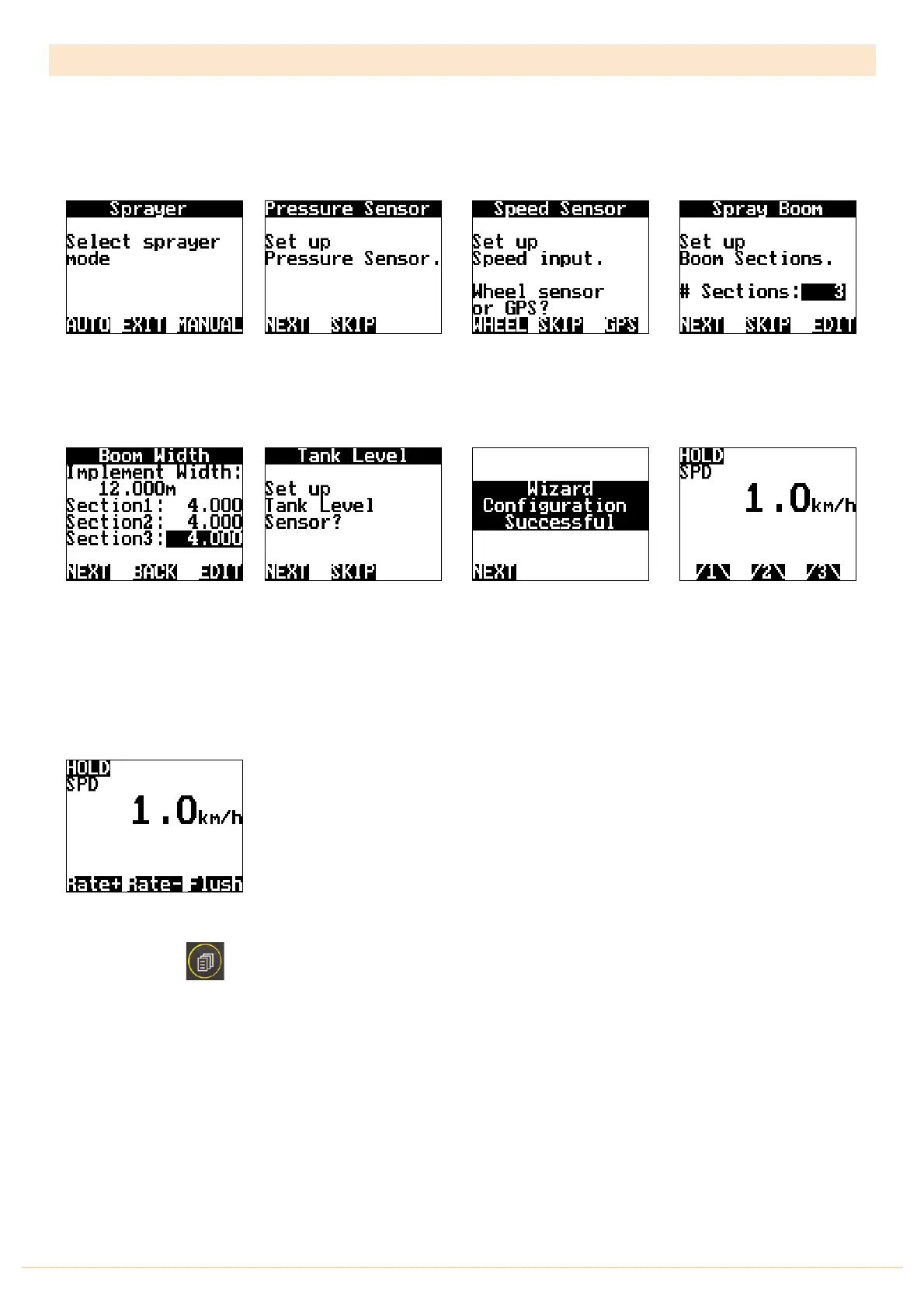
Select MANUAL: To Adjust
the Flow Control Valve
Manually
Press EDIT and change the
number of sections required
to control.
Press NEXT
Using the NAV & EDIT keys,
highlight and edit the
section width values as
required. The Section
Widths will also Total and be
displayed. Press NEXT
Press
NEXT
to finalise the
Wizard and return to the front
screen
When you return to the
Front Screen the Jackal
needs to display a value.
The value of 1.0km/h is not
relevant. It’s simply used for
the manual fucntion
Press the Run/Hold button
You can now manually
adjust your flow control
valve by pressing the Rate +
or Rate –
Simply drive to a set speed
Press the PAGE
button to display Rate+/-
Flush



 To Next Page