AM-JACKAL-35 / JULY 2020
SPRAY CONTROL – HOW TO USE
Once the Sprayer Wizard has been run you are now ready to start spraying. Familiarise yourself with the Spray
Controller layout as described below.
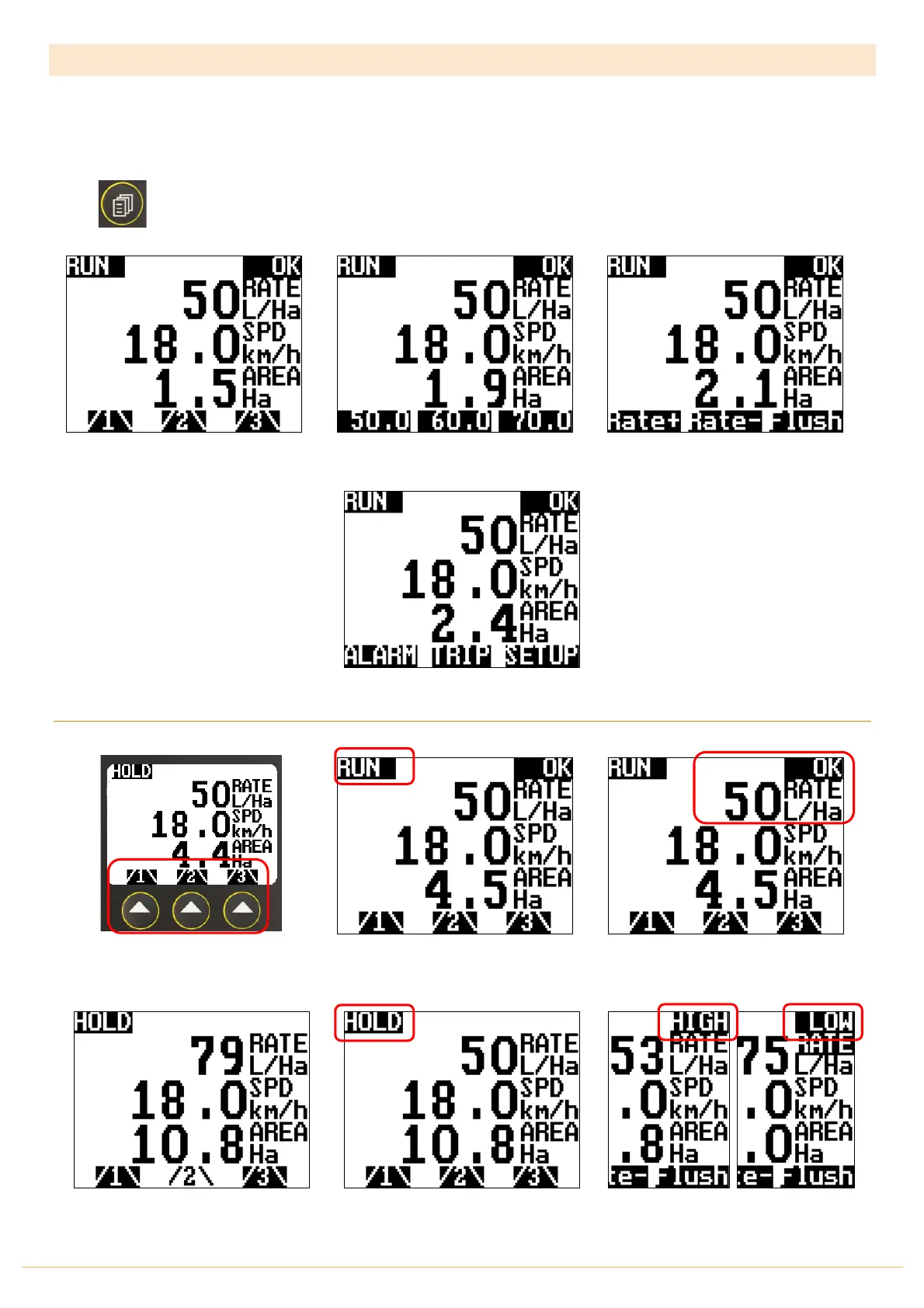
The Jackal Spray Controller Menu is laid out in 4 easy to use menus. These can be easily accessed by pressing the
PAGE button
Default
Section On/Off Control
&
Run
Screen
Pre-Set A/B/C
Rate Screen
Step Rate
Adjust &
Flush
Screen
Alarm
,
Trip
&
Setup
Layout
DEFAULT RUN & HOLD SCREEN
Sections can be individually turned
On/OFF by pressing the soft keys
underneath the sections numbers “/x\”
Pressing the Run/Hold button changes
the Jackal from HOLD to RUN
The LIVE rate in L/Ha is displayed and if
the desired target is reach,
OK
will also
be displayed
Example shows
Section 2
as OFF
Both
HIGH
&
LOW
rate warnings are
also displayed



 To Next Page