DAZZLER
TM
system manual Part I : installation & operation 4.2
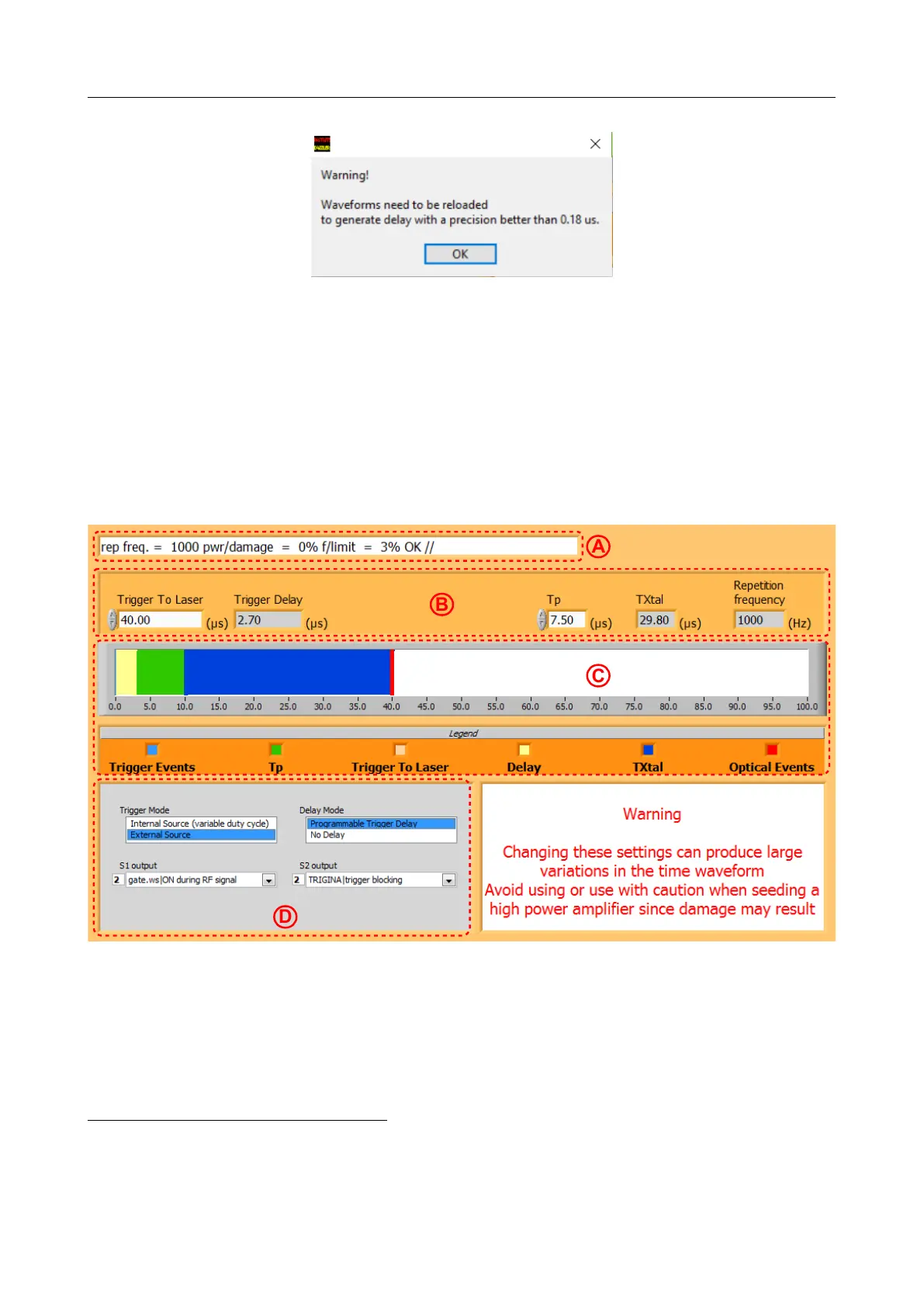
Figure 4.8: Warning message displayed when the Trig&Mode panel is opened for the first time
operating the main panel. This subprocess is activated regularly to update the message banner.
The Trig&Mode panel should not be left open during normal operation as it may cause
instabilities
6
: thus keep it open during adjustments but do not forget to close it: exit by the
left-top cross of the window.
4.2.1 Panel presentation
Figure 4.9: Trig&Mode panel (WR25 Dazzler
TM
typical values)
The Trig&Mode panel features the following parts (from top to bottom on Figure 4.9):
A: a message banner situated on the top-left corner, shows the same “polling” message as
the one in the Dazzler
TM
main window.
B: Parameters that are used to compute delays.
6
when open, every second, the trigger frequency is read and used to set the hardware delay circuits. As the
frequency is measured by counting, the count may vary by 1 or 2 and thus trigger inopportune reprogramming
of the delay circuits.
V3.00 - 8
th
April 2019 (ContentsTable) (FiguresTable) 28/94



 To Next Page