22
EXP MIDI CONTROL
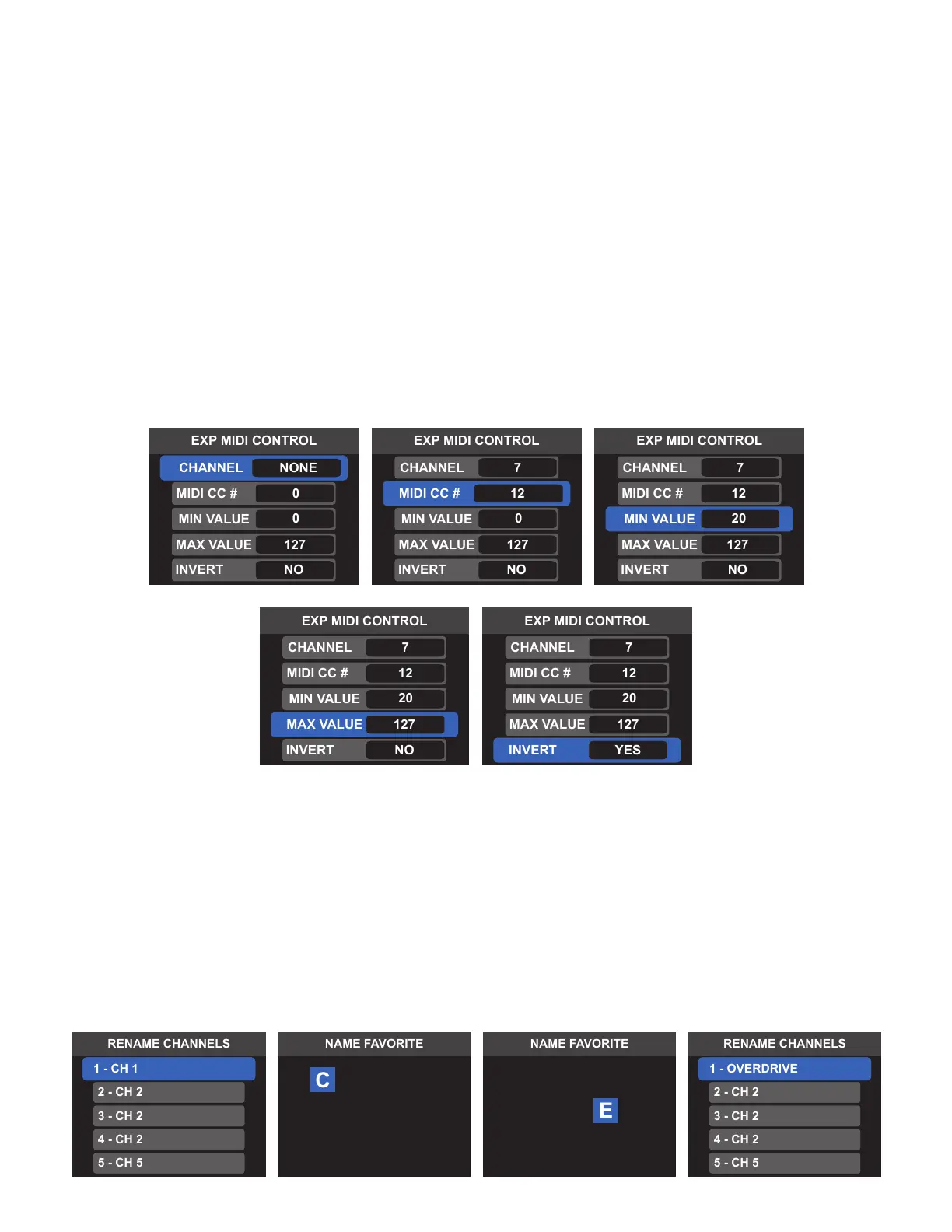
An expression pedal can be set to control any external device MIDI CC parameter. This control is congured
per preset and can control dierent MIDI CC parameters in each preset. Control parameters are:
• CHANNEL: Selects the MIDI channel (1-16) on which the CC messages will be transmitted; NONE transmits
no message.
• MIDI CC#: Sets the CC message control value.
• MIN VALUE: Sets minimum CC value in the range of adjustment.
• MAX VALUE: Sets maximum CC value in the range of adjustment.
• INVERT: Inverts expression pedal heel/toe position. Default setting is maximum value at toe position and
minimum value at heel position. Set invert to YES to set minimum value at toe position and maximum
value at heel.
To conrm parameters, press and hold encoder or press Footswitch 4 to exit and save changes.
RENAME CHANNELS
Switchboard’s MIDI channels 1-16 can be renamed to a user-dened name, making it more convenient to
identify the MIDI channel’s corresponding pedal or external gear. To rename a channel, select that channel
and then use the encoder of footswitches to enter a new name.
Note that by default the expression pedal will control the internal Volume Pedal and a MIDI CC parameter
simultaneously. To control the MIDI CC parameter only, the volume pedal must be turned o or the volume
pedal level must be set using the VOLUME PEDAL EDITOR.
H 1
EV R DO
VIR



 To Next Page