3. Diagnostics
3-11
Festo P.BE-CPX-FB32-EN en 1111a
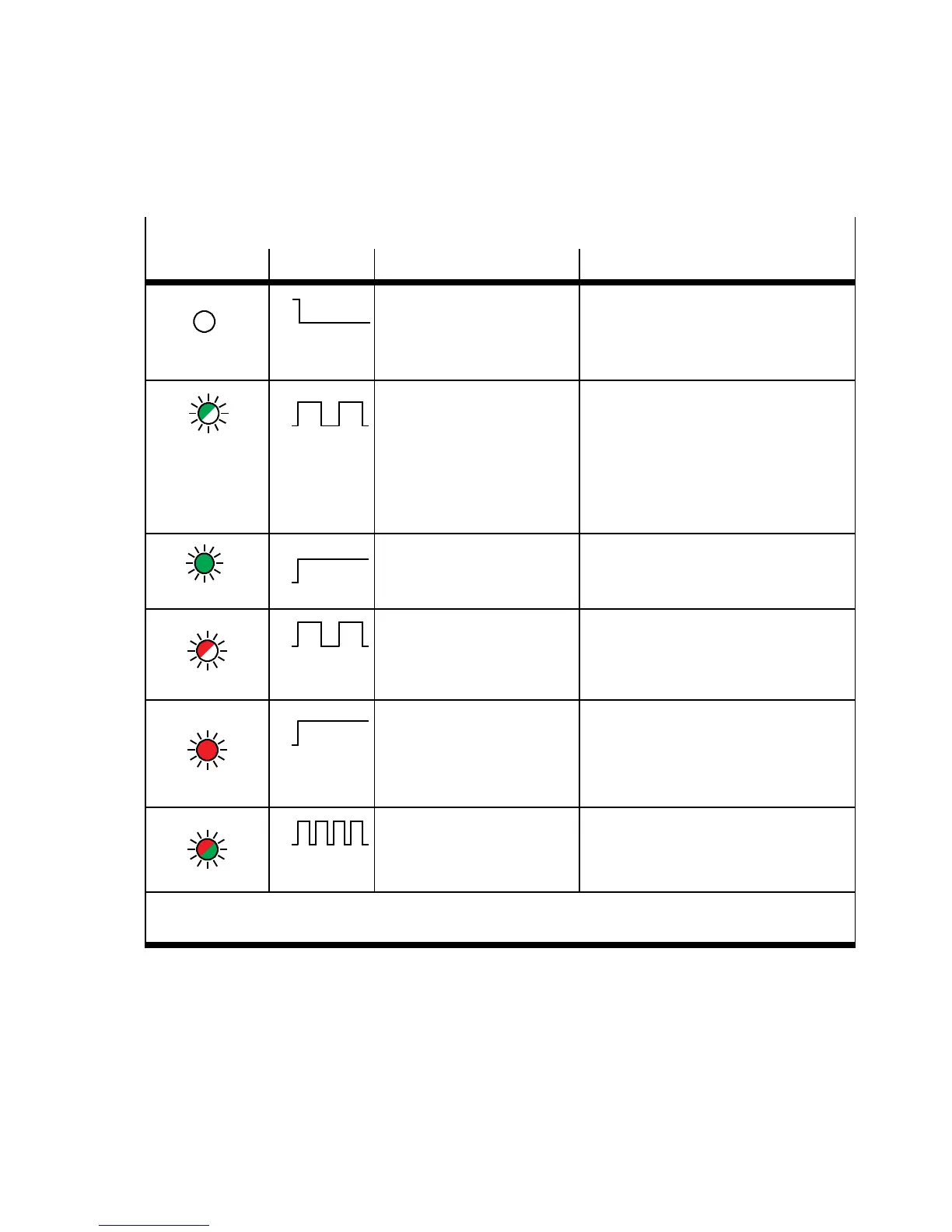
NS – network status
LED Sequence Status Meaning / error handling
Is of f
ON
OFF
The CPX terminal is not
online
– Logic supply for bus
interface not applied
• Check logic supply
Flashes green
ON
OFF
CPX terminal is online and
has received an IP address,
but the CPX terminal does
nothaveaconfigured
connection.
• Check configuration; it is possible
that the CPX terminal is not
assigned to a master/scanner
or
• Check the status of the master, it
is possible that the master is not in
the RUN mode.
Lights up green
ON
OFF
The CPX terminal is online
and has a c onnection to
the fieldbus
None (normal operating status)
Flashes red
ON
OFF
One or more
“I/O connections” are in
the time-out status
Check the physical connection to the
master/scanner ( EtherNet c able).
Lights up red
ON
OFF
Communication has failed.
– Non-permitted IP
address set and already
used in the network
• Correct IP address
Flashes red/green
ON
OFF
CPX terminal is in self-test None
*)
Test algorithm which ensures that no station numbers are assigned double in the network.
The test is usually carried out automatically when the network connection is set up.


 To Next Page