3. Commissioning
3-24
Festo CPX-FB36-EN en 1611a English
To change the “Configuration” connection parameter with the
“Studio 5000” software:
1. Terminate an existing online connection to the higher-or
der controller:
[Communications] , [Go Offline]
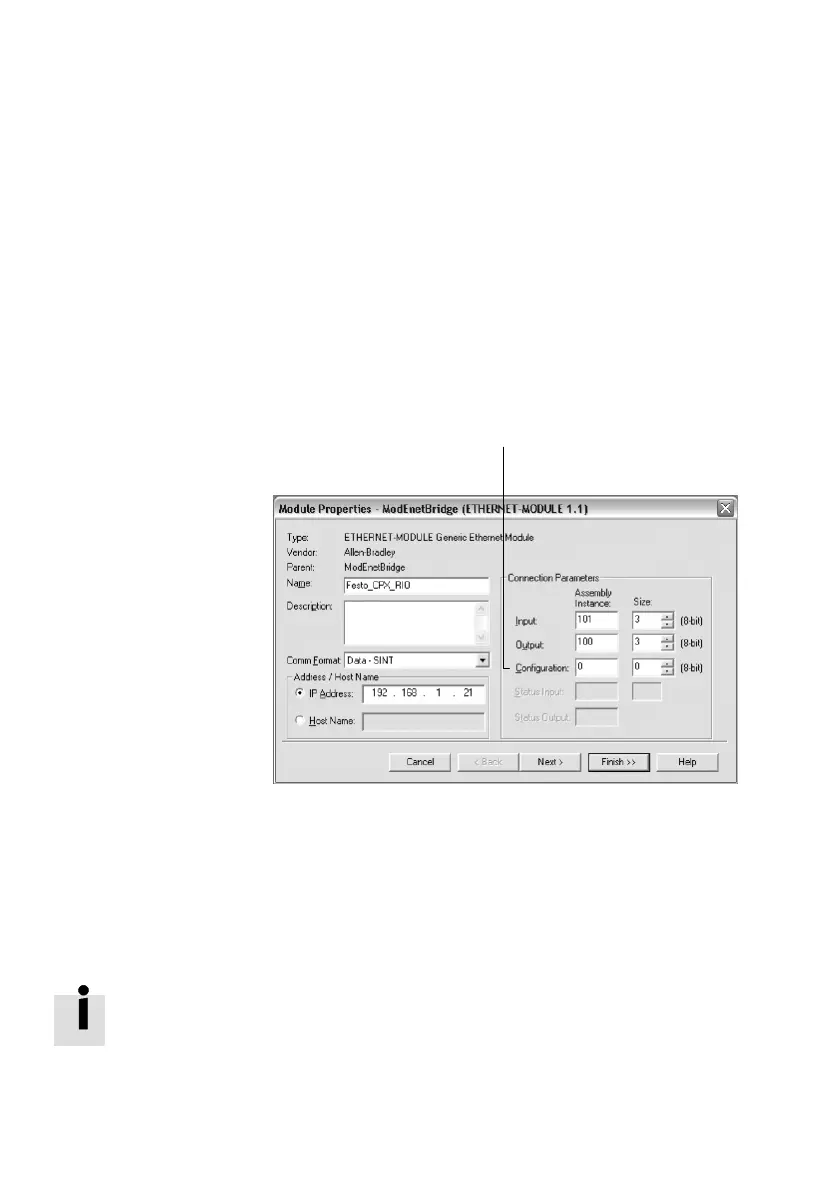
2. Open “Module Properties” dialogue:
Double-click on “Ethernet” in the “Controller Organizer”
window in the “I/O Configuration” directory.
1 “Assembly-
lnstance” connec
tion parameter
for “Configura
tion”
1
Fig. 3/15: “Module Properties” dialogue
3. Enter the value “Assembly Instance” = 0 for “Configura
tion” in the “Connection Parameters” area.
4. Close the “Module Properties” dialogue with the “Fin
ish >>” button.
If the “Modify” (M) LED on the bus node lights up perman
ently after system start-up, [System start with saved paramet
ers] is set.


 To Next Page