18
Congratulations, you have successfully loaded filament
into your printer!
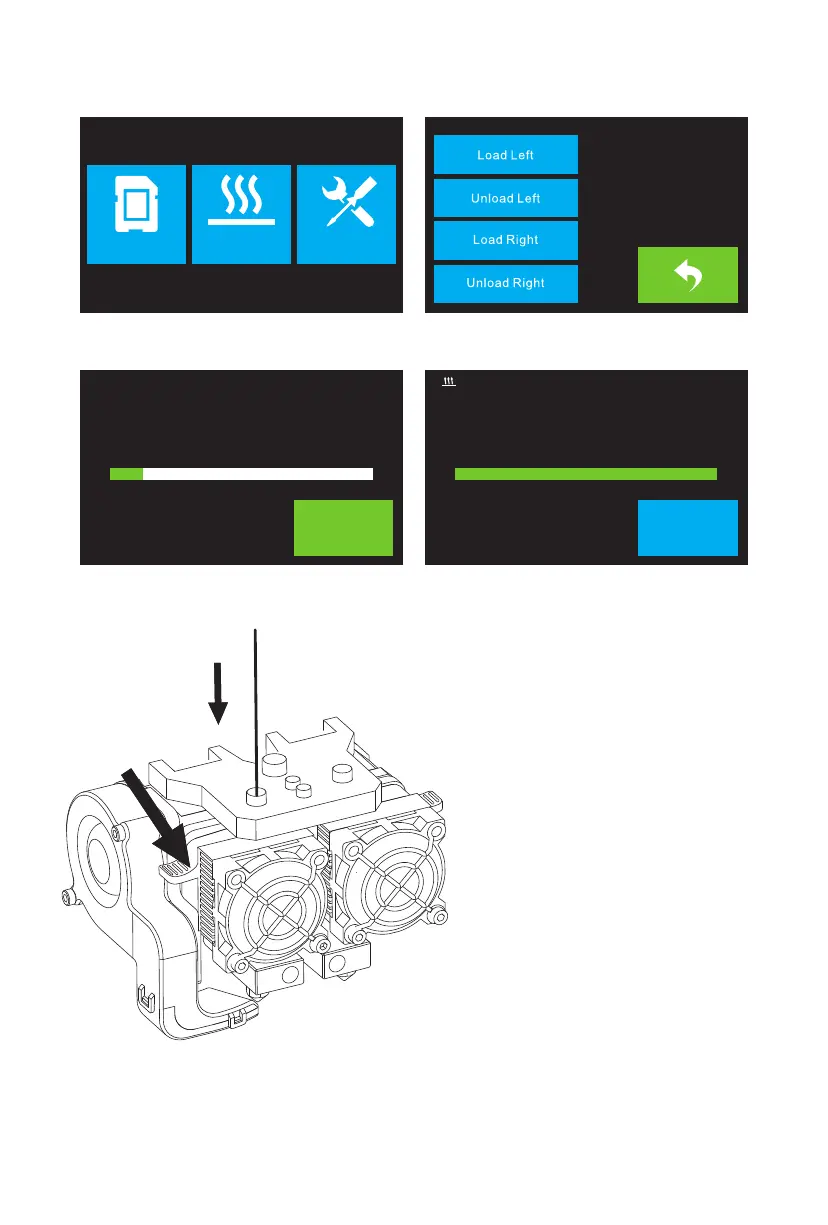
5. Load the filament by inserting it into the
extruder at an upright angle. Filament will
start to extrude out of the nozzle. Continue
loading to ensure that the filament is
extruding in a straight line. Refer to the
troubleshooting section if the filament is
extruding abnormally.
Touch the Done button to finish loading.
3. Touch the Filament button, then touch the Load Left button.
4. Wait for the extruder to heat up to the target temperature. The extruder will alert you when
it is at the target temperature.
Print Preheat Tool
14%
34℃ / 230℃
I’m Heating up...
L Extruder
Cancel
100%
230℃ / 230℃
Load begins,push filament vertically into
L Extruder
Done
extruder,and press [Done] when you see
filament come out of extruder















 To Next Page