08
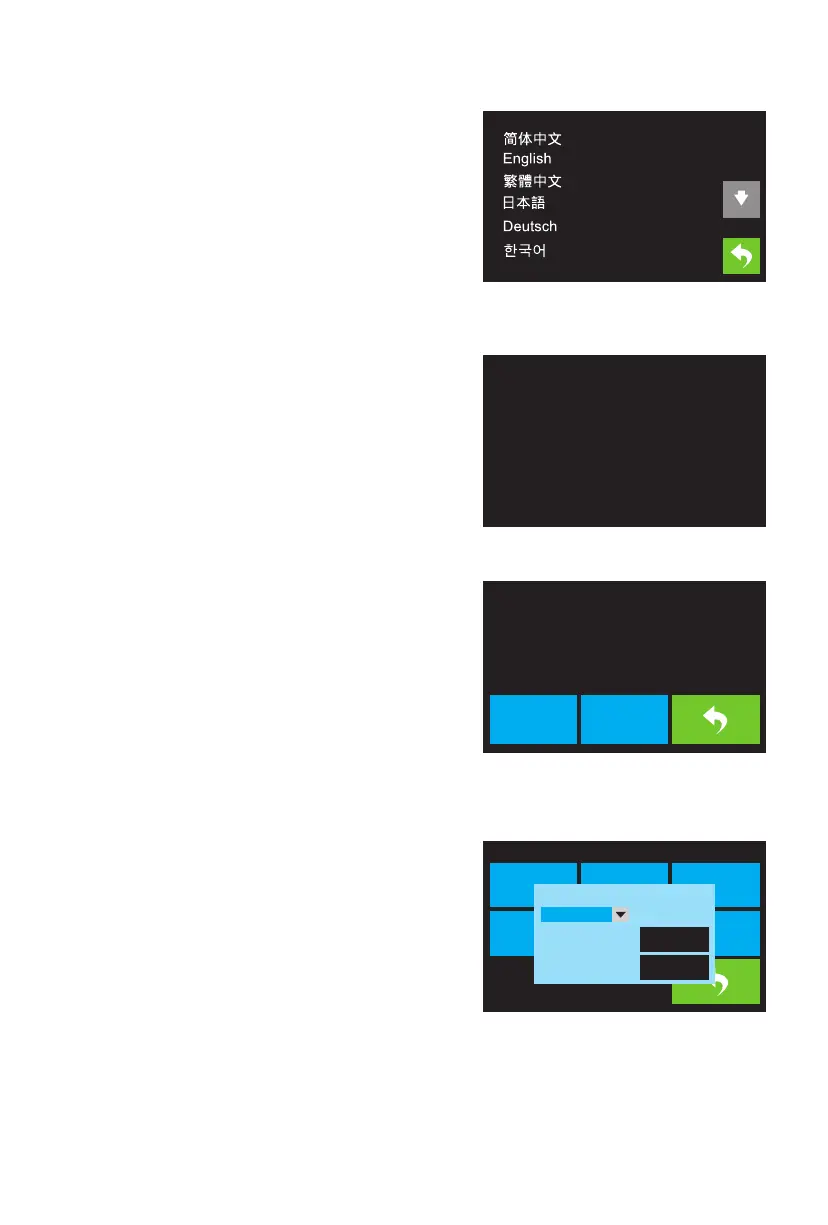
The Language Menu is displayed by touching the Language
button in the Setting Menu.
· Touch the specific language name to set the OSD
menu system to use that language.
· Touch the Down button to display the next page of
languages.
· Touch the Up button (not displayed) to display the
previous page of languages.
· Touch the Back button to return to the previous screen.
Language Menu
The TP Adjust is displayed by touching four point showed
in the screen to recalibrate screen. It just follow and touch
the plus sign.
TP Adjust
The WIFI Screen is displayed by touching the WIFI button
on the Setting Menu.
· Touch the Reset button to reset the Wi-Fi® radio.
· Touch the WIFI On button to turn the Wi-Fi radio on,
release the Wi-Fi hotspot, and set the Wi-Fi on the
computer.
· Touch the Back button to return to the previous menu.
WIFI Screen
The Pulley Type Selection Screen is displayed by touching
the Pulley button on the Setting Menu.
· Touch the Down Arrow next to the currently selected
pulley type to display a list of available pulley types.
Touch the name of a pulley type to select it.
· Touch the Yes button to save changes to the selected
pulley type.
· Touch the Cancel button to abort any changes to the
selected pulley type.
Pulley Type Selection Screen
Point
+
WIFI On
Reset
Not Connected
Language TP Adjust FactoryReset
WIFIFan On
Polley
WIFI
����
Pulley Type
Sliver Pulley
Cancel
Yes















 To Next Page