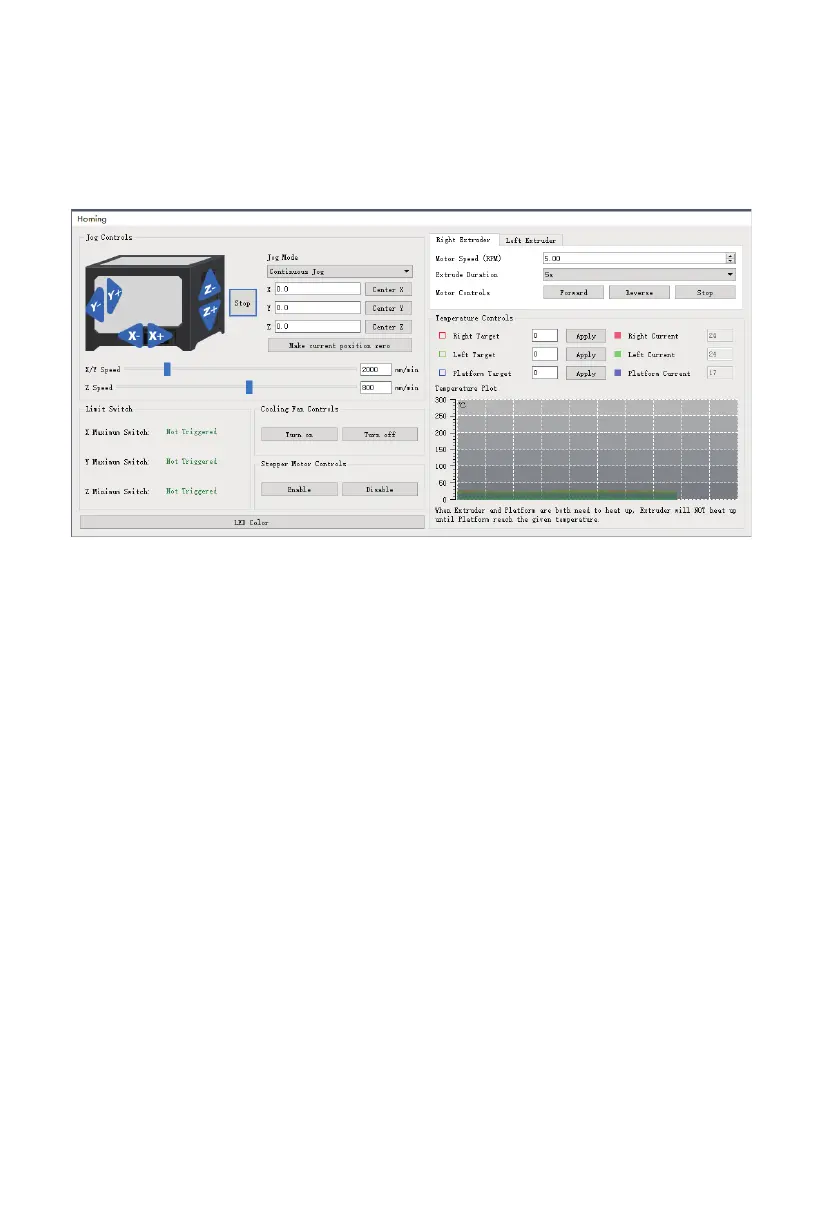
· Jog Mode: The Jog Mode section allows you to select the distance that the extruder and build
plate move with each mouse click.
· Six Blue Arrow Buttons: The buttons allow you to manually move the extruder and build plate.
The amount they will move with each click of the mouse is
determined by the Jog Mode settings.
· Stop: Click the Stop button to abort any current movement.
· XYZ Coordinates: Displays the current position of the extruder and build plate. You cannot edit
the displayed values.
· Make Current Position Zero: Click the Make Current Position Zero button to set the zero
position for the three axes.
· Center XYZ: Click a Center button to move the extruder or build plate to the zero position
for that axis.
· Set X/Y Speed: Sets the speed at which the extruder moves.
· Set Z Speed: Sets the speed at which the build plate moves.
· Limit Switch: Displays the status of the limit switches on each axis. If the extruder or build
plate are not moved to its maximum positions, the status will show
Not Triggered in green. If the extruder or build plate has been moved to its
maximum position, the status will show Triggered in red.
· Stepper Motor Controls: Click the Enable button to lock the stepper motor so that it does
not allow movement. Click Disable to unlock the stepper motor so
the extruder and build plate can be manually moved.
· LED Color: Allows you to set the LED color of the printer.
· Motor Speed (RPM): Controls the speed of the filament feed wheel.
Tools Menu
The Tools Menu contains the following options.
Control Panel: Click Tools > Control Panel to modify the printer's settings from within FlashPrint.
Note that if you are not connected to the printer, you will be prompted to do so
before the Control Panel can be displayed.
36















 To Next Page