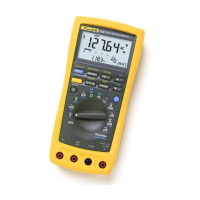
183 & 185
Users Manual
24
Auto Hold
To activate auto hold, press down on HOLD until
A
HOLD appears on the
display. Auto hold is not available for capacitance or AC DC measurements.
In auto hold mode the display automatically freezes and the instrument beeps
when the measurement reading stabilizes. The displayed value will be updated
when the meter stabilizes on a new measurement value.
Auto hold is useful when it is not possible for you to press
HOLD or see the
meter display while probing and taking measurements.
REL
t
Button (Making Relative (
REL
t
) Measurements)
Use this button to set the meter to delta mode and make relative measurements.
The reference value for the
t
measurement can be a measured, a stored, or a
programmed value.
t
Relative to a Measured Value
When you take the measurement and the meter settles on the measurement
value, press
REL t
. For subsequent readouts, the measured reference value is
subtracted from the actual measurement.
t
Relative to a Saved Value
Use the measurement function knob and softkeys to set the meter to the
measurement function you want. Use the memory information in the "MEM
(Memory)" section to recall (RCL) a reference value from memory, then press
REL
t
. To exit delta mode, press REL
t
.
For subsequent readouts, the recalled reference value is subtracted from the
actual measurement.



 To Next Page