True RMS Digital Multimeters
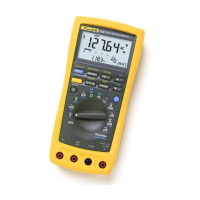
Button and Softkey Overview
25
t
Relative to a Programmed Value
Use the measurement function knob and softkeys to set the meter to the
measurement function and range you want and then press
REL
t
. While the
meter is in delta mode, press and hold the yellow (shift) button until the Setup
menu appears. Use the softkeys to edit rEF to the desired value and press
softkey
4
for OK. To exit delta mode, press
REL
t
.
For subsequent readouts the programmed reference value is subtracted from
the actual measurement. The programmed reference value is lost when you
turn off the meter.
You can also use
REL
t
to make relative dB (t
dB) measurements. See "dB
and dBm Voltage Measurements" for more information.
MEMORY
Use the memory mode to store and recall measurement values. No data is lost
during power cycles.
To activate the MEMORY mode, press the
yellow (shift) button and then REL
t
while
SHIFT shows on the LCD display. The display shows four softkey
selections:
STO, RCL, CLR, and EXIT.
STO
Select STO to store the held value in the next available memory location. The
memory location number momentarily shows on the upper display. If no
memory locations are available,
FULL shows on the upper display for two
seconds and nothing is stored.
To overwrite an existing memory value, recall the memory location using the
RCL button, press CLR, then press STO to store the new value in this location.
RCL
Select RCL to scroll through the stored values in reverse order. The upper
display momentarily shows the memory location while the main display shows
the value stored in that location.



 To Next Page