183 & 185
Users Manual
26
CLR
Select CLR to clear the currently selected memory location. The location is
replaced with “
-----”.
To clear all memory locations, press and hold
CLR for five seconds. A ?
shows on the display next to the CLR enunciator. The word
donE
shows on
the display indicating that all memory locations are clear and you can release
the button. If you release the button before the word
donE
shows, no data is
cleared from the memory.
EXIT
Select EXIT to exit memory mode. You can also exit memory mode by
pressing any button.
Softkeys (
1 2 3 4
)
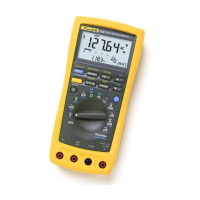
Each setting on the measurement function knob may activate one or more
softkey settings on the LCD. If there is more than one measurement for a
function knob setting, a softkey menu appears on the display. Press the
corresponding softkey to select the desired measurement.
Setup Menu
The Setup menu allows you to customize default settings. To activate the
Setup menu, press and hold the yellow (shift) button for two seconds.
Use the softkeys as shown in the following table to edit setup values. Setup
menu values are saved when you turn off the meter, except for reference
values.
Softkey 1 + 2 – 3 ← 4 OK
Function
Press to
increase
setting
value
Press to
decrease setting
value
Press to step to
next digit in
setting value
Press to save
setting and
move to next
setup
parameter



 To Next Page