Calibration Bath
Parts and Controls
7
Parts and Controls
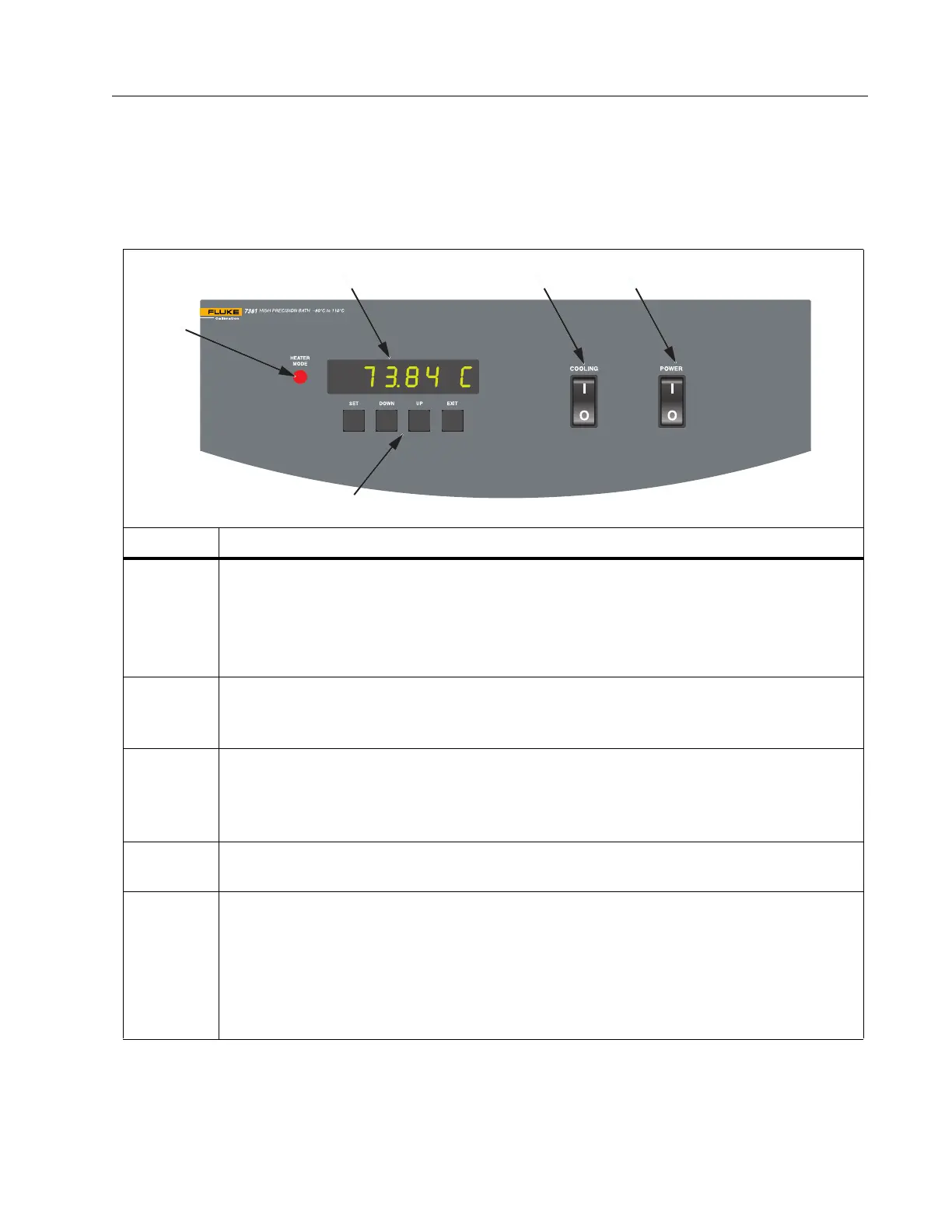
Front Panel
The front-panel controls and indicators are shown in Tab l e 1.
Table 1. Front Panel
Number Description
A
Control indicator light - A two-color LED that indicates the ratio of heating to
cooling.
• When the indicator is red, the heater is on.
• When the indicator is green, the heater is off and the Bath is cooling.
The indicator pulses as the Bath maintains a stable temperature.
B
Display - Used to view the set-point temperature, Bath temperature, and other
functions, settings, and constants. The display shows temperatures in °C or °F
units. See Temperature Scale Units.
C
Cooling on/off switch - Turns on the refrigeration for control <50 °C and rapid cool
down. Cooling shuts off automatically >60 °C. Manually turn off the refrigeration at
temperatures where it is unnecessary. See Refrigeration, Cooling Mode, and Hot
Gas Bypass Mode.
D
Bath power switch - Used to control power to the entire Bath and includes the
stirring motor.
E
Control buttons -
• SET - Shows the next parameter in a menu and stores parameters to the
shown value.
• DOWN - Decrements the value of shown parameters.
• UP - Increments the value of shown parameters.
• EXIT – Escapes from a menu. When you push EXIT, any changes made to the
shown value are ignored.
A
BCD
E



 To Next Page