17
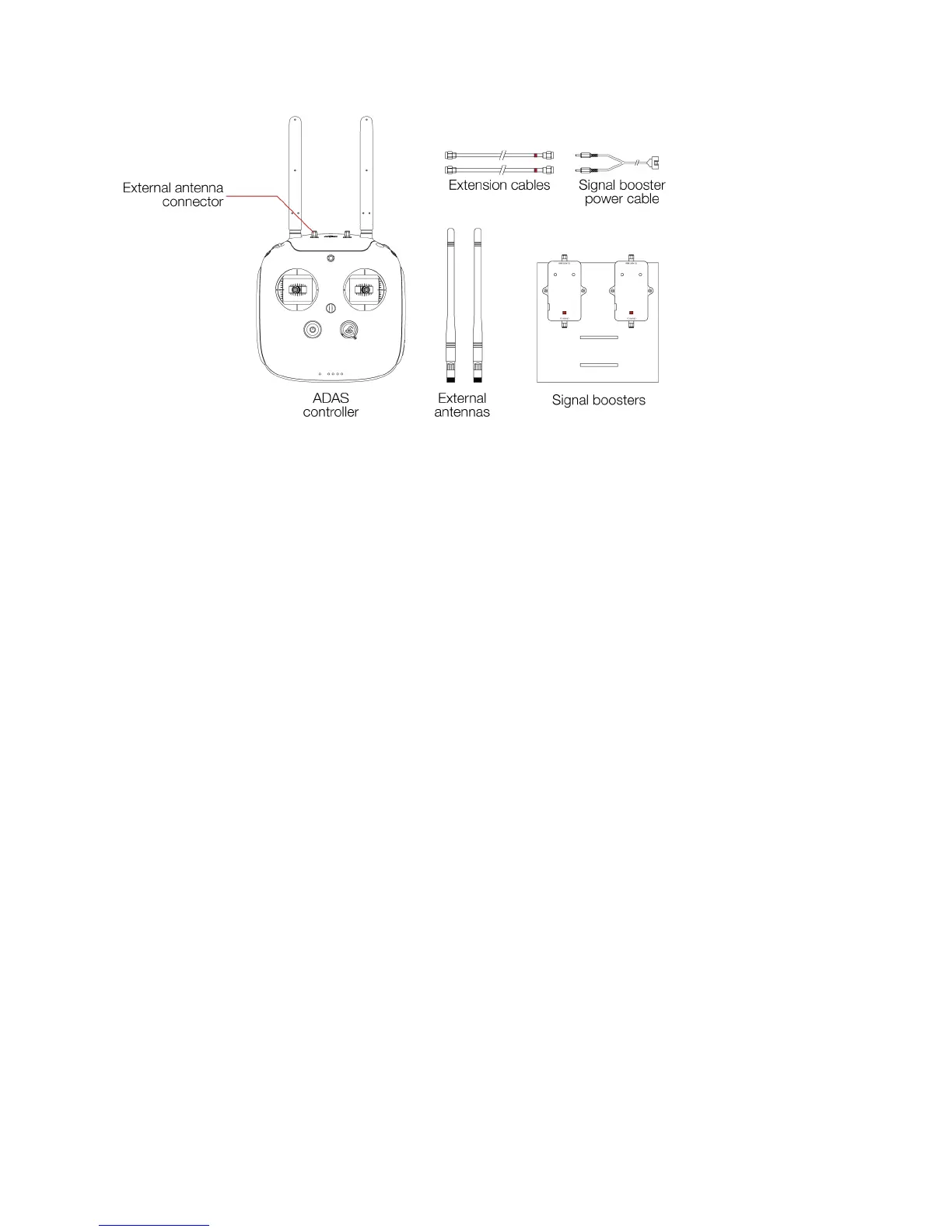
Figure 3.9: ADAS overview
ADAS controller
The controller has been modified to implement two external antenna connectors. This modification
offers the possibility to connect external antenna directly to the controller or to connect the
extension cables to deport those antennas.
External antennas
The External antennas are removable antennas. They can be placed directly on the Controller if the
ADAS is not needed. Or placed on the Signal Boosters if the operator uses the ADAS.
Extension cables
The extension cables drive the Radio Frequency signal from the controller to the signal booster.
They have a length of 20m.
Signal boosters
The signal boosters strengthen the Radio Frequency signal after being deported by the extension
cables.
Signal boosters power cable
Used to connect the battery to the signal booster. The signal booster uses the same battery than
Elios.
4. Flying with Elios
This section covers how to set up the GCS and Elios. It will also give the necessary instructions to do your
first flight with the Elios system.
4.1 Setting up the ground control system
4.1.1 Mount the tablet
To mount the GCS, follow those steps:
1. Place the antennas and the tablet holder to a vertical position.
2. Press the button on the side of the tablet holder to release the clamp.
3. Place your mobile device inside the clamp and adjust it to secure.
4. Connect your tablet to the remote controller via a USB cable.



 To Next Page