36
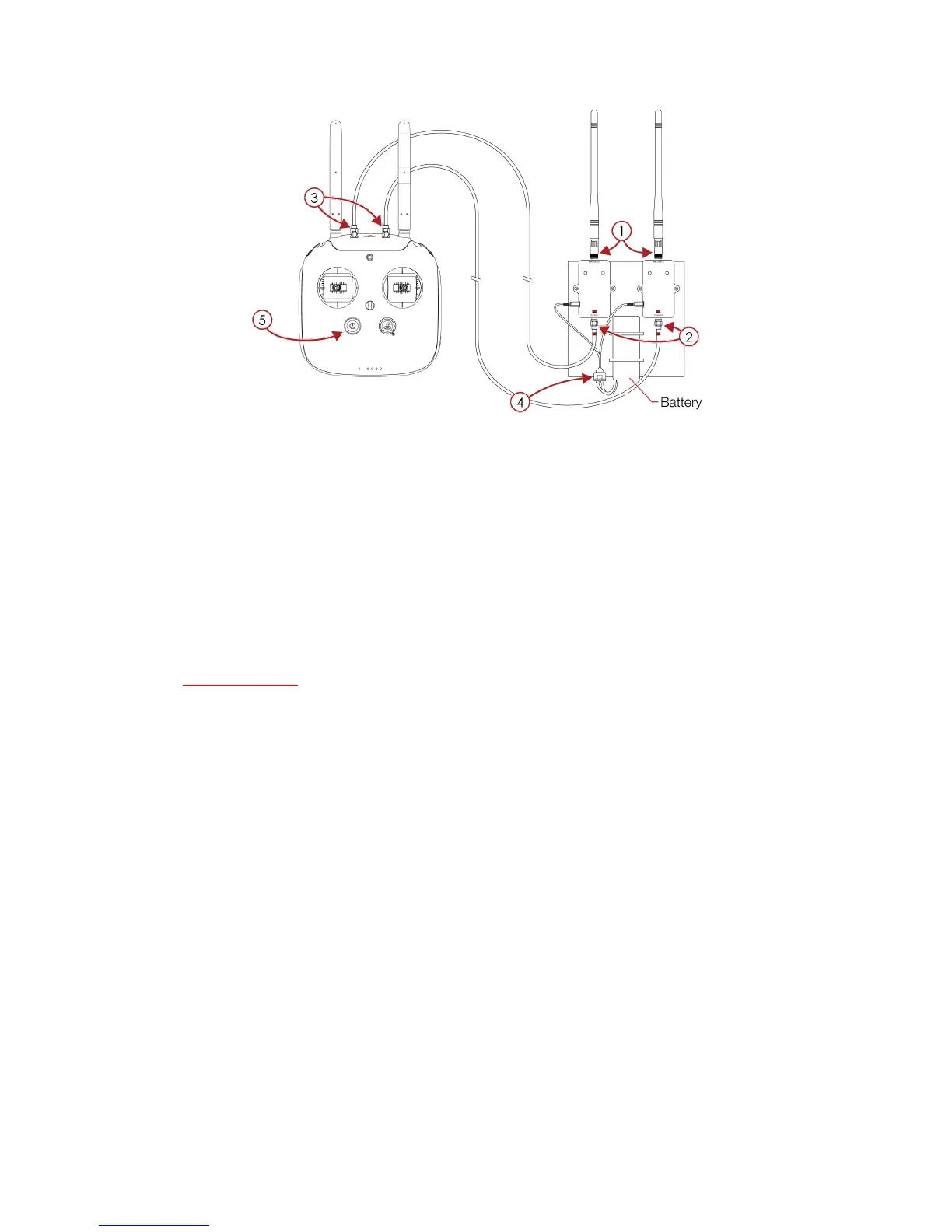
Figure 4.19: ADAS controller with deported antenna set up
5. Post mission data analysis
After a flight, you can review the recorded footage using one of the method presented below.
5.1 Flyability Inspector
Flyability Inspector is a software developed by Flyability offering you a simple interface to analyze all the
data gathered during a mission. Unfortunately, the software is compatible with windows 8+ only.
5.1.1 Download
Go to the my.flyability.com platform, and go to the Flyability Inspector Software section to download the
latest version of Flyability Inspector.
5.1.2 Installation
Extract the *.zip file where you want to install the software. For example in "C:\Program Files
(x86)\FlyabilityInspector".
5.1.3 Utilization
1. Launch FlyabilityInspector.exe.
2. You can open a video by clicking “File” > “Open Video”
3. Then open the corresponding flight data with “File” > “Open Flight Data”.
Note that the creation date of a Flight Data and a Video are a timestamp corresponding to the aircraft
total flight time. Hence, a Flight Data file and a Video file creation date should match.
In the example below, “Datalog_11.log” goes with “REC_0012.MP4” and “Datalog_10.log” goes with
“REC_0011.MP4”.



 To Next Page