43
6.5 Controller binding
6.5.1 Bind with DJI GO
Follow these steps to bind a Controller to Elios.
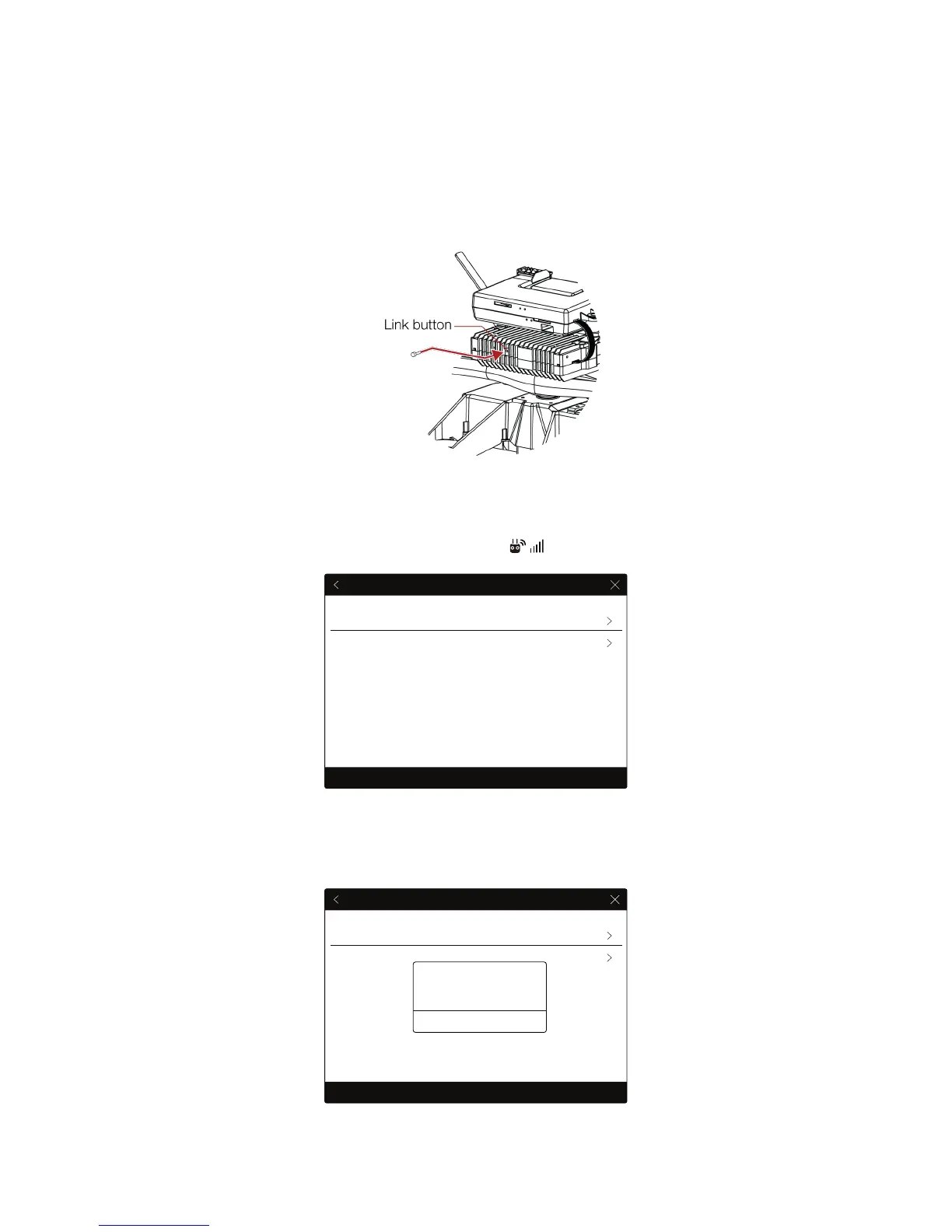
1. Remove the screw located on the back of the transmitter block.
Figure 6.3: Accessing transmitter link button
2. Place the controller and Elios at 1.5 m from each other.
3. Turn on Elios, and the controller and connect the tablet to it.
4. Launch the DJI GO app, and go to Camera View > > RC Control Settings. Click ‘Linking RC’.
Figure 6.4 Controller RC settings
5. The Controller Status Indicator will blink blue and emit a beep sound when the Controller is ready
to link
RC Control Settings
RC Calibration
Stick Mode
Default stick mode is Mode 2, changing stick modes alters the way the aircraft is controlled.
Do not change unless familiar with your new mode.
Linking RC
RC Control Settings
RC Calibration
Stick Mode
Default stick mode is Mode 2, changing stick modes alters the way the aircraft is controlled.
Do not change unless familiar with your new mode.
Linking RC
Searching for aircraft frequency,
timeout in 54 seconds
Cancel
Press the linking button on the air
system to link this remote controller



 To Next Page