26
4.5 Tablet interface
4.5.1 Main menu
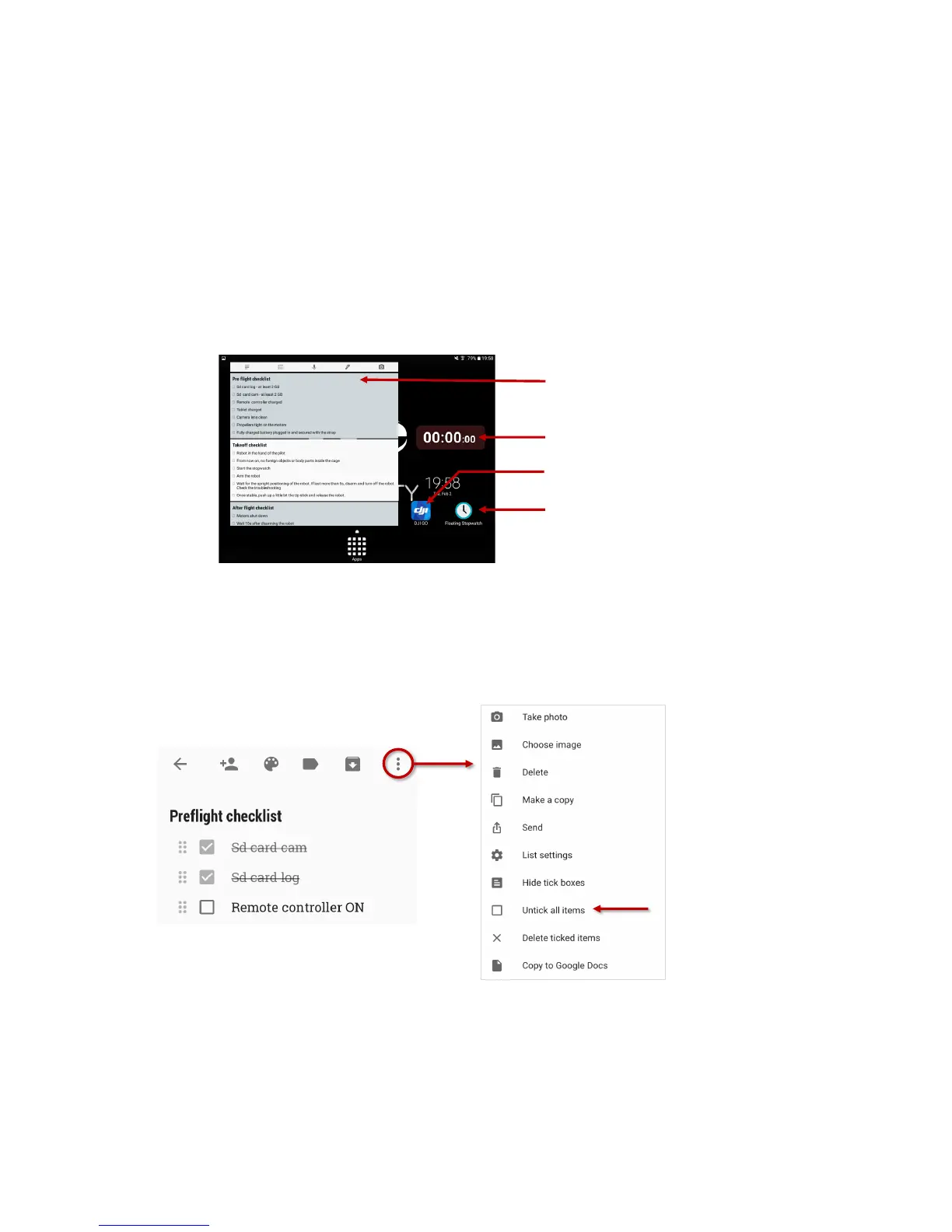
The main menu is composed of 3 different applications:
§ Google Keep – a checklist reminder, that will help you going through the different checklist
before, after and during the flight
§ Floating stopwatch, that will allow you to know how long did you fly and avoid to deplete the
battery. It is composed of a floating widget that will overlay any application running on the tablet
and the app to start/stop it.
§ DJI GO will show you the live video feed streamed by the robot.
Whilst using any application, you can go back to the main menu using the home button of the tablet.
Figure 4.8: Tablet main menu overview
4.5.2 Google keep
Google keep gives a nice interface for checklists helping going through the preflight, takeoff and after
flight checklists. By tapping on a box, you can simply check it. It is also possible to reset all the checklist by
going on the menu (upper right corner) and tap on “Uncheck all items”.
Figure 4.9: Google keep – checklist interface
Google Keep
Checklist reminder
DJI GO
Live video feed
Floating stopwatch app
Floating stopwatch widget
By tapping on the item,
you can check their boxes
Uncheck all items to
reset the checklist



 To Next Page