44
Figure 6.5: Controller awaiting for binding
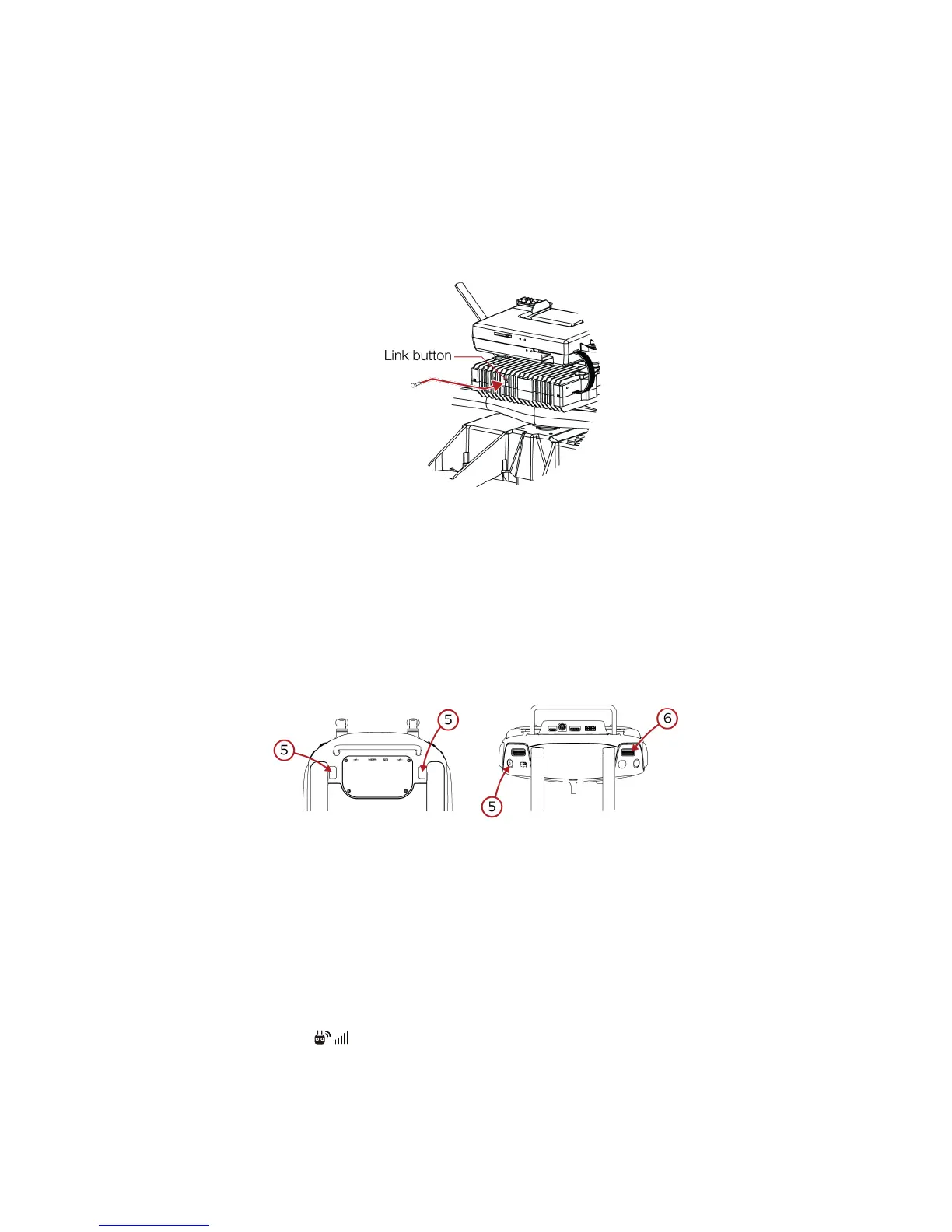
6. Using a small rod (e.g. a paper clip), press the link button on the transmitter block. The controller
status indicator will glow solid green if linkage is successful.
7. Put back the screw.
6.5.2 Bind without DJI GO
1. Remove the screw located on the back of the transmitter block.
Figure 6.6: Accessing transmitter link button
2. Insert and connect a battery in the aircraft.
3. Place the controller and Elios at 1.5 m from each other.
4. Turn on the controller to be bind
5. Press and hold simultaneously the FN button, the High Speed button and the Camera home
button. The controller shall start beeping
6. Then press the scroll EV/Lighting Wheel. The controller’s status indicator will flash blue. The
controller beeping shall be faster.
7. Press on the transmitter’s link button for 5s.
8. The controller’s status indicator shall turn green.
Figure 6.7: Binding button combination
6.6 Connect a camera operator GCS to pilot GCS
To connect the camera operator GCS to the pilot GCS, follow those steps:
1. Deploy and turn on the pilot GCS as well as the camera operator GCS.
On Camera operator GCS
1. Go to Camera View > > RC Control Settings.
2. Next to ‘Set RC Status’, select ‘Slave’
3. Tap ‘Search for Master Controller’ to register the Pilot GCS.



 To Next Page