31
4.7.2 Elios cockpit overview
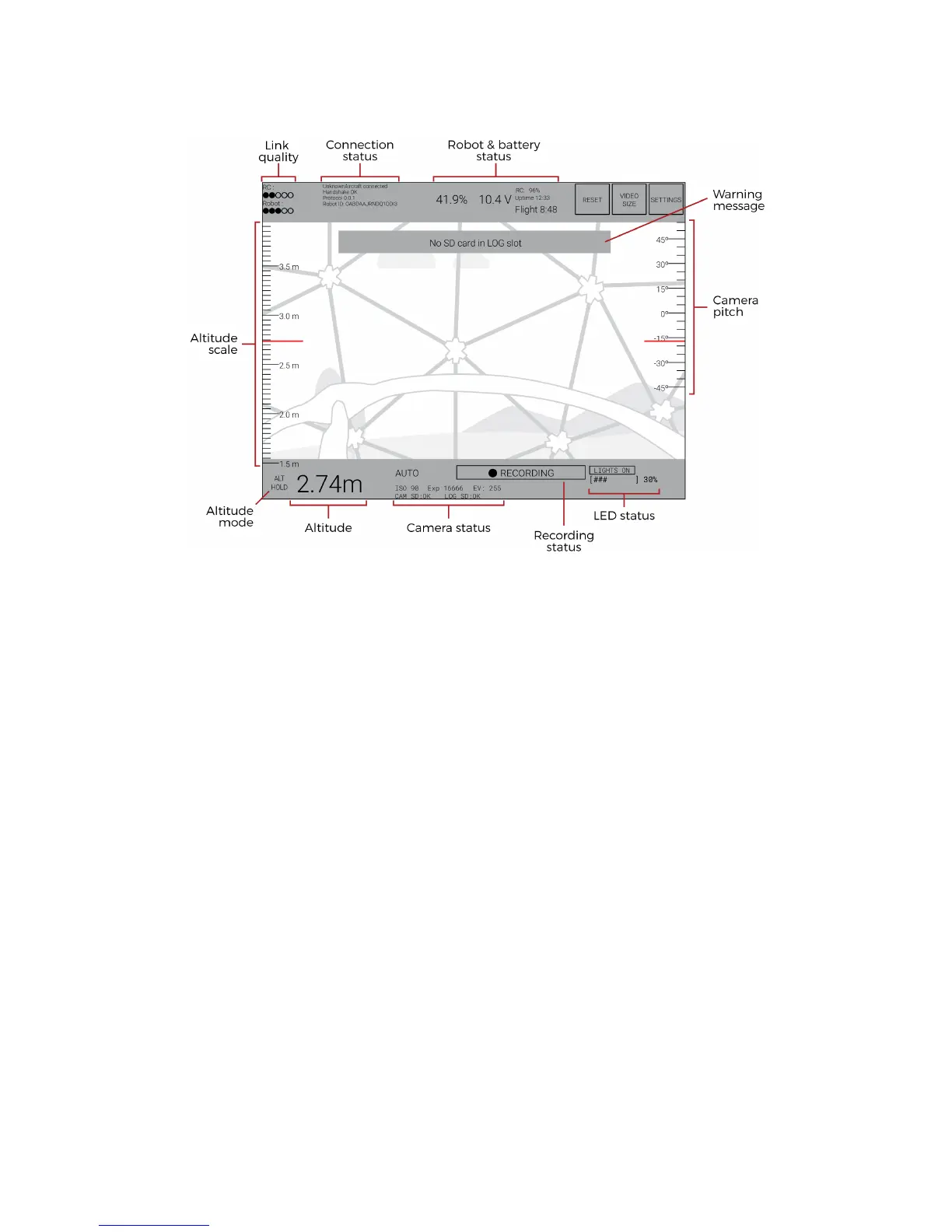
Figure 4.17: Elios cockpit overview
Link quality
RC: signal strength of the uplink communication (From the GCS to the aircraft)
Robot: Signal strength of the downlink communication (From the aircraft to the GCS)
Connection status
If “UnknownAircraft connected” and “Handshake OK” are displayed, the robot and the GCS are
properly communicating together.
Robot & Battery status
On the left side, this block shows readings of the battery state of charge. If ??% is shown, the battery
plugged wasn’t fully charged. In this case, the state of charge estimation is not functioning and the
pilot should be aware of the battery voltage. Note that, the State of charge is an estimation. The
pilot has to keep a battery voltage awareness.
On the right in [%] and the battery voltage in [V].
On the right side the RC battery state of charge is shown in [%]
The uptime gives the time elapsed since the robot was turned on.
The Flight telemetry gives the time spent flying since the robot was turned on.
Camera pitch
Give the current angle of the camera pitch.
LED status
Give the current power of the onboard lighting.
Recording status
If displayed, the HD optical camera is recording properly the video. If not, the video is not recorded.
Altitude scale & Altitude
Gives the current altitude of the aircraft relative to its startup elevation. Note that during a flight the
altitude may drift of about 2m.
Altitude mode
Inform the pilot to which altitude mode is on.
- White: The aircraft is in automatic altitude mode.



 To Next Page