32
G BG B
G BG B
G B
BLITZ
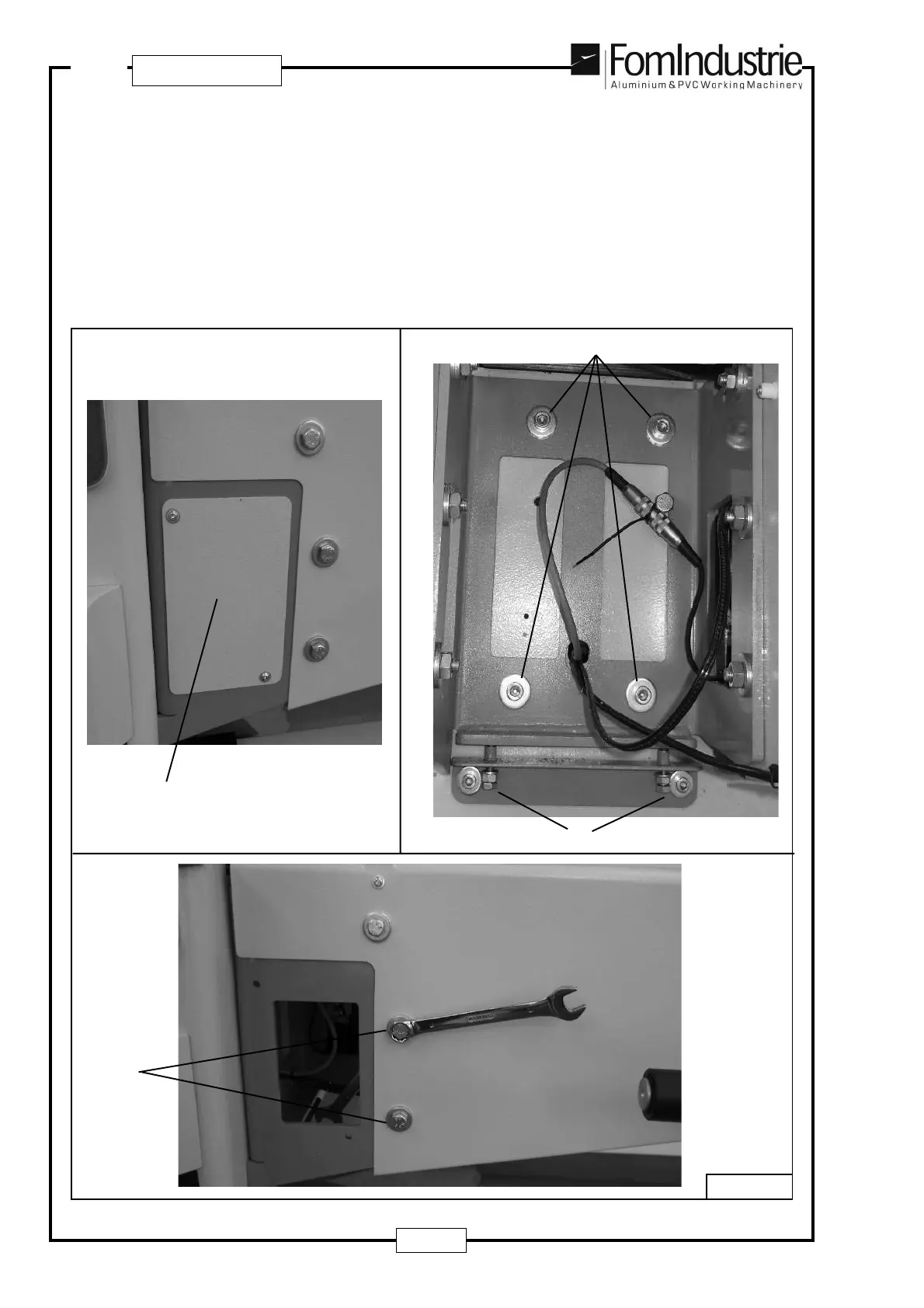
5.7 CHECKING THE ALIGNMENT OF THE MOBILE HEAD ROLLER TABLE (Fig. 05-19)
Check the alignment of the mobile head roller table with the machine worktable using, for example, a straight
bar and making sure it rests properly on the worktable and on the rollers.
If it is not, open guard “A”, then adjust the 4 screws “B” to align the 1st roller vertically with the head table (the
screws should be loosened and then tightened).
With a no. 10 spanner turn the 2 screws “C” to align the roller table crosswise and vertically.
With a no. 17 spanner turn the screws “D” (2 at the front and 2 at the rear) for longitudinal alignment.
After making the adjustments, tighten all the screws and secure guard “A”.
If the roller table alignment proves especially difficult, contact FOM service assistance.
05-19
A
D
B
C


 To Next Page