EasyManua.ls Logo

FOR-A MFR-3100EX - Page 40

FOR-A MFR-3100EX
86 pages
Print Icon
To Next Page IconTo Next Page
To Previous Page IconTo Previous Page
Loading...
40
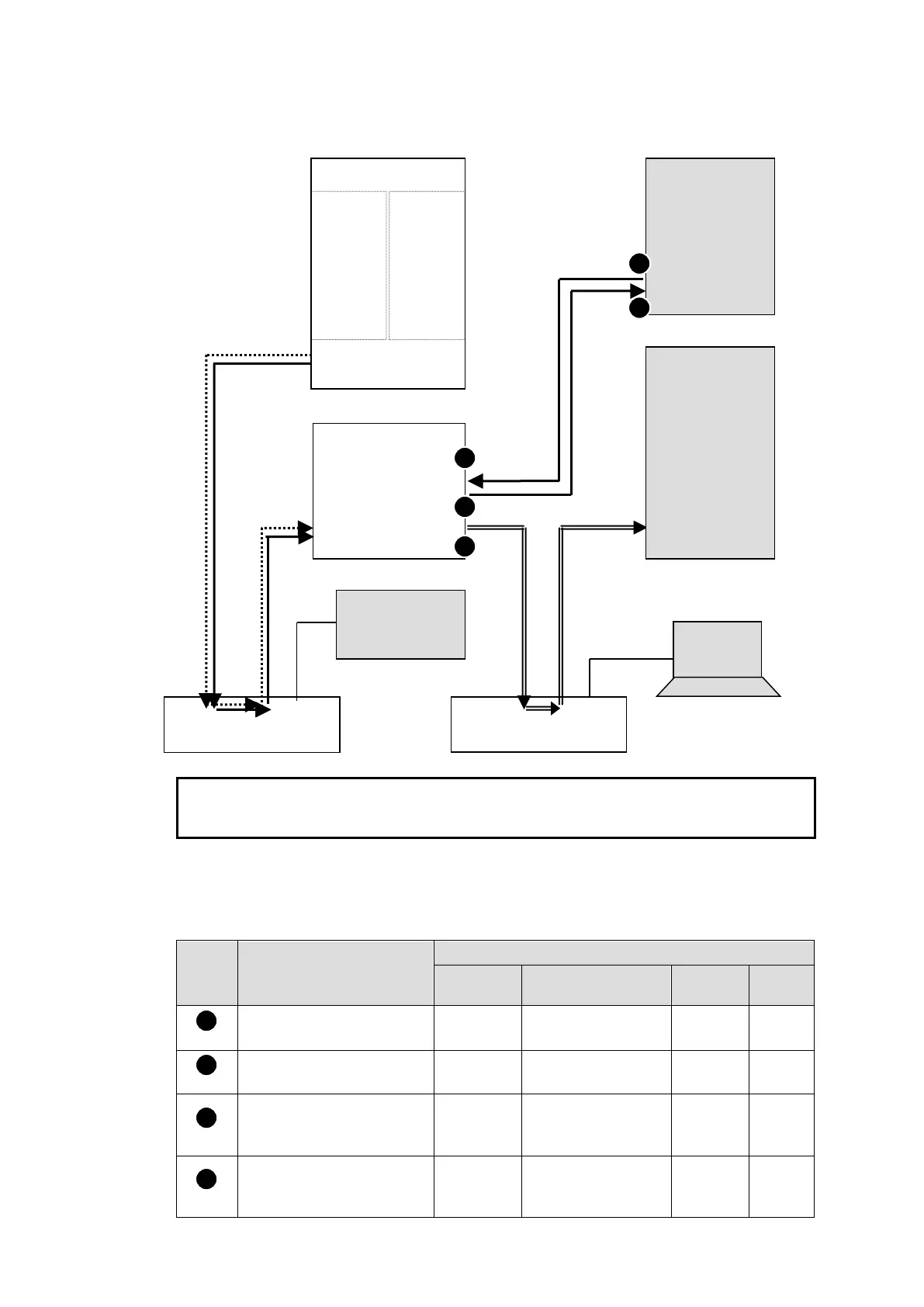
Transmitting Signal Name and Tally Data
The figure below shows an example signal name and tally data routing system using the MFR-
TALM.
Each serial port should be set as shown in the table below in the relevant page of the MFR-
TALM Web-based Control accessed from "http://192.168.1.62" (default IP address) on your
web browser.
Serial Port Settings
Open the [MFR-TALM Web-based Control: Port Settings - Serial Port page] and perform
port settings.
As for the HVS-4000 unit, perform port setting in the [EXT INTERFACE - RS-422] menu.
Port
Menu
[Port Settings] - [Serial Port]
Connector
Function
Baud
rate
Parity
Web-based Control
[TALM Settings]
No. 1
HVS-TAL Protocol
Reception
38400
EVEN
Web-based Control
[TALM Settings]
No. 2
Router/HVS
connection type 2
38400
NONE
HVS-4000
[EXT INTERFACE - RS-
422]
No. 1
TALLY
38400
EVEN
HVS-4000
[EXT INTERFACE - RS-
422]
No. 4
ROUTER (Tx)
38400
NONE
1
2
3
4
Ethernet Hub (PC-LAN)
Ethernet Hub (MFR-LAN)
MFR-LAN
PC-LAN
RS-422(1)
RS-422(2)
MFR-3100EX
MFR-8SDI
IN1
|
|
|
|
I
|
IN64
MFR-8SDO
OUT1
|
|
|
|
|
|
OUT72
PC
MFR Web-based Control
MV Layout Editor
MFR-TALM
Video Switcher
(HVS-4000)
SERIAL
Multi Viewer
(MV-3200)
RS-422(1)
RS-422(4)
LAN
MFR-LAN
MFR-xxRU
PC-LAN
Signal name data
Tally and name data
3
2
1
4
5
Switcher's tally data
Router's tally and name data

Table of Contents