20
Operation - Manual Functions
Load save settings
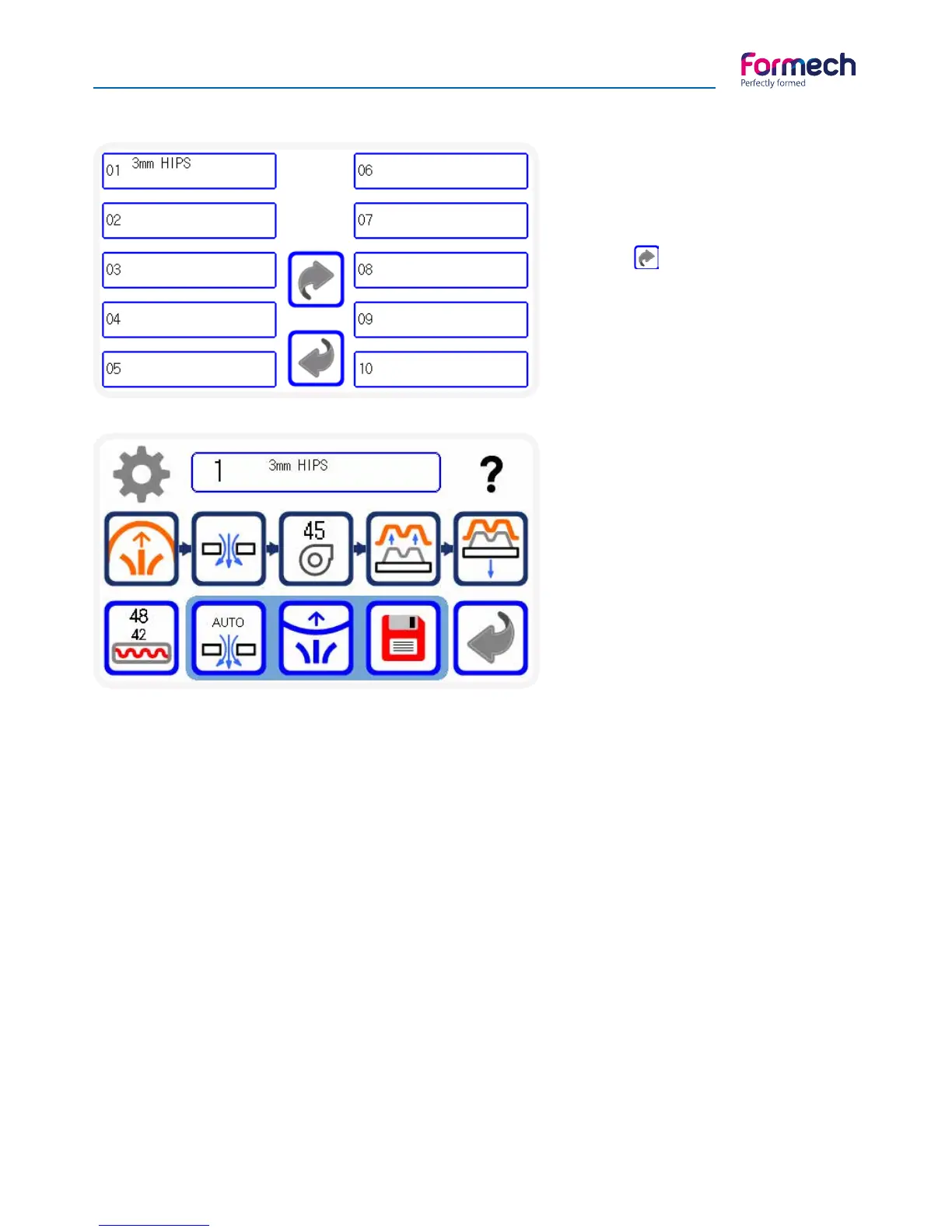
Allows you to choose a Job already
saved in the memories available.
Press to skip to the next 10 me-
mory slots.
Select the memory Job required to
load the saved settings.
The main operation screen will load.
Main operation screen
This screen opens when a saved job is
selected giving access to the machine
function of the vacuum forming pro-
cess. (See page 21 below dealing with
Icon descriptions)
The arrow guides the user through
the main 5 machine functions of the
forming cycle. Remain on this screen
when performing continuous cycles.
This operating screen opens with the loaded timer settings and the job title shown in the centre of the
screen. On the heater timer button, there are 2 values. The lower value shows the actual heater time set for
this job memory. The top value is the COUNT DOWN timer showing how much time is remaining during the
heating cycle.
When this time reaches ZERO it will continue counting and show a negative value and indicate how much
extra heat time have been applied.
If the save function is pressed, the actual time used will be taken to the settings screen – this will include the
negative count. These and other settings can be edited and saved as the same or other title at memory slot.
The timer values stored in memory can be changed by accessing the settings screen using the settings but-
ton on the operation screen or the main screen.



 To Next Page