29
Operation - Options
Heating Pyrometer Option
The Heating Pyrometer option allows the user to monitor the surface temperature of the plastic material.
The main benefit of this is to maintain consistency of mouldings by allowing the user to identify the tempe-
rature that is required to end the heating cycle and to begin the forming. The pyrometer is situated centrally
on the heater and a value of the temperature shown will be displayed on the operating screen. The buzzer
can be set to operate at a target temperature in the same way as the timer. The user can choose whether to
use the pyrometer or timer. The value given by the pyrometer is dependent on the colour and emissivity of
the material and hence will vary with material types.
The pyrometer is supplied with compressed air to ensure it does not overheat. The pressure tank that is sup-
plied with this option provides this air and is fitted with a pressure regulator which needs to be set at approx.
1 bar (15psi). The air supply is monitored by a pressure switch so that if the supply fails then the heater will
turn off. If this occurs the icon will show on the operating screens. The pressure tank will continue to provide
some air for a short while to help prevent pyrometer damage from the residual heat.
Low air pressure indicator on the main and operating screens.
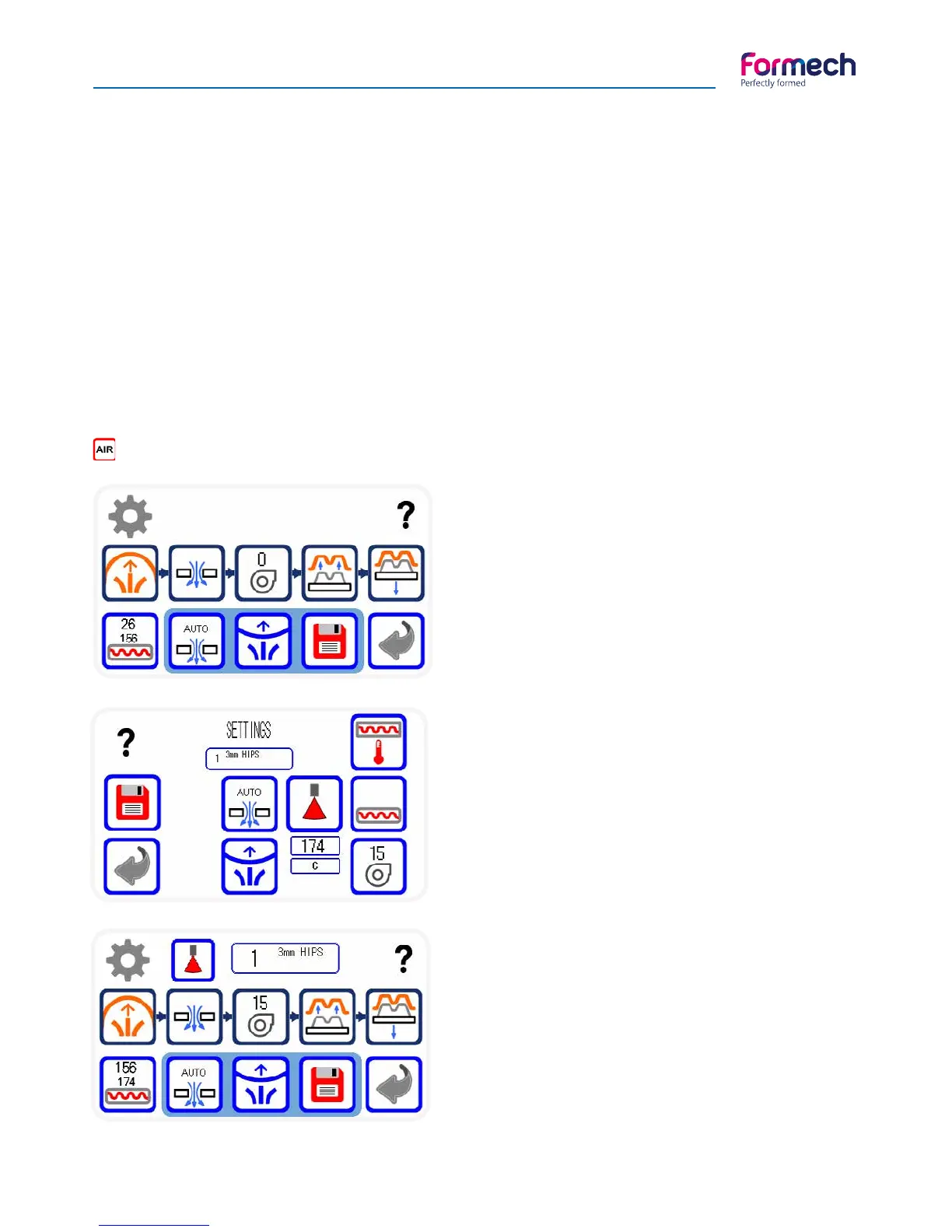
When the 686 is operated in the manual mode, the
heater icon will show the pyrometer temperature and
the timer value. The top value shows the timer value
that will count up when the heater is pulled forward
and the lower value is the pyrometer temperature that
will change as the plastic material is heated.
When using a saved program, the user may choose
between running with the pyrometer or the timer.
Enter the settings screen to set. The pyrometer / timer
button will toggle between the 2 modes (Pyrometer
mode shown). When the timer is selected adjust the
heat time on the heater button. When pyrometer
mode is selected, adjust the target temperature by
pressing on the box positioned under the pyrometer
button and using the pop-up keypad.
When the pyrometer mode is set, the operation screen
will show the pyrometer icon at the top of the screen.
For Timer mode it will show the clock face icon.
The pyrometer target temperature is shown as the
lower of the 2 values in the heater icon. The upper
value is the actual temperature being read by the
pyrometer. When the heater is in the rear position this
value will be high since it is looking at the heatshield.
Operate the machine as normal and the buzzer will
activate when the pyrometer temperature reaches the
target setting indicating the end of the heating cycle.



 To Next Page