26
Operation - Settings
Heater settings
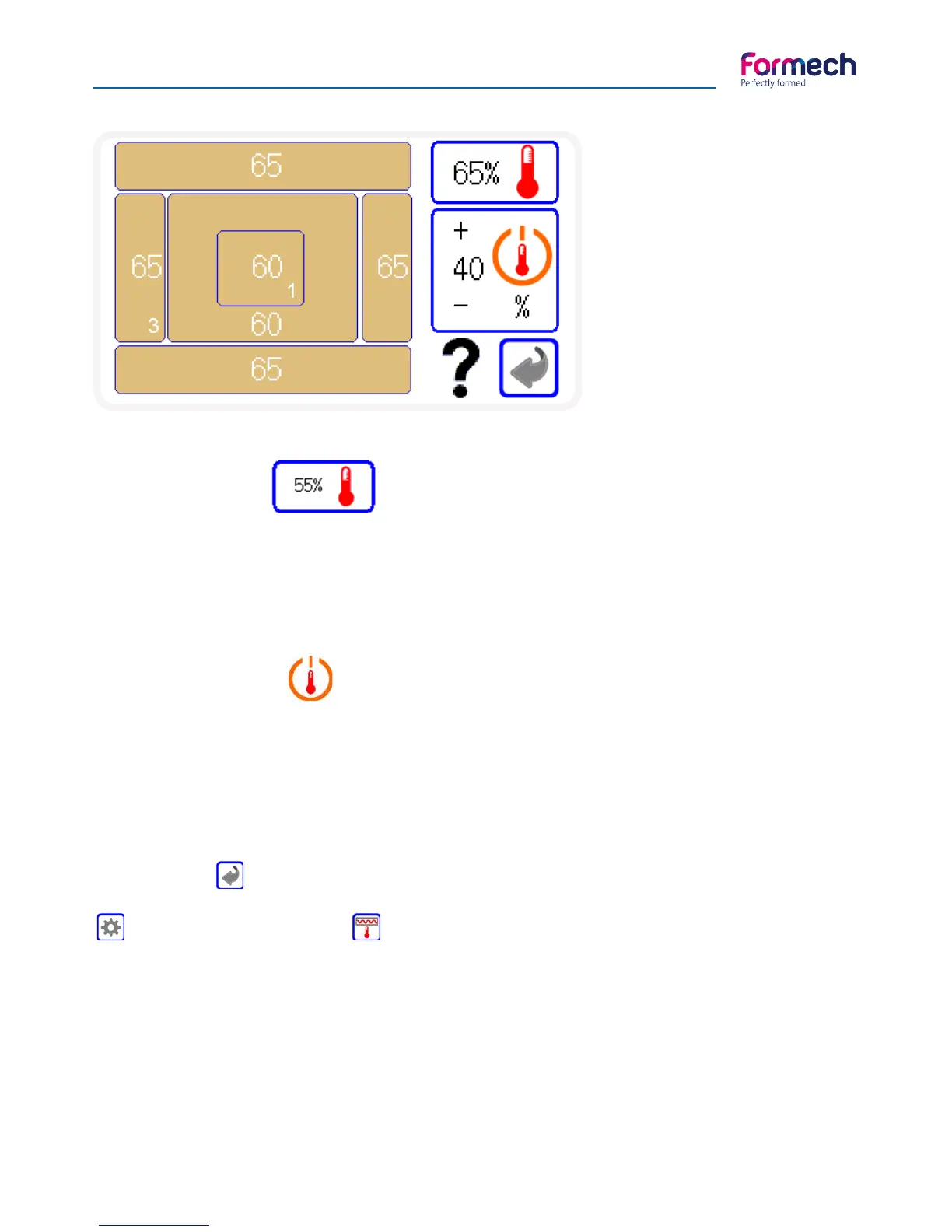
This screen shows the zone layout of
the heater. Zones 1-6
Refer to the section on the heater
arrangement to gain further unders-
tanding of setting methods.
The % power of each zone and the
standby % setting can be set on this
screen.
Heater zone settings
The power setting box shows the power level that is to be used to set each zone power. Press on this value to
change the power level to be used using the pop up keypad and press on each of the zones that require
this setting. The value will transfer to the zone. Change the power level to set other zones as required. Power
levels can be set in 1% increments. 100% is full power.
Heater standby settings
The Heater standby setting allows the heater to idle at a lower power setting when the heater is in the rear
position. The % set is a proportion of the heat profile set. When set at lower levels the heater will need slight-
ly extra heat time to respond to the required heat level depending on the standby level set. This feature will
provide significant energy savings when used continuously. The Standby settings can be adjusted using the
+/- buttons. Heater standby power level is adjustable in 5% increments.
The back button will return to the settings screen.
The heater settings screen can be accessed from the main operation screen by pressing the settings button
and the heater settings button .



 To Next Page