28
Operation - Options
Vacuum Tank Option
The function of the vacuum system is slightly different when the vacuum tank option is fitted.
An oil pump with higher flow rate provides a higher level of vacuum (8mbar abs). The pump is connected
directly to the vacuum tank and will continually evacuate the tank when running. When vacuum is required
a valve connects the tank and the pump to the mould table port when activated in the normal way from the
touch screen. The Auto-vac function will operate as normal.
The 686 is designed so that the pump does not run continuously when the machine is idle. The pump will
run to evacuate the tank for a default time of 6 minutes if the machine is not used or if the heater is not
used. The pump will start when the heater is pulled forwards and will continue to run when the machine is
being used. This run time can be increased in the help screen section if required.
Bolster Option - fixing tooling
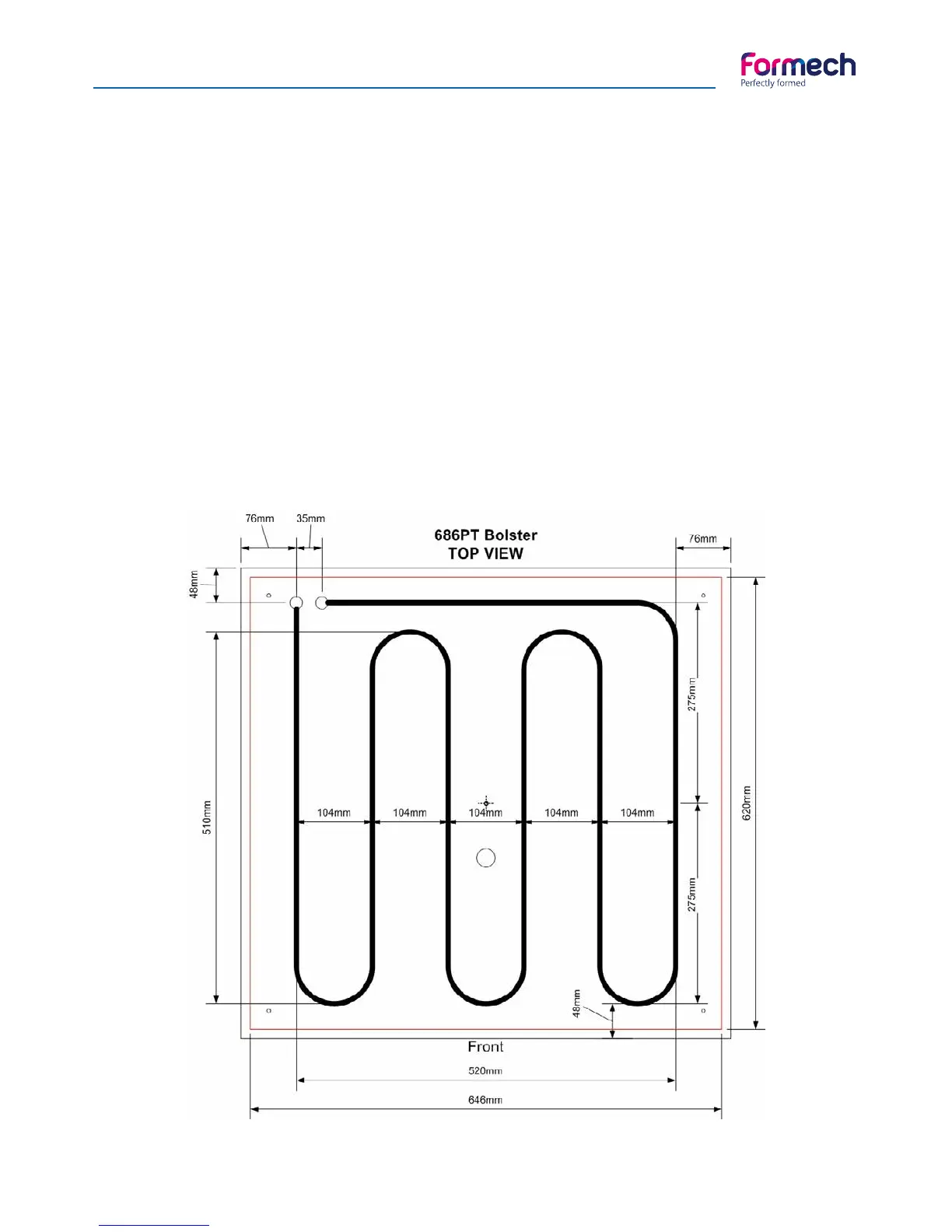
Mould tooling or tool base boards may require fixing to the cooling bolster. The following drawing shows
the position of the bolster pipework. Avoid the pipework when there is a need to insert fixing threads in the
bolster plate. Pipework is 10mm Dia.



 To Next Page