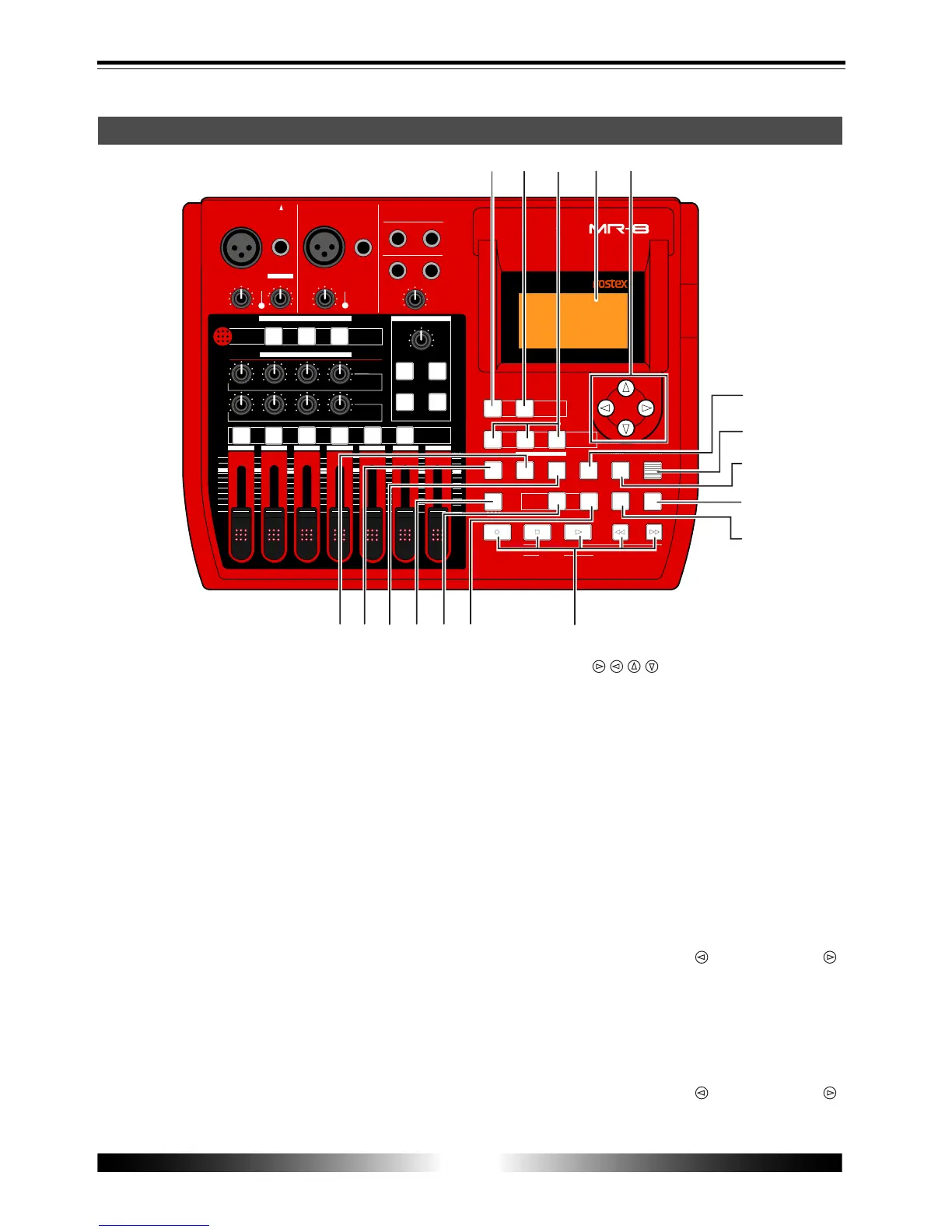
12
MR-8 Owner’s Manual
ENTER
MENU
CURSOR
UNDO
/REDO
CONTRAST
0 RETURN
TIME BASE
SELECT
STORE
B / OUT
A / INPLAY MODE
AUTO PUNCH
RESET
RECORD STOP PLAY
REWIND F FWD
MASTERING
BRIGHTNATURAL
POWERFUL
BOUNCE
1-6 > 7/8
1-4 > 5/6
HALL
DELAY
REC
SELECT
PA N
EFFECT
SEND
INPUT A
L
R
L
R
L
R
L
R
0
10
0
10
0
10
0
10
BRIT STACK US METAL
60's COMBO
DYNAMIC
CONDENSER
TUBE
REVERB / DELAY TIME
MIN
MAX
ROOM
PLATE
MIC SIMULATION
AMP SIMULATION
MIC
BAL
UNBAL
/GUITAR
BAL
UNBAL
MIN
MAX
2
1
R
L
PHONES
STEREO OUT
INPUT A
INPUT B
EFFECT
DISTORTIONTRIM
TRIM
PEAK
LINE MIC
PEAK
LINE MIC
MIN MAX
MASTER
7 / 8
5 / 6432
1
MAX
MIN
MAX
MIN
LOCATE REC END
LOCATE ABS ZERO
DIGITAL MULTITRACKER
-1
+1
LOCATE
7/8 >
+ - _ 0
A B C 1
D E F 2
G H I 3
J K L 4
Y Z 9
V W X 8
S T U 7
P Q R 6
M N O 5
NO
YES
GUITAR
PHONES VOL
INPUT A SELECT
COUNTER
STEREO
WAV FILE
DELETE
A - B PLAY
17
19 20 21
22
23
24
25
26
27
28
29
3031
32
33
18
Top panel (right part)
17. [1-4 > 5/6, 1-6 > 7/8] / [DELETE] key
Selects the bounce mode (see page 43).
Each press of the key alternates "1-4 > 5/6" and
"1-6 > 7/8". In the menu mode, this key is also
used for deleting a character in a song name (see
page 58).
18. [7/8 > STEREO WAV FILE] key
Converts a mono WAV file recorded on tracks 7/
8 to a stereo WAV file (see page 86).
You can export the stereo WAV file to your per-
sonal computer over the USB connection (see
page 88).
19. [MASTERING] keys
Used to select the mastering effect during track
bounce or mixdown (see page 41).
In the menu mode, the [POWERFUL] key is used
for character entry of +, -, _, and 0 (see page 21).
20. LCD display
This 128 x 64 dot LCD display shows various in-
formation (see page 27).
21. [CURSOR / / / ] keys
Used to move the cursor in the menu mode, ex-
ecute/cancel settings, etc.
22. [STORE] / J K L 4 entry key
Stores the current recorder position (timedata)
as the LOCATE A/IN or LOCATE B/OUT point (see
page 36 and 53). In the menu mode, this key is
used for character entry of J (j), K (k), L (l) and 4
(see page 21).
23. [ENTER] / [CONTRAST] key
Confirms the selection in the menu mode.
While holding down this and the [MENU] key
together, you can adjust the LCD display con-
trast by using the [CURSOR
] and [CURSOR ]
key (see page 28).
24. [MENU] / [CONTRAST] key
Enters the menu mode.
While holding down this and the [ENTER] key
together, you can adjust the LCD display con-
trast by using the [CURSOR
] and [CURSOR ]
key (see page 28).



 To Next Page