20
MR-8 Owner’s Manual
Preparation for recording onto the supplied card
flashing
After playing back the demo song, let's make preparations for a CompactFlash
TM
card onto
which you are going to record. Depending on whether you are going to record a material
onto the supplied CompactFlash
TM
card or a new card, make either of the following prepara-
tions.
Before recording a material onto the supplied
card, you must release the protection of the demo
song and delete the demo song, then create a
new song on the card.
1) Make sure that the supplied card is set to the slot,
then turn on the MR-8 power.
The recorded demo song is loaded.
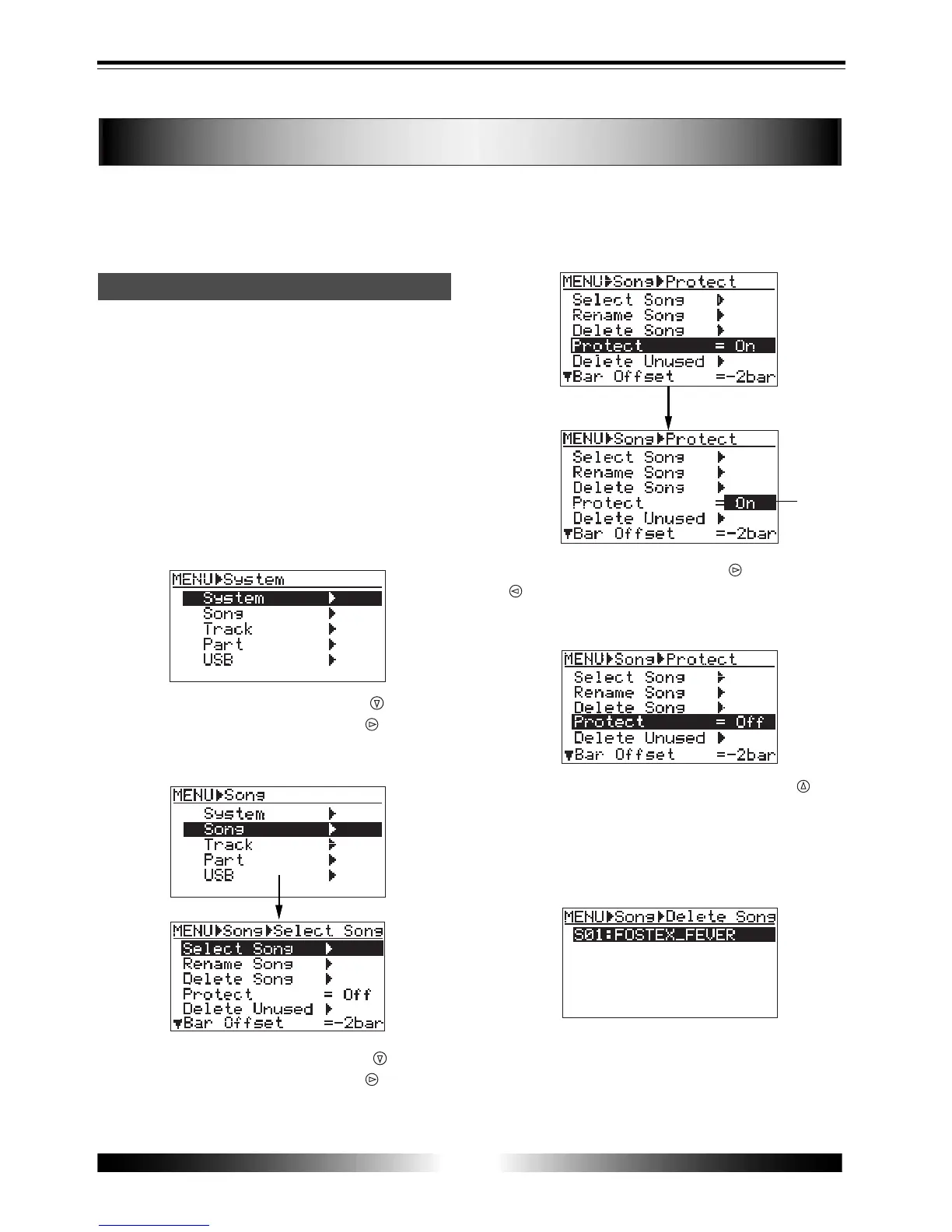
2) Press the [MENU] key to enter the menu mode.
The LCD display shows the MENU screen. The
first time you access to this screen, "System"
is highlighted.
3) Highlight "Song" using the [CURSOR
] key, then
press the [ENTER] key (or [CURSOR
] key).
The display now shows the song edit menu
screen. Initially, "Select Song" is highlighted.
4) Highlight "Protect" using the [CURSOR ] key, then
press the [ENTER] key (or [CURSOR
] key).
"On" (default) starts flashing.
5) Select "Off" using the [CURSOR
] or [CURSOR
] key, then press the [ENTER] key.
The protection is released, and the screen now
looks like the following.
6) Highlight "Delete Song" using the [CURSOR
] key,
then press the [ENTER] key.
The display shows the screen on which you
can select a song to be deleted.
On the supplied card, only one song (S01:
FOSTEX_FEVER) is shown.
7) While "S01: FOSTEX_FEVER" is highlighted, press
the [ENTER] key.
The display shows the confirmation screen for
deleting a song.
Preparation of a CompactFlash card
TM



 To Next Page