31
MR-8 Owner’s Manual
ENTER
MENU
CURSOR
UNDO
/REDO
CONTRAST
0 RETURN
TIME BASE
SELECT
STORE
B / OUT
A / INPLAY MODE
AUTO PUNCH
RESET
RECORD STOP PLAY
REWIND F FWD
MASTERING
BRIGHTNATURAL
POWERFUL
BOUNCE
1-6 > 7/8
1-4 > 5/6
HALL
DELAY
REC
SELECT
PA N
EFFECT
SEND
INPUT A
L
R
L
R
L
R
L
R
0
10
0
10
0
10
0
10
BRIT STACK US METAL
60's COMBO
DYNAMIC
CONDENSER
TUBE
REVERB / DELAY TIME
MIN
MAX
ROOM
PLATE
MIC SIMULATION
AMP SIMULATION
MIC
BAL
UNBAL
/GUITAR
BAL
UNBAL
MIN
MAX
2
1
R
L
PHONES
STEREO OUT
INPUT A
INPUT B
EFFECT
DISTORTIONTRIM
TRIM
PEAK
LINE MIC
PEAK
LINE MIC
MIN MAX
MASTER
7 / 8
5 / 6432
1
MAX
MIN
MAX
MIN
LOCATE REC END
LOCATE ABS ZERO
A - B PLAY
DIGITAL MULTITRACKER
-1
+1
LOCATE
7/8 >
+ - _ 0
A B C 1
D E F 2
G H I 3
J K L 4
Y Z 9
V W X 8
S T U 7
P Q R 6
M N O 5
NO
YES
GUITAR
PHONES VOL
INPUT A SELECT
COUNTER
STEREO
WAV FILE
DELETE
1
2
3
4
56
7
7
8
9
10
11
flashing
Remain
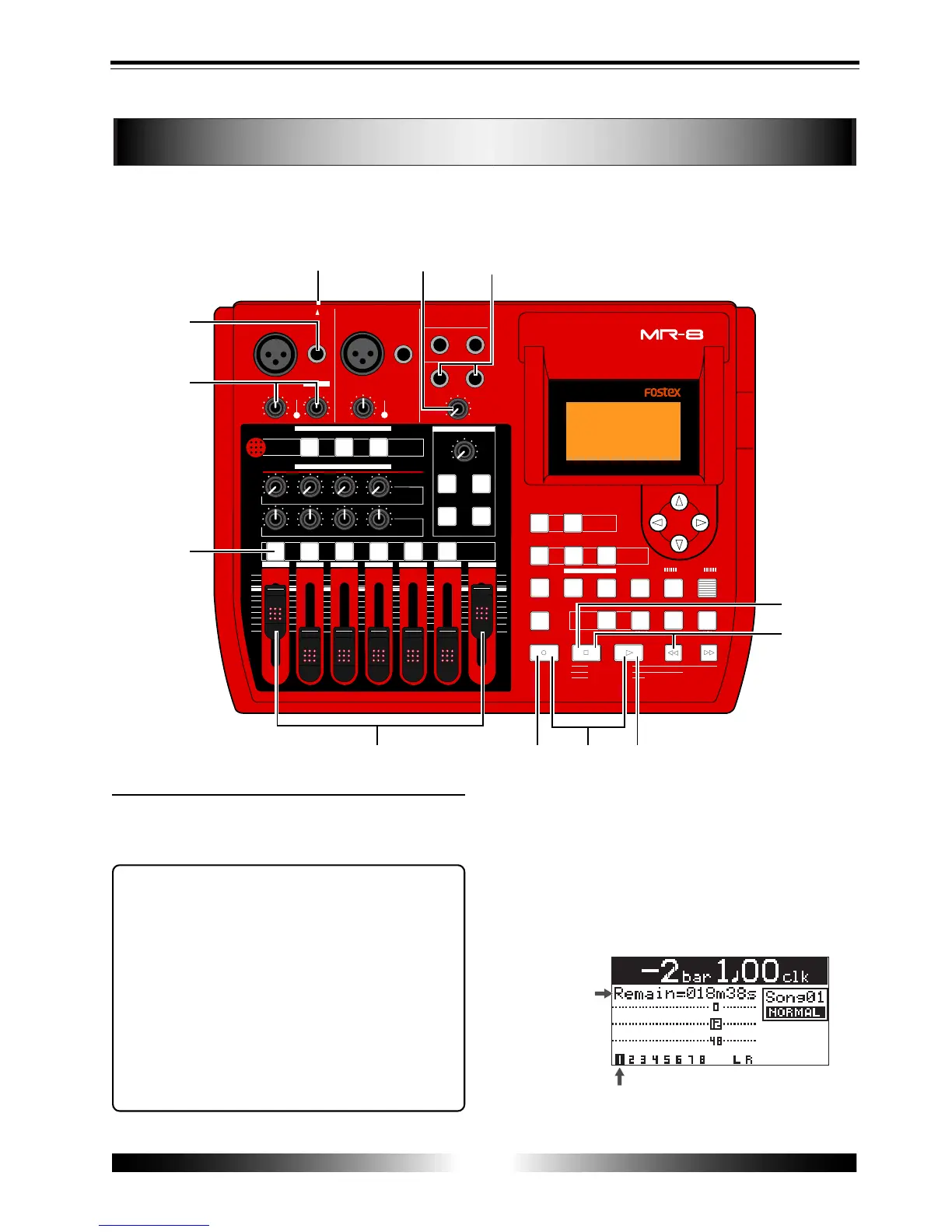
Recording onto a single track
You can record onto any one of tracks 1 through 4.
The following describes the procedure for recording a guitar sound onto track 1. We assume
that a CompactFlash card is set to the slot and Song 1 is loaded.
Preparation for recording
1) Connect headphones to the [PHONES] jack.
2) Set the [INPUT A SELECT] switch to "GUITAR".
<Notes>
• To record an external microphone or line
output signal such as a keyboard output, set the
[INPUT A SELECT] switch to "MIC/LINE".
To record a built-in microphone sound, set the
[INPUT A SELECT] switch to "INT MIC".
When setting the switch to "MIC/LINE", you can
use the microphone simulation effect (see page
30 and 38).
• When recording a guitar sound with the [INPUT
A SELECT] switch set to "GUITAR", you can use
the amplifier simulation effect. Try each of three
simulation types (see page 30 and 38).
3) Connect a guitar to the [UNBAL/GUITAR] phone
connector of the [INPUT A] section.
4) Press the [REC SELECT] key for track 1.
Track 1 is armed, while track number "1" starts
flashing on the screen.
In the song name display section on the screen, the
remaining time (available recording time) of the
card is shown.



 To Next Page