58
MR-8 Owner’s Manual
flashing
PLAY MODE
A B C 1
Editing a song name
You can edit a current song name.
1) Load the desired song of which you are going to
edit the song name.
2) While the recorder is stopped, press the [MENU]
key to enter the menu mode.
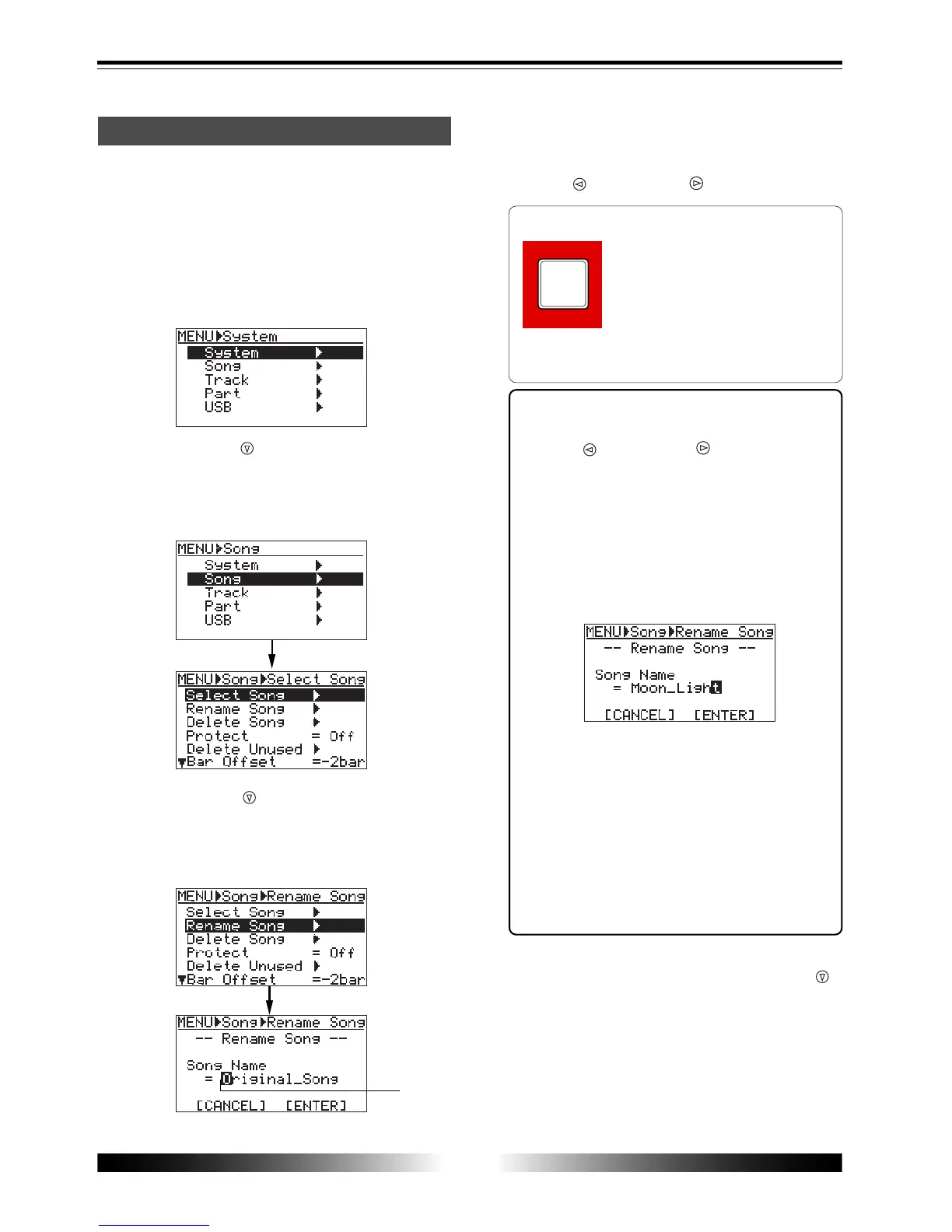
The display shows the menu selection screen, in
which "System" is highlighted initially.
3) Use the [CURSOR ] key to highlight "Song", then
press the [ENTER] key.
The display now shows the song edit menu
selection screen, in which "Select Song" is
highlighted initially.
4) Use the [CURSOR ] key to highlight "Rename
Song", then press the [ENTER] key.
The display now shows the song name editing
screen, in which the first character of the current
song name flashes.
5) Use the character entry keys to enter a desired
character to the flashing point.
You can move the cursor (flashing point) using the
[CURSOR ] and [CURSOR ] keys.
<Character entry keys>
Some keys on the MR-8 top panel
act as character entry keys in the
menu mode. For example, the
[PLAY MODE] key (shown at the
left) can be used for entering A,
B, C, a, b, c and 1. Each press of a
character entry key switches the character to be
entered from among those assigned to the key.
<Entry example>
To modify a part of the current name, use the
[CURSOR ] and [CURSOR ] keys to move the
cursor to a character to be changed, and enter
a desired character using the appropriate char-
acter entry key. If you reenter a new name, move
the cursor to the first character of the name,
and press the [1-4 > 5/6, 1-6 > 7/8] key repeat-
edly until all characters are deleted. Then, en-
ter a new song name using the character entry
keys. In the screen example below, "Moon_Light"
is entered.
<Note>
If you carry out step 6 below after entering the
same name as an existing song or without enter-
ing a name, the display shows "
Illegal Song Name!
"
and returns to the song name editing screen.
Also note that you cannot use “+” for a song
name with less than 9 characters. For example,
you cannot enter “AAA+BBB” for a song name.
You can use “+” for asong name with 8 or more
characters. For example, you can enter
“AAA+BBBBB”.
6) After entering the name, move the cursor to
“[ENTER]” on the screen using the [CURSOR
]
key, then press the [ENTER] key.
The display now shows the screen in which
"Rename Song" is highlighted.
7) Press the [MENU] key to exit the menu mode.
The MR-8 exits the menu mode and the display
shows the home screen of the current song.



 To Next Page