23
MR-8 Owner’s Manual
Creating a song
flashing
This section describes how to create a new song on a card and how to select a desired song
among more than one song created.
In the following procedure, we assume that song
1 (S01) is already created on the card and we are
going to created a new song.
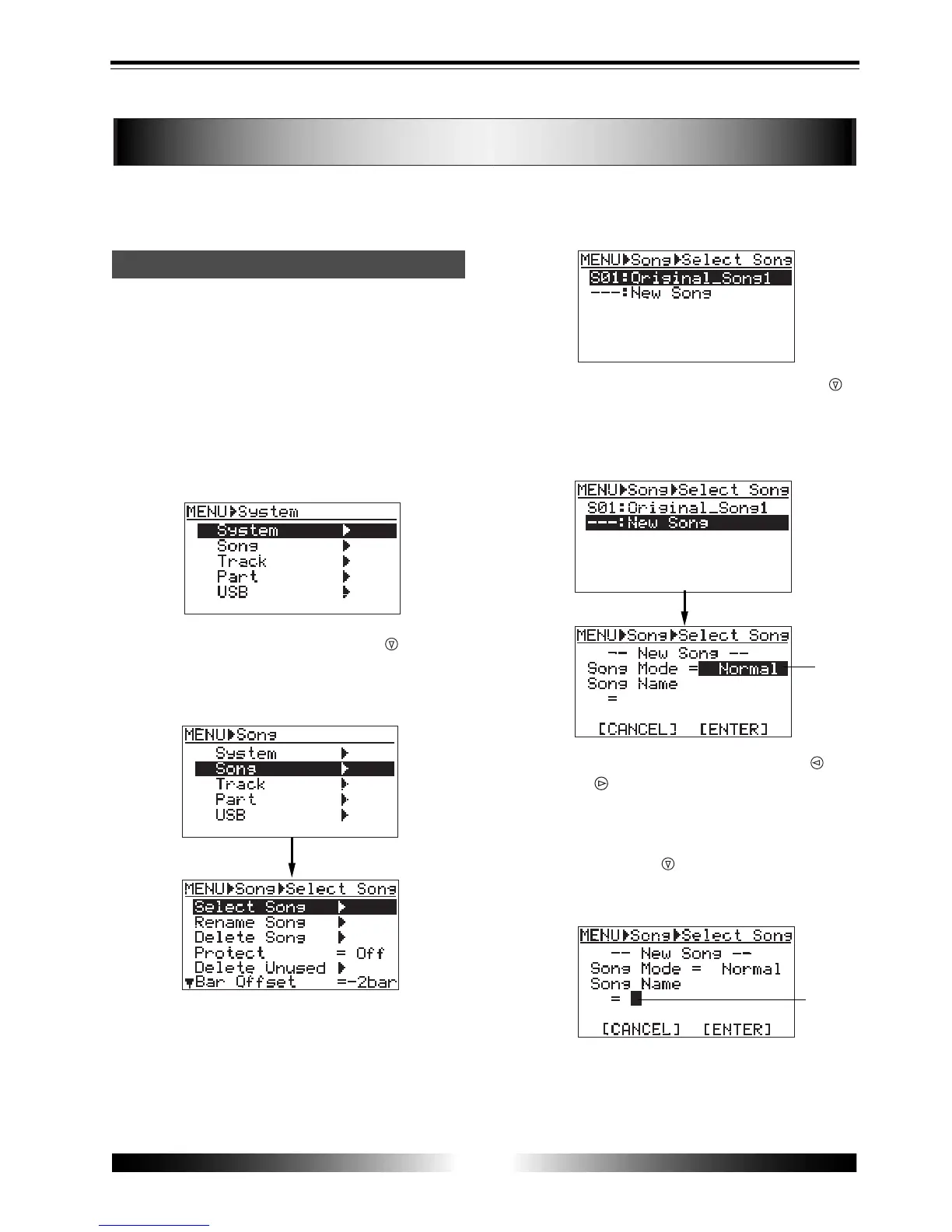
1) While the recorder is stopped, press the [MENU]
key to enter the menu mode.
The LCD display shows the MENU screen. The
first time you access to this screen, "System"
is highlighted.
2) Highlight "Song" using the [CURSOR
] key, then
press the [ENTER] key.
The display now shows the song edit menu
screen. Initially, "Select Song" is highlighted.
3) While "Select Song" is highlighted, press the
[ENTER] key.
Song 01 (S01: Original Song1) already created
is highlighted, while "---:New Song" is shown
on the next line.
4) Highlight "---:New Song" using the [CURSOR
]
key, then press the [ENTER] key.
The display now shows the screen on which
you can select the song mode of the new song
you are going to create.
5) Select the song mode using the [CURSOR
] or
[CURSOR ] key.
You can select between "Normal" and
"Extended".
6) Press the [CURSOR ] key.
The cursor (flashing point) moves to the first
character entry position of a song name.
7) Enter a desired name following the same
procedure as described on page 21.
Creating a song/selecting a song
flashing



 To Next Page