55
MR-8 Owner’s Manual
Setting the pre-roll/post-roll
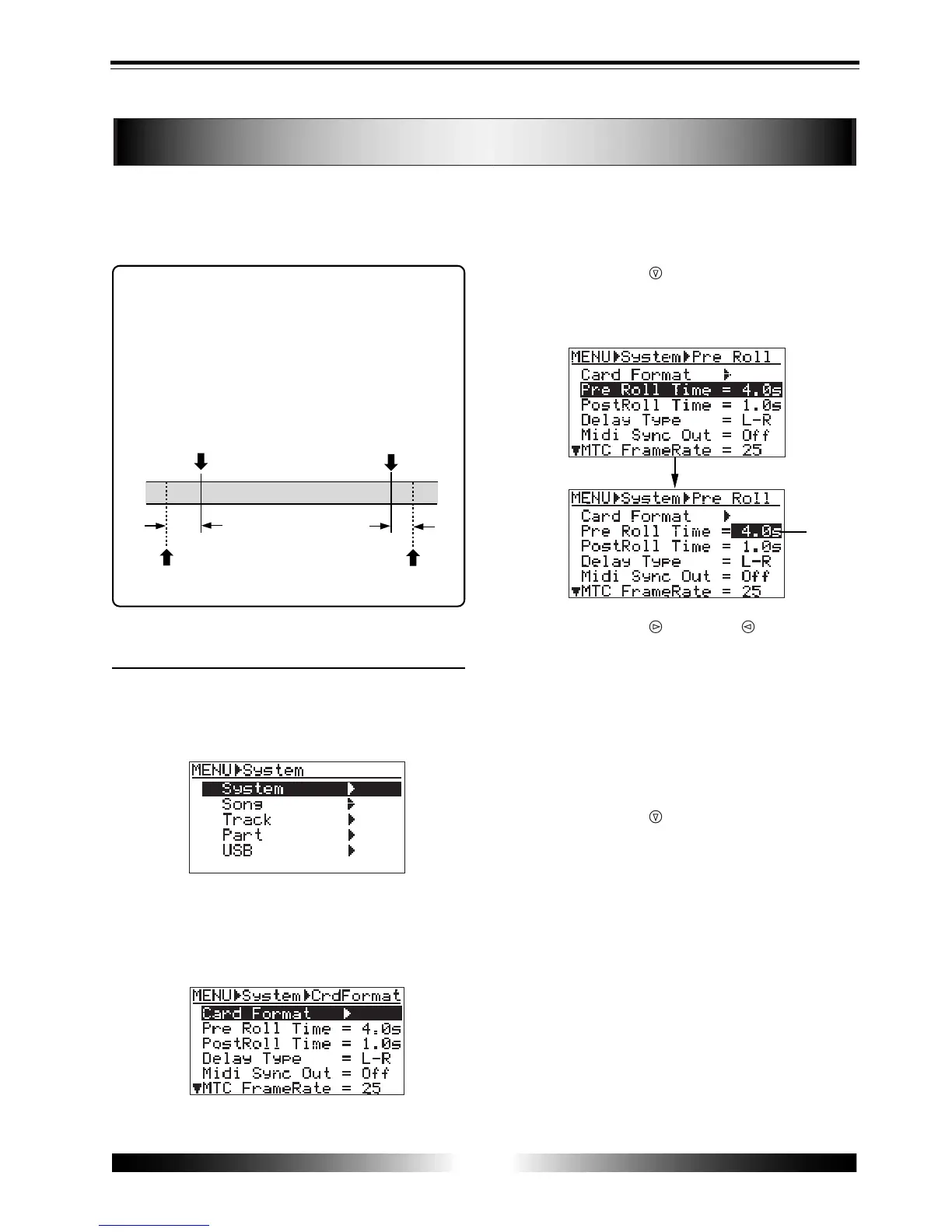
As described earlier on page 51, when both the auto punch in/out and loop modes are
active, the pre-roll and post-roll are effective in the loop function.
You can set the pre-roll and post-roll time value by the following procedure.
When both the auto punch in/out and loop
modes are active, the loop function starts at
"the LOCATE A point minus the pre-roll time"
and ends at "the LOCATE B point plus the post-
roll time". The pre-roll time is initially set to
four seconds, while the post-roll time is set to
one second.
• How to set the pre-roll/post-roll time
1) While the recorder is stopped, press the [MENU]
key to enter the menu mode.
The display shows the menu selection screen, in
which "System" is highlighted initially.
2) When "System" is highlighted, press the [ENTER]
key.
The display now shows the system menu selection
screen, in which "Card Format" is highlighted
initially.
3) Use the [CURSOR ] key to highlight "Pre Roll
Time", then press the [ENTER] key.
The current pre-roll time value (initially, "4.0s")
flashes.
4) Use the [CURSOR ]/[CURSOR ] keys to select
the desired pre-roll time.
You can select the pre-roll time between 0.1 s and
10.0 s in 0.1 s steps.
5) After selecting the pre-roll time, press the [ENTER]
key.
The pre-roll time is set, and the screen now high
lights "Pre Roll Time".
6) Use the [CURSOR ] key to highlight "PostRoll
Time", then press the [ENTER] key.
The current post-roll time value (initially, "1.0s")
flashes.
7) Select the post-roll time in the similar manner to
the pre-roll time selection, then press the [ENTER]
key.
You can select the post-roll time between 0.1 s and
10.0 s in 0.1 s steps.
8) After setting the pre-roll and post-roll, press the
[MENU] key to exit the menu mode.
LOCATE A
point
LOCATE B
point
4 sec.
1sec.
LOOP START
point
LOOP END
point
flashing



 To Next Page