19
MR-8 Owner’s Manual
ENTER
MENU
CURSOR
UNDO
/REDO
CONTRAST
0 RETURN
TIME BASE
SELECT
STORE
B / OUT
A / INPLAY MODE
AUTO PUNCH
RESET
RECORD STOP PLAY
REWIND F FWD
MASTERING
BRIGHTNATURAL
POWERFUL
BOUNCE
1-6 > 7/8
1-4 > 5/6
HALL
DELAY
REC
SELECT
PA N
EFFECT
SEND
INPUT A
L
R
L
R
L
R
L
R
0
10
0
10
0
10
0
10
BRIT STACK US METAL
60's COMBO
DYNAMIC
CONDENSER
TUBE
REVERB / DELAY TIME
MIN
MAX
ROOM
PLATE
MIC SIMULATION
AMP SIMULATION
MIC
BAL
UNBAL
/GUITAR
BAL
UNBAL
MIN
MAX
2
1
R
L
PHONES
STEREO OUT
INPUT A
INPUT B
EFFECT
DISTORTIONTRIM
TRIM
PEAK
LINE MIC
PEAK
LINE MIC
MIN MAX
MASTER
7 / 8
5 / 6432
1
MAX
MIN
MAX
MIN
LOCATE REC END
LOCATE ABS ZERO
A - B PLAY
DIGITAL MULTITRACKER
-1
+1
LOCATE
7/8 >
+ - _ 0
A B C 1
D E F 2
G H I 3
J K L 4
Y Z 9
V W X 8
S T U 7
P Q R 6
M N O 5
NO
YES
GUITAR
PHONES VOL
INPUT A SELECT
COUNTER
STEREO
WAV FILE
1
2
[POWER] SW
3
3, 5
46
5
Listening the demo song
A demo song is recorded on the supplied CompactFlash
TM
card. Let's listen to this song.
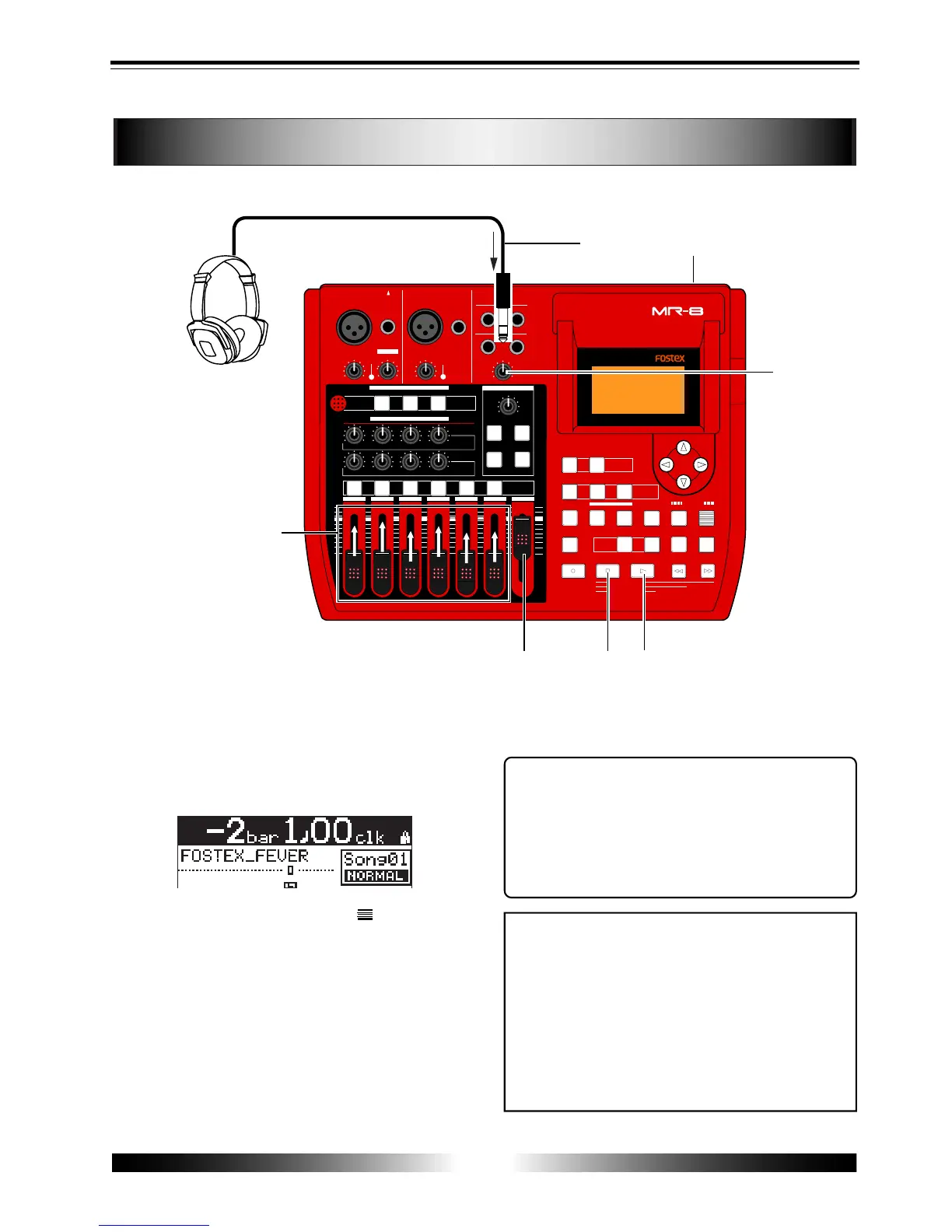
1) Connect headphones or a monitor system to the
MR-8.
2) Set the [POWER] switch to ON.
The MR-8 turns on the power. After the LCD
display shows the startup screen, the demo song
(Song 01: FOSTEX_FEVER) is loaded.
Tips: Listening to the demo song again
When the recorder is stopped after listening to the
demo song, press the [REWIND] key while holding
down the [STOP] key. The recorder instantly moves
back to the beginning of the demo song.
Then pressing the [PLAY] key starts playback from
the beginning of the demo song.
<Note>
To record a new material onto the supplied card,
you have to delete the demo song.
If you wish to keep the demo song, you cannot record
a material onto the supplied card, therefore, you
must record a material onto a new CompactFlash
TM
card.
Before recording a material onto a new card, you
must make preparations for a card. See "Prepara-
tions of a CompactFlash
TM
card" on the next page.
6) When the demo song ends, press the [STOP] key
to stop the recorder.
3) Raise the [MASTER] fader to the " " position.
Do not raise the track faders at this stage.
4) Press the [PLAY] key to start playback.
5) Raise the track faders gradually to adjust the play
back level.
If you are using headphones for monitoring, also
raise the [PHONES] control gradually to adjust the
headphones level. (If you are using a monitor
amplifier/speaker system for monitoring, adjust the
level control of the amplifier.)



 To Next Page