57
MR-8 Owner’s Manual
Editing a song
The following describes song editing functions.
Creating a new song
See "Creating a song/selecting a song" on page
22 for details about how to create a new song.
Selecting a desired song
When more than one song is created on a card,
you can select (load) a desired song.
<Tip>
You can also select a desired song by press-
ing the [REWIND] key or [F FWD] key while
holding down the [ENTER] key (see page 24
for details).
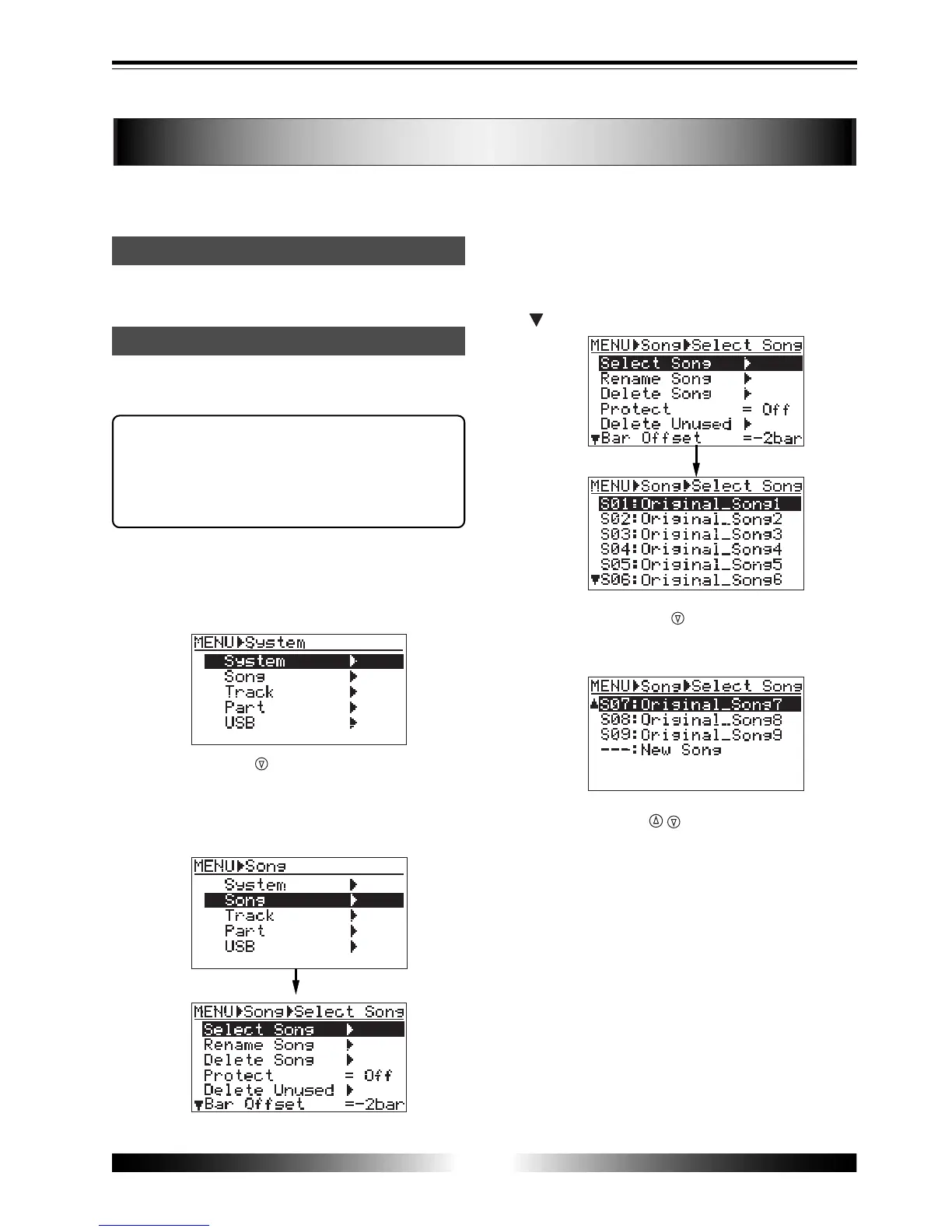
1) While the recorder is stopped, press the [MENU]
key to enter the menu mode.
The display shows the menu selection screen, in
which "System" is highlighted initially.
2) Use the [CURSOR ] key to highlight "Song", then
press the [ENTER] key.
The display now shows the song edit menu
selection screen, in which "Select Song" is
highlighted initially.
3) While "Select Song" is highlighted, press the
[ENTER] key.
The display now shows the song list screen, in which
the current song number and name are highlighted.
" " shows that the song list continues.
Pressing the [CURSOR ] key scrolls down the list.
When you create a new song, select "---: New Song"
shown in the bottom line of the list (see page 23).
4) Use the [CURSOR / ] keys to select a desired
song, and press the [ENTER] key.
The display returns to the song edit menu selection
screen, in which "Select Song" is highlighted.
5) Press the [MENU] key to exit the menu mode.
The display shows the home screen of the selected
song.



 To Next Page