22
MR16 Owner’s Manual (Names and functions)
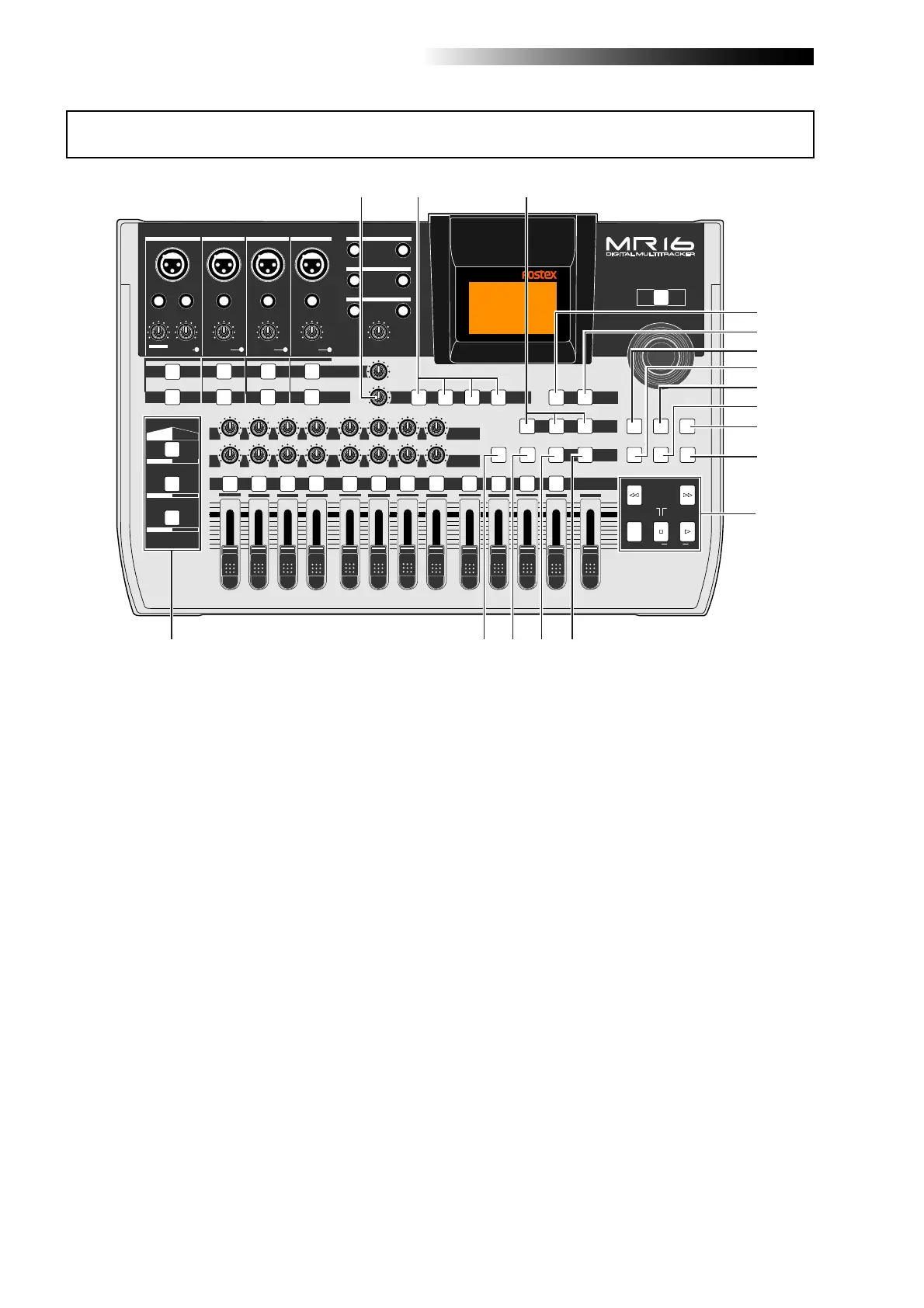
23. [MASTERING] keys
(POWERFUL / NATURAL / BRIGHT)
Used to select the desired mastering effect
during track bounce or mixdown. You can
select from three effect types by pressing an
appropriate key (see page 74).
25. [15/16 > STEREO WAV FILE] key
This key is used when converting a mono
WAV file recorded on tracks 15/16 to a ste-
reo WAV file (see page 104). A converted
stereo WAV file can be exported to a USB-
connected personal computer (see page
107), or can be burned to an audio CD us-
ing the internal CD-R/RW drive or an exter-
nal CD-R/RW drive (see the supplementary
manual "How to use the CD-R/RW drive").
Top panel 2
PEAK
GUITAR
MIN
DISTORTION
MAX
LINE MIC
TRIM
INSERT/GUITAR
UNBAL
BALBALBALBAL
INPUT A INPUT B INPUT C INPUT D
VOLUME
MIN
MAX
PEAK
LINE
TRIM
MIC
UNBAL
POWER
UNBAL
MIC
TRIM
LINE
PEAK
UNBAL
MIC
TRIM
LINE
PEAK
MAX
MIN
1
R
L
100
SIMULATION
SIMULATION
AMP
MIC
010
LR
010
LR
2
3
RL
100
4 8
010
LR
7
6
RL
100
RL
100
010
LR
5
MAX
MIN
MASTER
REC SELECT
RECORD STOP PLAY
REWIND F FWD
UNDO/REDO
STORE
LOCATE REC END
LOCATE ABS ZERO
A-B PLAY
BOUNCE
MASTERING
BRIGHT
15/16 > STEREO WAV FILE
NATURAL
POWERFUL
B / OUTA / INPLAY MODEAUTO PUNCH
LOCATE
EFFECT
DELAYPLATEHALLROOM
BOUNCE MODE
CONTRAST
TIMEBASE SELECT
RHYTHM GUIDE DIRECT LOCATE
EFFECT SEND
PAN
INPUT EQ
TO STEREO BUSS LEVEL
9/10 11/12 13/14 15/16
ABC1 DEF2
GHI3 JKL4
MNO5 YZ9PQR6 +-_0STU7 VWX8 DELETE
MENU / ENTER
MIN MAX
MIN
MAX
REVERB / DELAY TIME
L
STEREO OUT
R
1
AUX OUT
2
1
PHONES
2
DYNAMIC BRIT STACK
CONDENSER
US METAL
TUBE
60'S COMBO
INPUT A INPUT B INPUT C INPUT D
21
22
23
31
35
36
34
33
32
30
29
28
27
26
25
24
37
These keys are used to select the effect type.
You can select from three reverb types
(ROOM, HALL and PLATE) and a delay
(DELAY). The selected key is lit (see page 70).
22. [EFFECT] keys
(ROOM / HALL / PLATE / DELAY)
21. [REVERB/DELAY TIME] control
This control adjusts the reverb time or de-
lay time. When you select "ROOM", "HALL"
or "PLATE" for the effect type, it adjusts the
reverb time.When you select "DELAY", it
adjusts the delay time (See page 71).
27. [RHYTHM GUIDE] key
Switches on/off of the rhythm guide func-
tion (see page 90). Each press of the switch
alternates on and off. A long press of the
key enters the rhythm guide menu, in which
you can set the rhythm guide parameters
(see page 91).
26. [TIME BASE SEL] key
Selects the time base shown on the display
(see page 15). Each press of the key switch
between "time" and "bar/beat".
24. [BOUNCE MODE] key
Used to select the bounce mode.
Each press of the key switches the bounce
mode (see page 78).



 To Next Page