71
MR16 Owner’s Manual (Using effects)
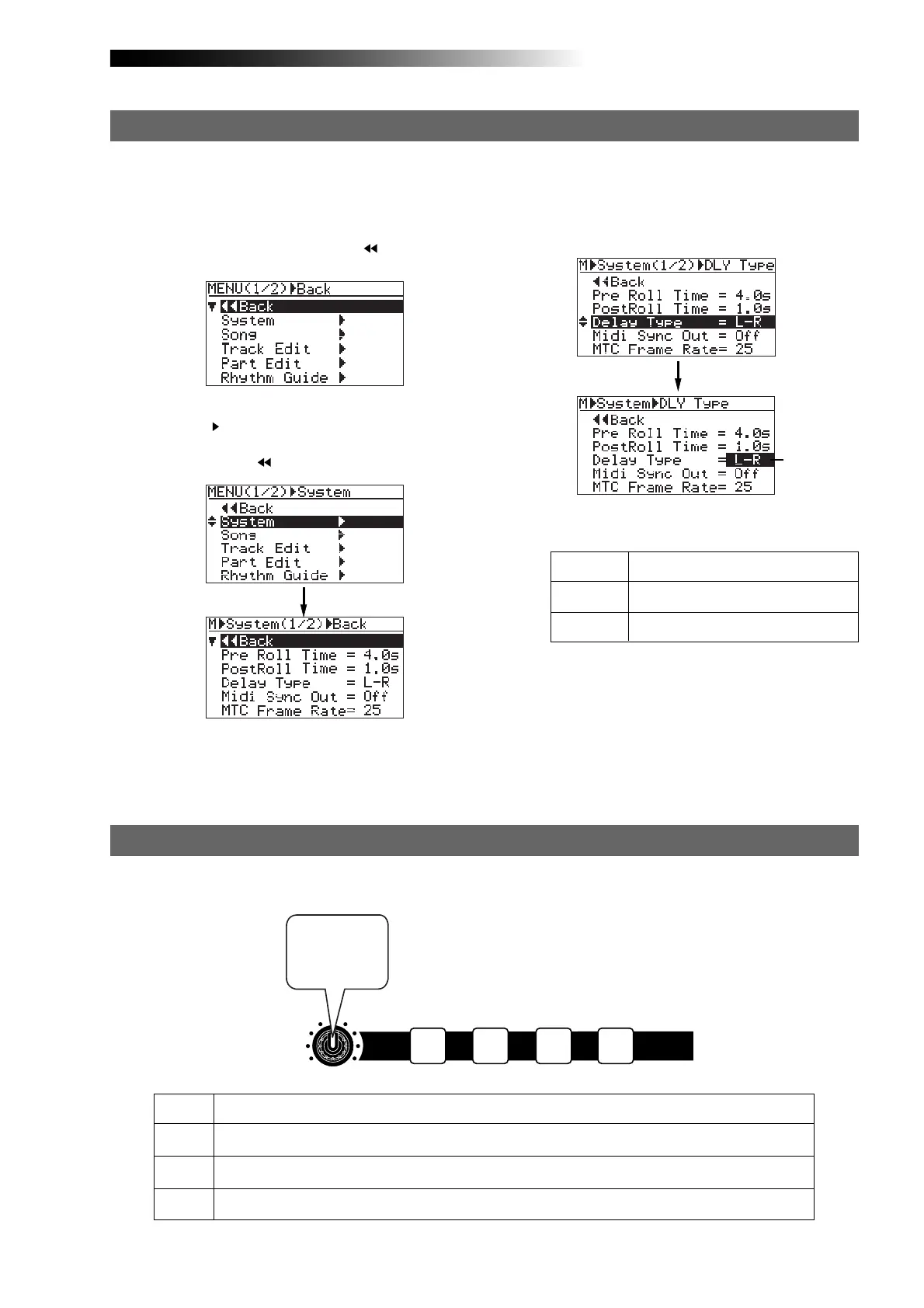
2) Rotate the [MENU/ENTER] knob to select
"System
", and press the [MENU/ENTER] knob.
The display now shows the system menu
screen, where "
Back" is highlighted.
1) While the recorder is stopped, press the
[MENU/ENTER] knob to enter the menu mode.
The display now shows the first page of the
menu selection screen, where "
Back" is
highlighted initially.
When you use the delay effect, you can select a delay type.
3) Rotate the [MENU/ENTER] knob to select
"Delay Type" and press the [MENU/ENTER] knob.
Selecting a delay type
Flashing
The current delay type starts flashing and you
can now select from among three options
shown below ("L-R" is initially selected).
4) Rotate the [MENU/ENTER] knob to select the
desired delay type and press the [MENU/ENTER]
knob.
The selected delay type is set, while the
display returns to the previous screen.
5) Press the [STOP] key to quit the menu mode.
You can choose from among the following three
delay types.
L - R
Mono
Diff
L-R delay (default)
Mono delay
Diffusion delay
HALL
ROOM
PLATE
DELAY
Adjusts the reverb time within the range between 1.0 s and 6.0 s (center position: 3.0 s)
Adjusts the reverb time within the range between 0.1 s and 2.0 s (center position: 1.0 s)
Adjusts the reverb time within the range between 0.5 s and 4.0 s (center position: 2.0 s)
Adjusts the delay time within the range between 100 ms to 1000 ms (center position: 300 ms)
You can adjust the reverb time or delay time using the [REVERB/DELAY TIME] control, depending
on the selected effect type.
Adjusting the delay/reverb time
EFFECT
DELAYPLATEHALLROOM
MIN MAX
REVERB / DELAY TIME
Adjusts
reverb or
delay time.



 To Next Page