77
MR16 Owner’s Manual (Track bouncing)
Track bouncing modes
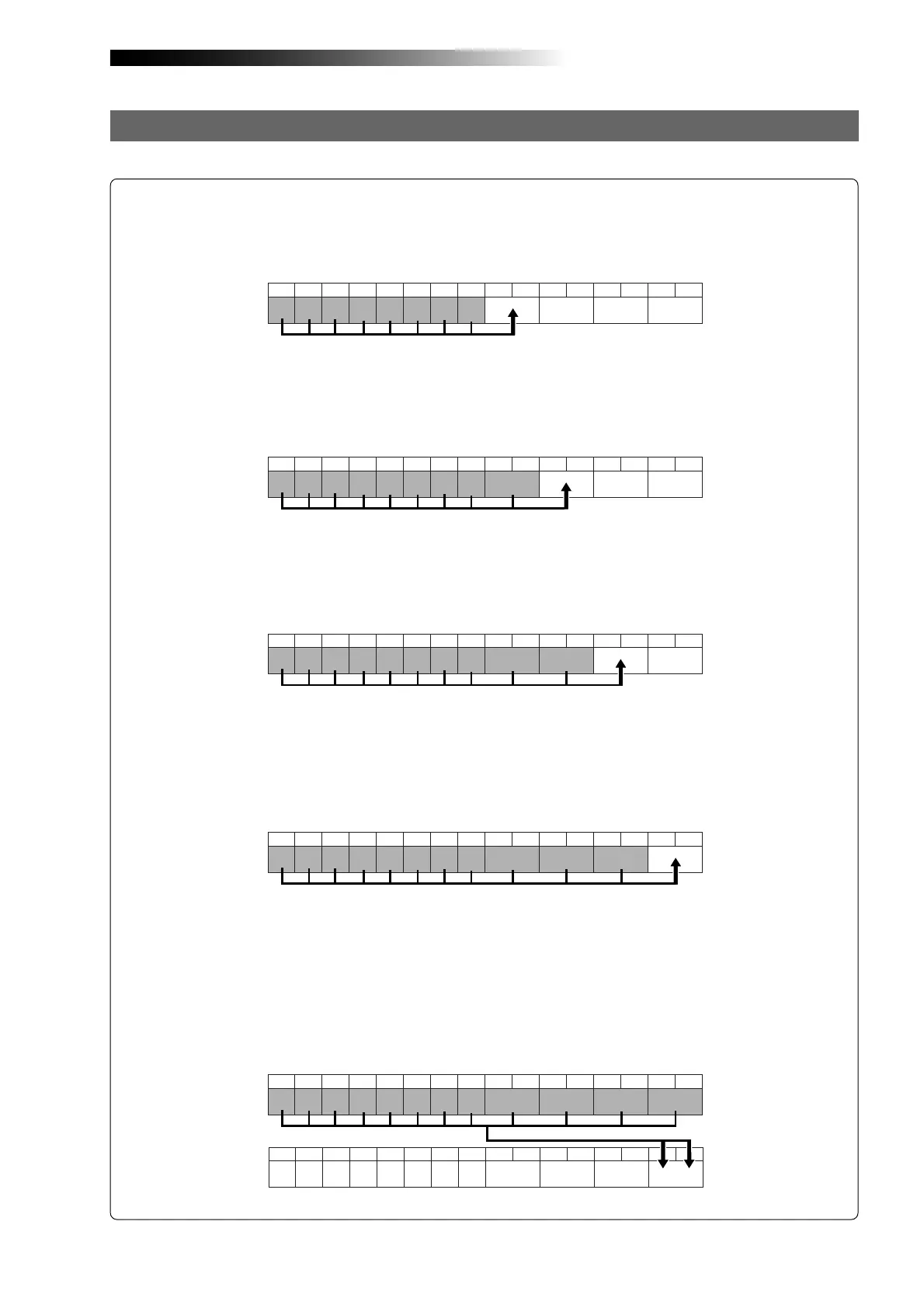
The five track bouncing modes described below are available.
"1-10 > 11/12" mode
In the "1-10 > 11/12" mode, tracks 1 through 10 are played back, mixed down to stereo, and
bounced to tracks 11/12. You can apply a reverb (or delay) to tracks 1 through 8, as well as
apply the mastering effect to the mixed signals.
"1-8 > 9/10" mode
In the "1-8 > 9/10" mode, tracks 1 through 8 are played back, mixed down to stereo, and
bounced to tracks 9/10. You can apply a reverb (or delay) to tracks 1 through 8, as well as
apply the mastering effect to the mixed signals.
"1-16 > New Song" mode
In the "1-16 > New Song" mode, tracks 1 through 16 are played back, mixed down to stereo, and
bounced to tracks 15/16 of the new song which is automatically created. By using this mode,
you can create a master song in the MR16 itself without the need of using an external master
recorder. You can apply a reverb (or delay) to tracks 1 through 8, as well as apply the master-
ing effect to the mixed signals. You can convert song data bounced to tracks 15/16 of the new
song to a stereo WAV file, which can be burned to an audio CD.
Trk 1
Trk 2
Trk 3 Trk 4 Trk 5
Trk 6
Trk 7 Trk 8 Trk 9 Trk 10 Trk 11 Trk 12 Trk 13 Trk 14 Trk 15 Trk 16
Trk 1
Trk 2
Trk 3 Trk 4 Trk 5
Trk 6
Trk 7 Trk 8 Trk 9 Trk 10 Trk 11 Trk 12 Trk 13 Trk 14 Trk 15 Trk 16
"1-12 > 13/14" mode
In the "1-12 > 13/14" mode, tracks 1 through 12 are played back, mixed down to stereo, and
bounced to tracks 13/14. You can apply a reverb (or delay) to tracks 1 through 8, as well as
apply the mastering effect to the mixed signals.
Trk 1
Trk 2
Trk 3 Trk 4 Trk 5
Trk 6
Trk 7 Trk 8 Trk 9 Trk 10 Trk 11 Trk 12 Trk 13 Trk 14 Trk 15 Trk 16
"1-14 > 15/16" mode
In the "1-14 > 15/16" mode, tracks 1 through 14 are played back, mixed down to stereo, and
bounced to tracks 15/16. You can apply a reverb (or delay) to tracks 1 through 8, as well as
apply the mastering effect to the mixed signals. You can convert song data bounced to tracks
15/16 to a stereo WAV file, which can be burned to an audio CD.
Trk 1
Trk 2
Trk 3 Trk 4 Trk 5
Trk 6
Trk 7 Trk 8 Trk 9 Trk 10 Trk 11 Trk 12 Trk 13 Trk 14 Trk 15 Trk 16
Trk 1
Trk 2
Trk 3 Trk 4 Trk 5
Trk 6
Trk 7 Trk 8 Trk 9 Trk 10 Trk 11 Trk 12 Trk 13 Trk 14 Trk 15 Trk 16
Trk 1
Trk 2
Trk 3 Trk 4 Trk 5
Trk 6
Trk 7 Trk 8 Trk 9 Trk 10 Trk 11 Trk 12 Trk 13 Trk 14 Trk 15 Trk 16
New Song



 To Next Page