69
MR16 Owner’s Manual (Using effects)
During recording, you can apply external effects to a sound source connected to an input con-
nector in the [INPUT A] channel.
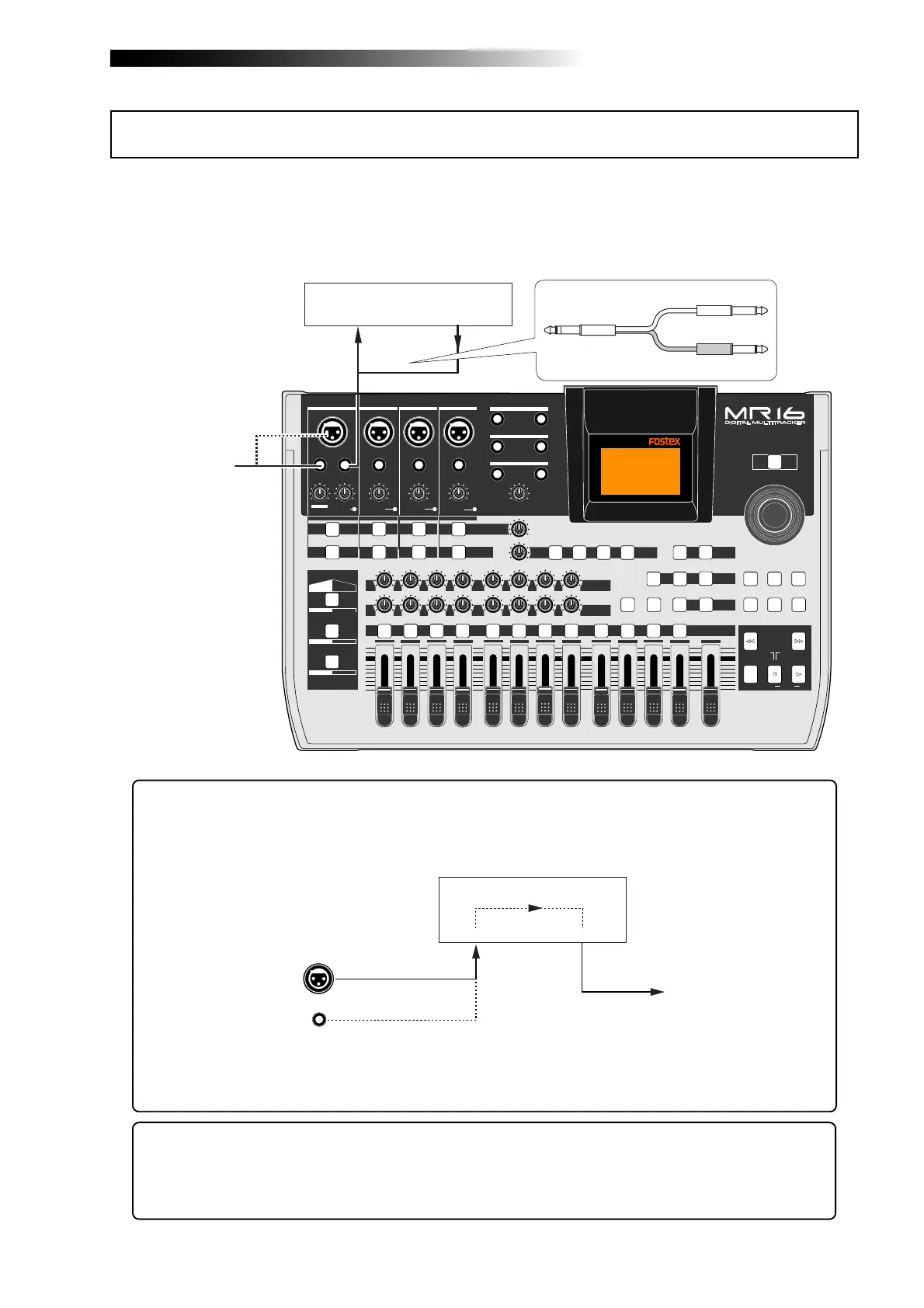
The [INPUT A] channel has the [INSERT] connector (phone jack). You can connects an external
effect unit (typically, a compressor/limiter) to this connector using a Y-cable, as shown below.
PEAK
GUITAR
MIN
DISTORTION
MAX
LINE MIC
TRIM
INSERT/GUITAR
UNBAL
BALBALBALBAL
INPUT A INPUT B INPUT C INPUT D
VOLUME
MIN
MAX
PEAK
LINE
TRIM
MIC
UNBAL
POWER
UNBAL
MIC
TRIM
LINE
PEAK
UNBAL
MIC
TRIM
LINE
PEAK
MAX
MIN
1
R
L
100
SIMULATION
SIMULATION
AMP
MIC
010
LR
010
LR
2
3
RL
100
4 8
010
LR
7
6
RL
100
RL
100
010
LR
5
MAX
MIN
MASTER
REC SELECT
RECORD STOP PLAY
REWIND F FWD
UNDO/REDO
STORE
LOCATE REC END
LOCATE ABS ZERO
A-B PLAY
BOUNCE
MASTERING
BRIGHT
15/16 > STEREO WAV FILE
NATURAL
POWERFUL
B / OUTA / INPLAY MODEAUTO PUNCH
LOCATE
EFFECT
DELAYPLATEHALLROOM
BOUNCE MODE
CONTRAST
TIMEBASE SELECT
RHYTHM GUIDE DIRECT LOCATE
EFFECT SEND
PAN
INPUT EQ
TO STEREO BUSS LEVEL
9/10 11/12 13/14 15/16
ABC1 DEF2
GHI3 JKL4
MNO5 YZ9PQR6 +-_0STU7 VWX8 DELETE
MENU / ENTER
MIN MAX
MIN
MAX
REVERB / DELAY TIME
L
STEREO OUT
R
1
AUX OUT
2
1
PHONES
2
DYNAMIC BRIT STACK
CONDENSER
US METAL
TUBE
60'S COMBO
INPUT A INPUT B INPUT C INPUT D
EFFECTOR (COMP/LIMITER) etc.
Input
Output
Sound source
INPUT A
EFFECTOR
Input
Output
The source (dry) signal fed to the [INPUT A] channel is sent to the external effect unit
connected to the [INSERT] connector and the wet (effect) signal returns to the [INPUT A]
channel. Thus, you can apply effects to the "INPUT A" signal by connecting an external
effect unit.
See the manual of your effect unit for details about how to use it.
A Y-cable is not supplied with the MR16, therefore, purchase an appropriate Y-cable
available in the market.
Sound source
Dry (original) sound
Wet (effect) sound
Using external effects for recording
<Hint>: The unit provides two pairs of the [AUX OUT] connectors. During mixdown, you
can apply an effect to the desired tracks by connecting an external effect unit to the
[AUX OUT] connectors. For details about how to use the [AUX OUT] connectors, see "Ap-
plication examples" on page 149.



 To Next Page