88
MR16 Owner’s Manual (Track bouncing)
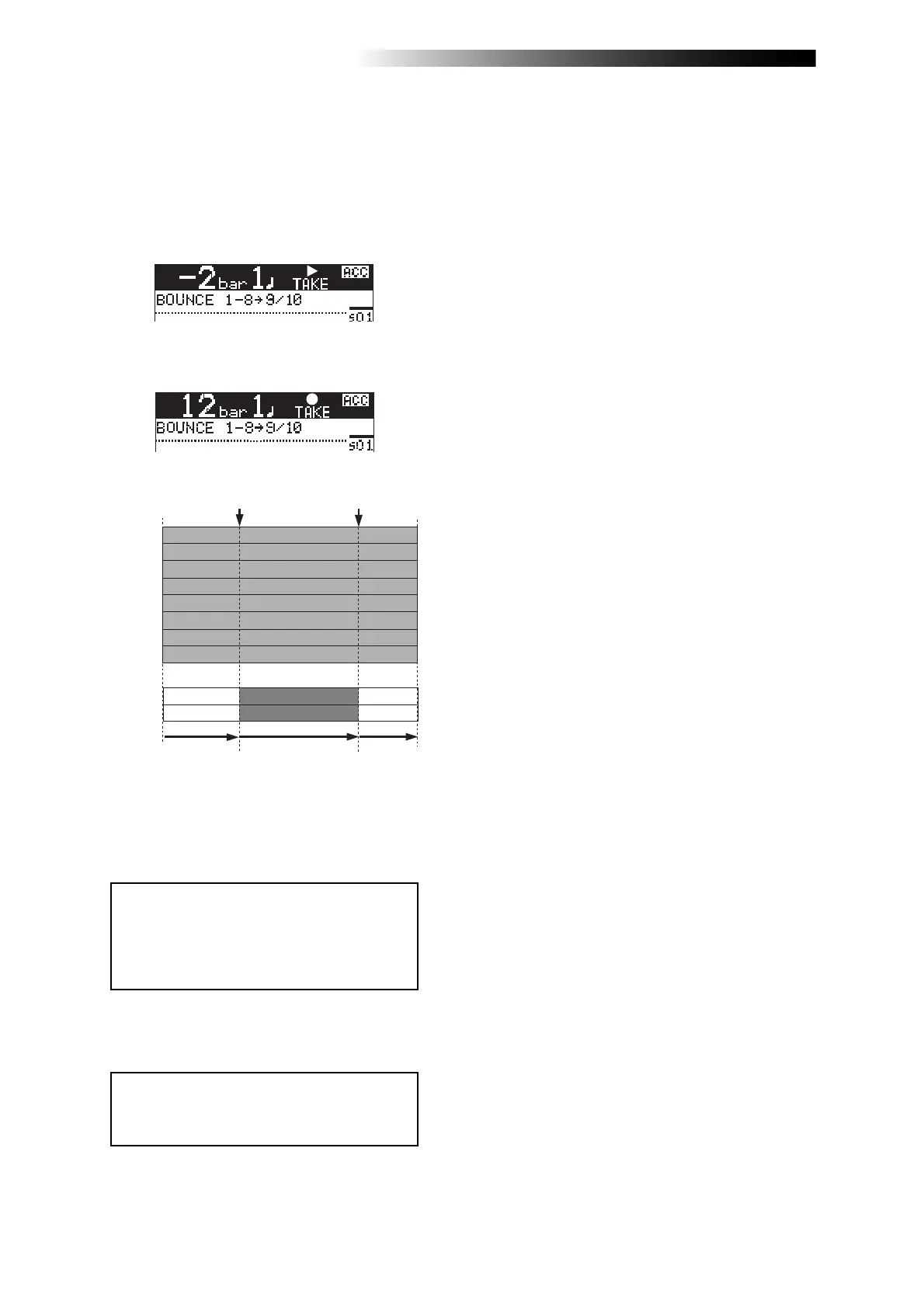
5) Press the [RECORD] key while holding down the
[PLAY] key.
"TAKE" is shown in the upper part of the screen
and the recorder starts playback.
It automatically starts recording (bouncing)
when it reaches the punch-in point.
TRK 1
TRK 2
TRK 3
TRK 4
TRK 5
TRK 6
TRK 9
TRK 10
TRK 7
TRK 8
Punch In point
(Locate A Point)
Punch Out point
(Locate B Point)
Play back
(Input Monitor)
Recording
(Bouncing)
Play back
The recorder stops recording (bouncing) at the
punch-out point and returns to playback, while
the auto punch mode exits and "TAKE" in the
screen turns off.
6) Press the [STOP] key to stop the recorder.
Check the result by playing back the bounced
tracks, as described earlier.
<Note>:
During playback in the operation
above, you cannot monitor the sound. You
can monitor the sound (bounced sound)
only during recording between punch-in
and punch-out points.
<Note>:
If you are not satisfied with the
result, press the [
UNDO/REDO
] key to redo
the operation.
Before the punch-in point
Between the punch-in and
punch-out points



 To Next Page