38
5.3 Basic Startup
During initial power-up, the VFD will show the message [Initializing VFD] and the HOA will be
locked in the OFF position. At minimum, parameters BASIC-01 through BASIC-09 should be set
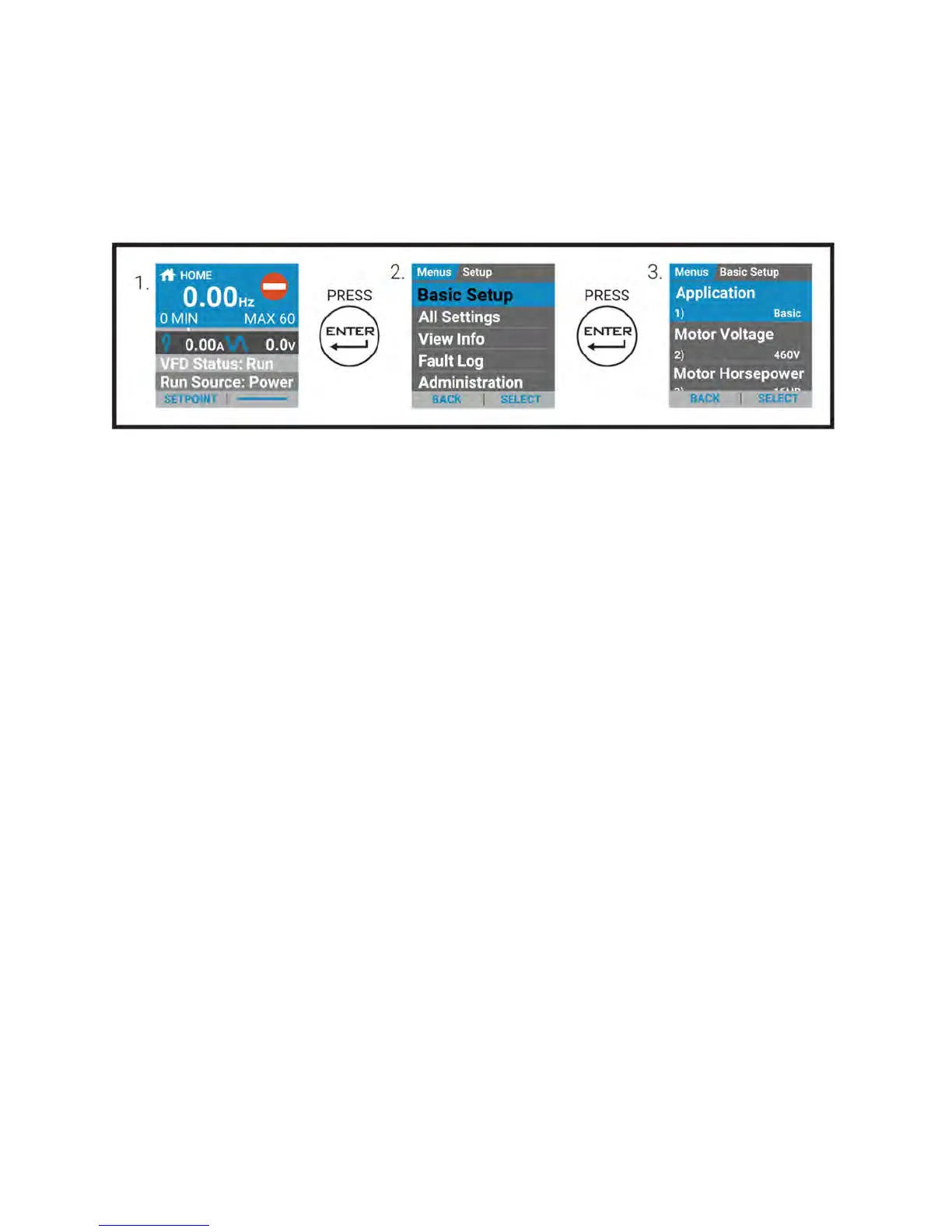
prior to starting the VFD. To access the Basic Parameter group from the Home screen press
'Enter' to access 'Menus' and 'Enter' once more to select 'Basic Setup,' see below:
Step 1: Select Application [Basic-01]
Select [BASIC] application if VFD is controlled by BMS, or select another application [Exhaust
Fan, Supply Fan, Etc] if it is wired to a pressure transducer. Refer to the parameter table at the
end of this quick-start for presets.
Step 2: Enter Rated Motor Voltage [Basic-02]
Enter the rated voltage of the motor from the motor nameplate.
Step 3: Enter Rated Motor HP [Basic-03]
Enter the motor horsepower rating from the motor nameplate.
Step 4: Enter Rated Motor Current [Basic-04]
Enter the motor FLA (Full Load Amps) rating from the motor nameplate.
Step 5: Enter Rated Motor RPM [Basic-05]
Enter the rated speed of the motor from the motor nameplate.
Step 6: Set the High Frequency Limit [Basic-09]
Enter the high frequency limit that the drive will allow during operation.
Basic Parameters 10–22 should be verified and changed if necessary to ensure desired
operation.


 To Next Page