39
5.4 Main Menu Displays
5.4.1 Home Screen
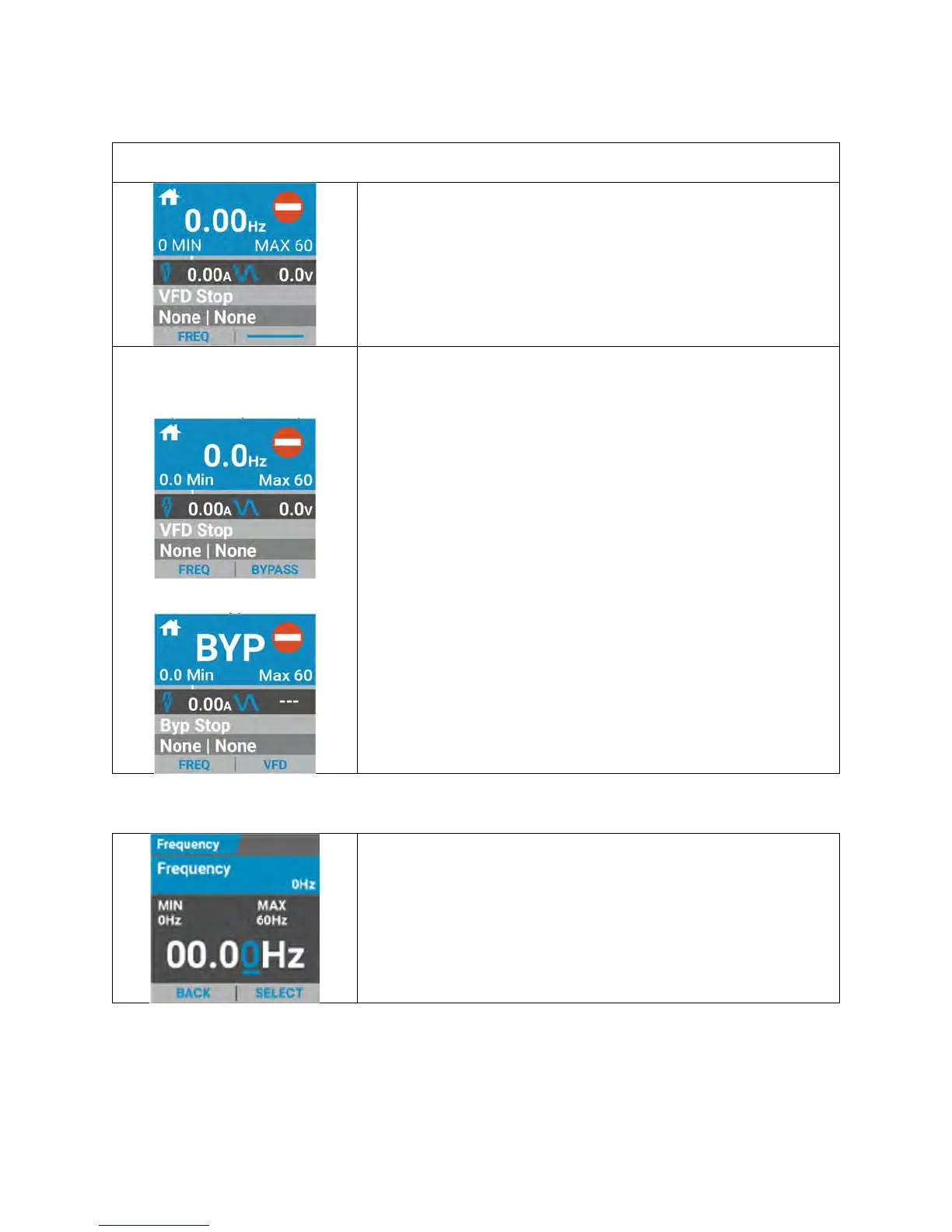
The “HOME” screen displays horizontal rows, each containing information regarding the
immediate status of the VFD.
The home screen rows from top to bottom display:
Motor Frequency
Motor Current
Output Voltage
VFD status
Run Source
SmartBypass Home Screen
When in VFD Mode
(Normal Operation)
When in Bypass Mode
On bypass packages, the right soft key is used to switch
between VFD and Bypass mode.
When the bypass package is in VFD mode (normal
operation), the right soft key will display “Bypass.” To enter
into bypass mode, press the bypass button.
Once in bypass mode the screen will indicate “BYP” in place
of the drive speed, as it will now be operating across the line
(60Hz) when run command is received.
Status will also ready “BYP Stop” or “BYP Run” when in
bypass mode.
To switch back into VFD mode, press the right soft key that
indicates “VFD”.
5.4.2 Setpoint Screen
The “Setpoint” screen is used to change the motor “Motor
Frequency Setpoint Value.” Use the right soft key labeled
“Select” to shift the cursor to the desired character. Use the
up/down arrow keys to change the value. Select, “BACK” to
exit this setting.


 To Next Page