40
5.4.3 Quick Monitor Screen
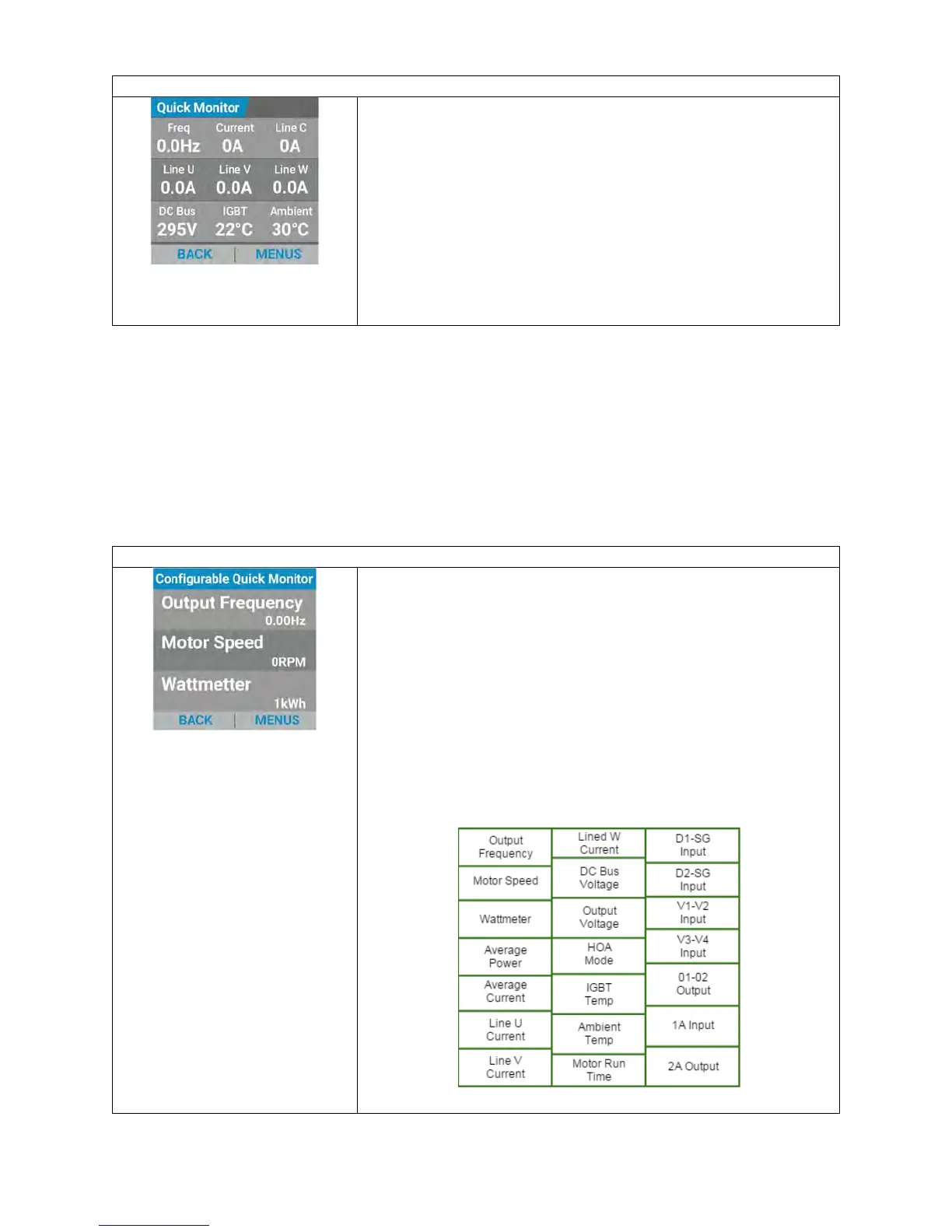
The “Quick Monitor” screen displays four horizontal rows.
The first three rows contain information relating to:
Phase A Motor Current
Phase B Motor Current
Phase C Motor Current
Average Motor Current
DC Bus Voltage
Output Voltage
Kilowatt Hours
IGBT Inverter Temperature
Ambient Temperature
The bottom row allows for back navigation to the home screen and entry to the
submenus.
The indicators displayed on the Quick Monitor screen are defaults and cannot be
changed. A separate “Configurable Quick Monitor” allows the user to select desired
values to monitor (see section 5.4.4 below).
5.4.4 Configurable Quick Monitor Screen
The “Configurable Quick Monitor” screen displays four horizontal rows.
The first three rows display up to three user configurable
values.
A user can modify what appears on the display screen by
pressing "ENTER" and then using the arrow keys to move up
or down and press "ENTER" again to select which of the three
items they would like to change. Upon depressing “ENTER”
another submenu will appear displaying three of the possible
twenty-one display item options. Use the arrow keys to scroll
through the submenu list of items and then depress the
“ENTER” key to choose what you would like to display.
Available values are:


 To Next Page