S90-600 O FRICK QUANTUM EVAPORATOR CONTROL PANEL
Page 10 OPERATION
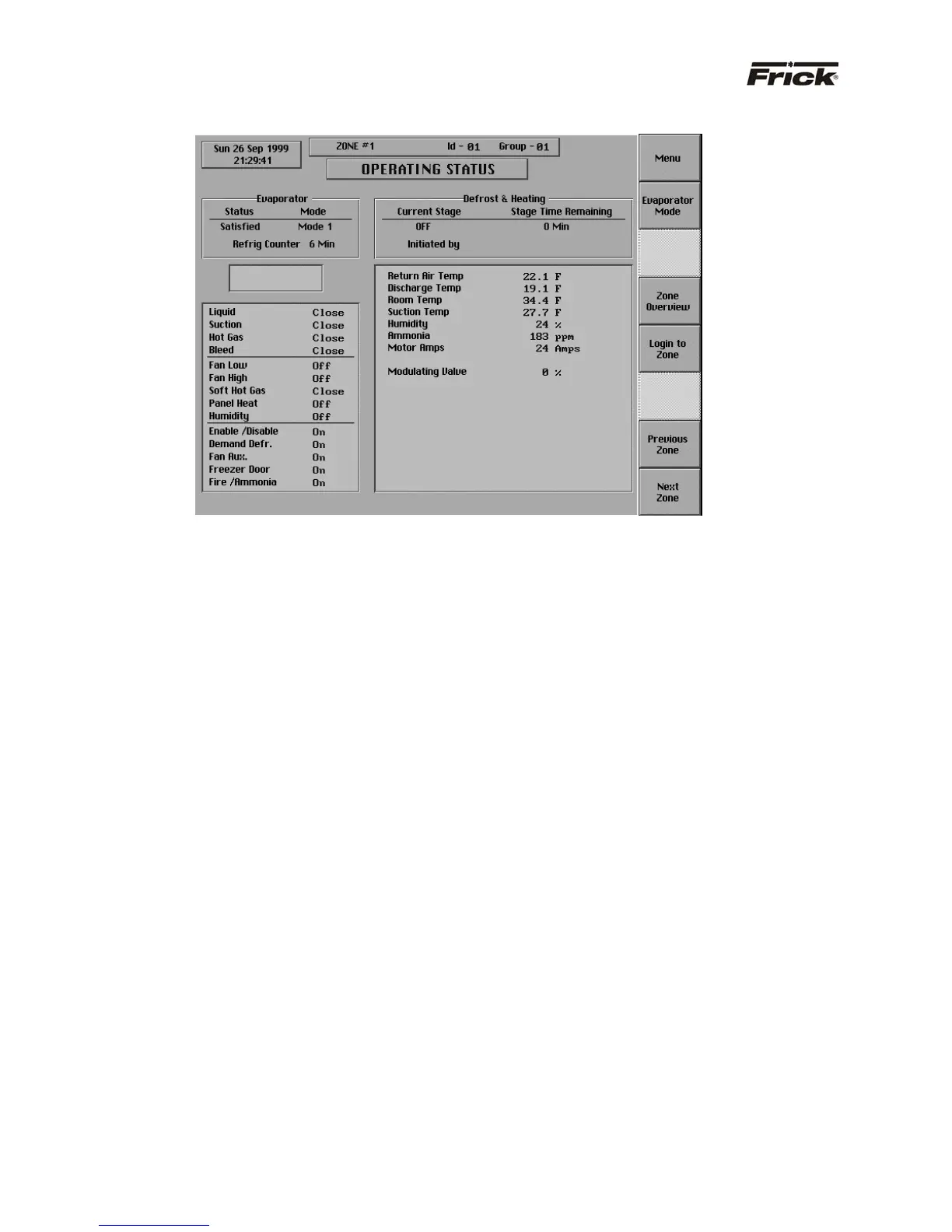
”OPERATING STATUS” SCREEN
The most important information about the zone is
displayed here. The following information is shown on the
left side of this screen:
EVAPORATOR DATA BOX:
Shows the present operating status of the zone and from
what source it has been initiated:
· Status - One of the following messages is
shown:
· Off
· Cooling – The zone is in a temperature
control mode and the liquid valve is open
because the control temperature equals or
exceeds the liquid on setpoint. If the suction
valve is not a modulating valve, it is open
during cooling. During cooling, a modulating
valve regulates the suction valve based on
its setpoints.
· Satisfied - The zone is in a temperature
control mode and the liquid valve is closed
because the control temperature is less than
or equals the liquid off setpoint. During this
time, the suction valve is open.
· Defrost – The zone is using defrost control
setpoints.
· Heating - The zone is using heating control
setpoints.
· Mode - One of the following messages is shown:
· Off – The zone is disabled from being
controlled. All valve station solenoids as well
as fan motor starter(s) are de-energized.
· Mode 1 - The zone was sent a command to
use the Mode 1 setpoints for control.
· Mode 2 - The zone was sent a command to
use the Mode 2 setpoints for control.
· Mode 3 - The zone was sent a command to
use the Mode 3 setpoints for control.
· Auto – Mode 1 - The zone is being
controlled using the Mode 1 setpoints that
are presently activated by the “Time
Schedule”.
· Auto - Mode 2 - The zone is being
controlled using the Mode 2 setpoints that
are presently activated by the “Time
Schedule”.
· Auto - Mode 3 - The zone is being
controlled using the Mode 3 setpoints that
are presently activated by the “Time
Schedule”
· Auto - Off - The zone is off because it was
entered into the “Time Schedule” for this
time of this day.
· Defrost – The zone is being
controlled using the Defrost setpoints.
· Refrigeration Counter - This message shows
the length of time in minutes that the liquid valve
has been opened (cooling) since the last defrost.
The counter is reset during defrost. If liquid
override is enabled and defrost has been
scheduled, then defrost will only initiate when the
refrigeration counter is greater than the counter
setpoint. The counter can help indicate if enough
ice has built up to benefit from defrost.
ALARM STATUS BOX:
The alarm status is displayed in the indented box below
the evaporator data box. The status box is blank with no
message if there are no alarms present.
The following message could be shown:
· ALARM - This message flashes when an alarm
is present. An alarm is a condition that requires



 To Next Page