S90-600 O FRICK QUANTUM EVAPORATOR CONTROL PANEL
Page 16 OPERATION
CONTROL SETUP -
“TEMPERATURE SETPOINT” SCREENS
Temperature settings are used to control temperature.
Three separate groups of setpoints (modes) can be used
to control one zone’s temperature. A time schedule is
used to select which mode to use at what time of day.
Lower or higher temperature settings can be setup in the
different modes. Higher temperature setpoints can be
used to reduce energy consumption. When the plant is
unused or used much less such as at night or on
weekends, less energy is lost in refrigerated rooms from
door openings, so higher temperature settings can be
used.
The following is a list of the temperature setpoint screens:
· Mode 1
· Mode 2
· Mode 3
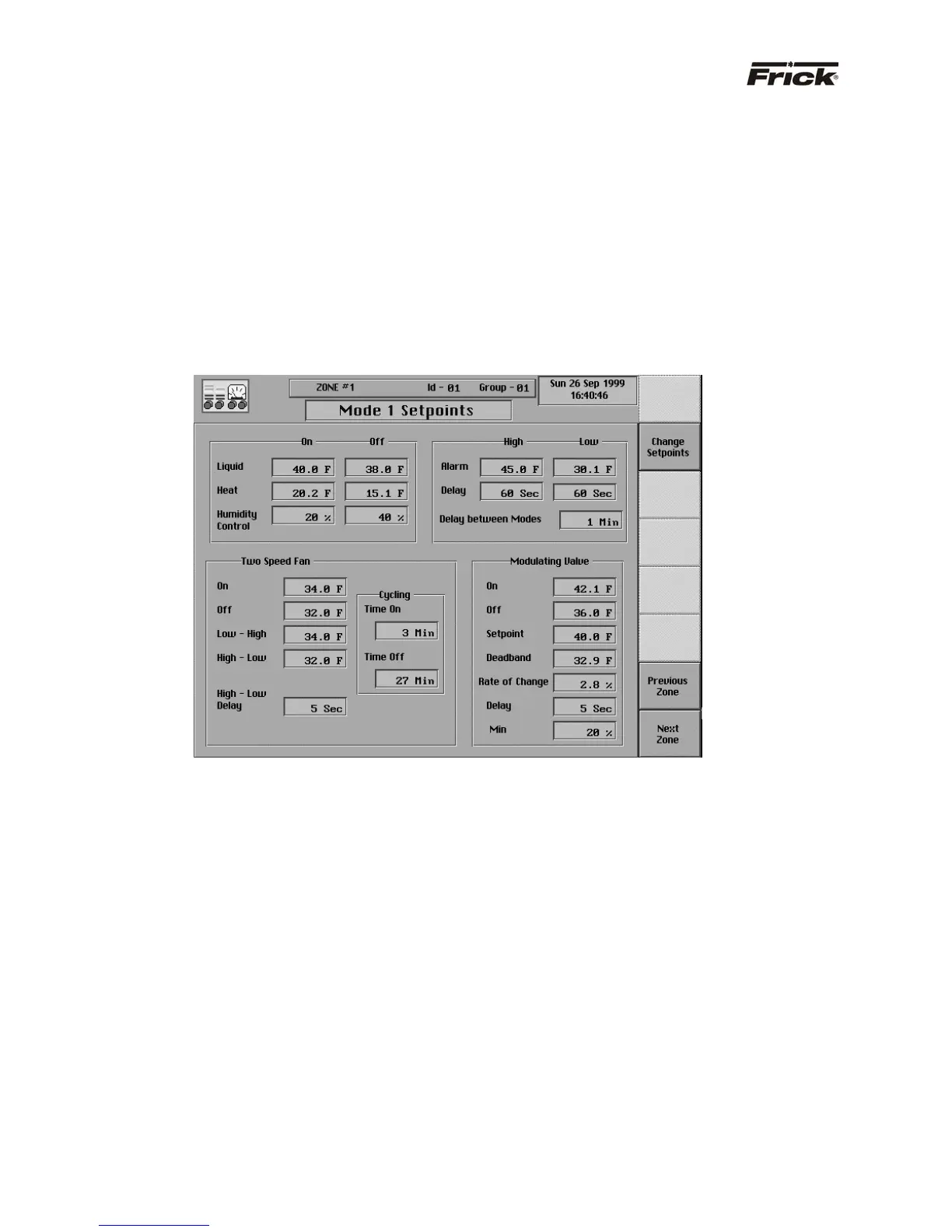
Below is an example of a temperature setpoint screen:
CONTROL SETUP - TEMPERATURE SETPOINTS
– “MODE 1 SETPOINTS” SCREEN
Below are the temperature setpoints:
Basic Unit Setpoints
· Liquid On - If the control temperature equals or
exceeds this setpoint, the output for the liquid valve
will be energized or turned on to open a liquid valve
and therefore provide cooling.
· Liquid Off - If the control temperature is less than or
equal to this setpoint, the output for the liquid valve
will be de-energized or turned off to close a liquid
valve and therefore prevent further cooling.
· Heat On - If the control temperature is less than or
equal to this setpoint, control switches to using the
heating setpoints. For further information, reference
the Control Setup – “Heating Setpoints” screen.
· Heat Off - If the control temperature equals or
exceeds this setpoint after completing the “Pre-Heat”
stage of heating, control stops the heating and
proceeds to the “Post-Heat” stage of heating so as to
properly exit from heating. For further information,
reference the Control Setup – “Heating Setpoints”
screen.
· High Temperature Alarm - If the control temperature
is greater than or equal to this setpoint, for its time
delay, an alarm occurs.
· High Temperature Alarm Time Delay - The time in
minutes that the control temperature must remain
greater than or equal to the low temperature alarm
setpoint before notification of the alarm.
· Low Temperature Alarm - If the control temperature
is less than or equal to this setpoint, for its time delay,
an alarm occurs.
· Low Temperature Alarm Time Delay - The time in
minutes that the control temperature must remain less
than or equal to the low temperature alarm setpoint
before notification of the alarm.
· Delay between Modes - When starting to use the
setpoints of another mode, this is the time in minutes
that must elapse before evaluation and notification of
alarms.



 To Next Page