Troubleshooting and tips
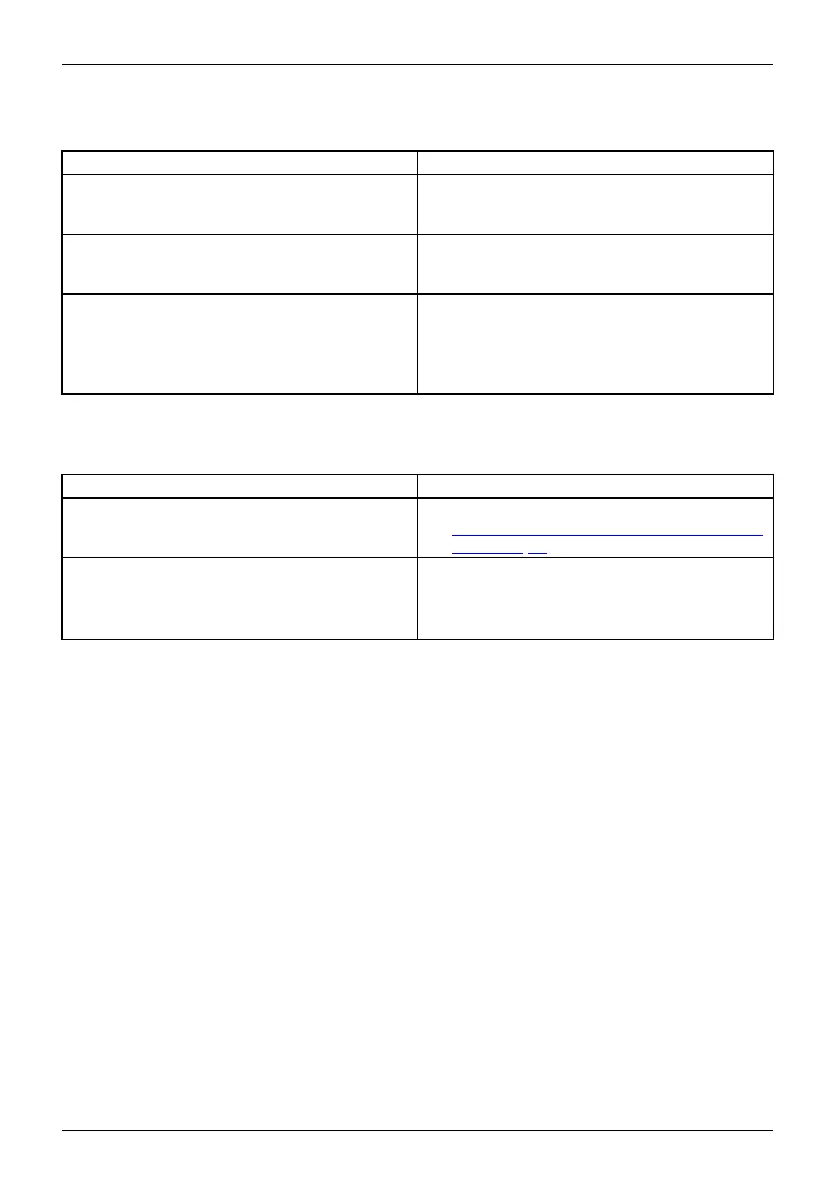
The printer does not print
Printerdoesnot print
Cause Tro ub lesho ot ing
The printer is not switched on. ► Make sure that the printer is sw
itched
on and ready for operation (ref
er to th e
documentation supplied with t
he printer).
The printer is not connecte d c
orrectly.
► Check that the data cable connecting
the Table PC to the printer is properly
connected.
The printer drive r is faulty or not co rrectly
installed, or it is the wrong printer driver.
► Check that the data cable connecting
the Tablet PC to the printer is properly
connected.
► Check whether the co rrect printer driver is
loaded (refer to the printer documentation).
The wireless connec
tiontoanetworkdoesnotwork
Thewireless conne
ctiontoan etworkdoes notwork
Cause Tro ub lesho ot ing
The wireless compo
nent is disabled.
► Switch the wireless c omponen t on (see
"
Switch ing the wireless components on and
off", Page 36).
The wireless component is enabled. Despite
this, the wireless connection to a network does
not work.
► Check whether the wireless connection is
switched on via the software.
► Further information on using the wireless
component can be found in the help files.
72 Fujitsu



 To Next Page
 Loading...









