EasyManua.ls Logo

FUTABA FX40 - Page 42

FUTABA FX40
129 pages
Print Icon
To Next Page IconTo Next Page
To Previous Page IconTo Previous Page
Loading...
42
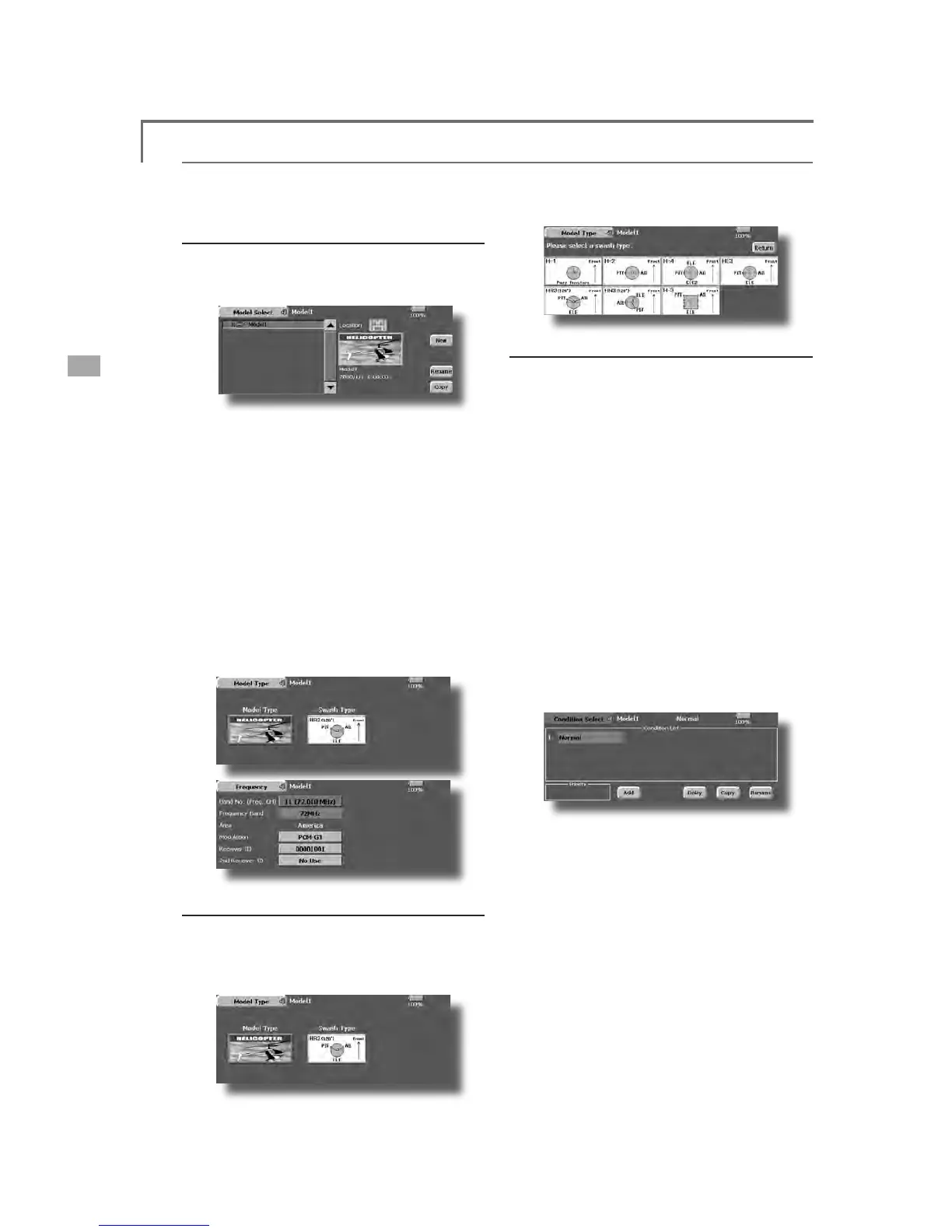
<Model Basic Setting Procedure>
1
. Model add
i
t
i
on and cal
l
D
efault settin
g
assi
g
ns 1 model to the FX-40. To
a
dd
new mo
d
e
l
s or to ca
ll
a mo
d
e
l
a
l
rea
d
y set, use t
h
e
Mo
d
e
l
Se
l
ect funct
i
on of t
h
e L
i
n
k
a
g
e Menu.
T
hi
s
i
s conven
i
ent w
h
en ca
lli
ng a mo
d
e
l
after
re
g
isterin
g
the model names in advance. (The data o
f
up
to 30 models can be saved at the transmitter. Dat
a
can a
l
so
b
e save
d
to t
h
e accessory Data-Pac
k
.
)
The currentl
y
called model is displa
y
ed at the top
RIWKHVFUHHQ%HIRUHÀ\LQJDQGEHIRUHFKDQJLQJDQ
\
V
HWW
L
QJVD
O
ZD\VFRQ
¿
UPW
K
HPR
G
H
O
QDPH
Pl
ease
b
e aware t
h
at t
h
e transm
i
tter w
ill
stop
t
ransmitting when you change the model.
W
h
en a new mo
d
e
l
i
s a
dd
e
d
, t
h
e Mo
d
e
l
Type Se
l
ec
t
s
creen and Frequenc
y
/Modulation mode/Receiver ID
s
etup screen automaticall
y
appear. Chan
g
e, or check
th
at t
h
ey matc
h
t
h
e type, frequency, an
d
rece
i
ver type
of the model used
.
2. Model t
y
pe and swash t
y
pe selection
W
h
en a separate mo
d
e
l
type
i
s a
l
rea
d
y se
l
ecte
d
,
s
e
l
ect
h
e
li
copter w
i
t
h
t
h
e Mo
d
e
l
T
y
pe funct
i
on of t
h
e
L
inka
g
e Menu, and then select the swash t
y
pe matche
d
t
o t
h
e
h
e
li
copter
.
H
el
i
copter bas
i
c sett
i
ng procedure
3. Fl
ig
ht cond
i
t
i
on add
i
t
i
on
The transmitter can install up to eight flight
co
ndi
t
i
ons per mo
d
e
l
. You can ass
i
gn a
ll
sw
i
tc
h
es
i
ncludin
g
sticks, switches, trim levers and trim switches
as f
ligh
t-con
di
t
i
on se
l
ect
i
on sw
i
tc
h
es. You can a
l
so
a
dd
d
e
l
aye
d
m
i
x
i
ng to t
h
ese funct
i
ons
i
n or
d
er to
avoid sudden changes. Moreover, you can set priorit
y
RUGHUIRUÀL
J
KWFRQGLWLRQVZKHQ
\
RXVHWPRUHWKDQRQH
con
di
t
i
on. In a
ddi
t
i
on,
y
ou can cop
y
con
di
t
i
ons an
d/
o
r
c
h
ange names of con
di
t
i
ons. T
hi
s comman
d
may a
l
so
be
used
t
o
de
f
i
n
e
wh
at
swi
t
ches
an
d/o
r
co
ntr
ols
ar
e
X
VHGWRDFWLYDWHHDFKÀLJKWFRQGLWLRQ
The Condition Select function automaticall
y
D
OO
RFDWHVW
K
H&RQ
GL
W
L
RQIRUHDF
K
PR
G
H
O
W
\
SH1RUPD
O
L
V
th
e
d
efau
l
t con
di
t
i
on, an
d
i
s t
h
e on
l
y one act
i
ve w
h
en
a
QHZPRGHOW\SHLVGH¿QHG7KLVFRQGLWLRQLVDOZD\VRQ
and remains on until other conditions are activated b
y
s
witches
.
T
h
e Con
di
t
i
on De
l
ay can
b
e programme
d
for eac
h
channel. The Condition Delay is used to change the
s
ervo throw smoothl
y
when switchin
g
conditions
.
*HQHUDOÀLJKWFRQGLWLRQVHWWLQJH[DPSOH
ŏ1RUPDO
8VHLQLWLDOVHWWLQ
J
FRQGLWLRQVRSHUDWH
Z
KHQVZLWFK2))
8VHIURPHQJLQHVWDUWLQJWRKRYHULQJ
ŏ,GOHXS
6ZLWFKVHWWLQ
J
H[DPSOH2SHUDWH
D
W6:(FHQWHU
8VHLQVWDOOWXUQORRSUROOLQ
J
VWDOOWXUQDQGRWKH
U
PDQH
XY
HUV
ŏ,GOHXS
6Z
L
WFKVHWW
L
QJH[DPSOH2SHUDWH
D
W6:(IRUZDUGVLGH
8VH
L
QUROOV
ŏ7KURWWOHKROG
6ZLWFKVHWWLQ
J
H[DPSOH
2
SHUDWHDW6:*IRUZDUGVLGH
8VHLQDXWRURWDWLRQ
The priorit
y
is throttle hold/idle up 2/idle up 1/
normal. Throttle hold has the highest priority.

Add
ot
h
er con
di
t
i
ons, as requ
i
re
d
.

Table of Contents

Related product manuals