The »DVIMUX2-DL-USB« KVM switch
G&D DVIMUX2-DL-USB · 4
English
The »DVIMUX2-DL-USB« KVM switch
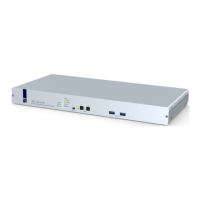
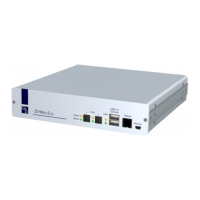
The DVIMUX2-DL-USB KVM switch enables you to operate up to two computers
via one console.
The console is provided with a USB keyboard, a USB mouse and a digital and/or
analog monitor. The computers connected to the KVM switch are operated from
the installed console.
The switching between computers takes place either via the push buttons on the
front panel, configurable key combinations, or a serial device which is connected to
the Service or the RS232 port.
The front panel of the device provides two USB 2.0 interfaces to operate any USB
devices. The connected USB devices are available to whichever active computer.
After enabling the USB hold function (see page 43), the USB devices can be perma-
nently switched to a defined computer (see page 15). The switching of the USB
devices remains the same when switching the KVM channel.
Package Contents
1 × DVIMUX2-DL-USB KVM switch (basic or multi-channel variant)
1 × DVI-Divider adapter per supported video channel
1 × data cable (Update-Service-2)
1 × power cable
1 × »Installation and Operation« manual
NOTE:
The KVM switch emulates keyboard and mouse on each channel and
hence guarantees error-free booting at all times.
IMPORTANT:
A corresponding KVM cable is required in order to connect the com-
puters to the KVM switch.


 To Next Page